Clean
Wide-band, precise delay voices with clear transient detail. A good starting point for transparent thickening.
 PRODUCT GUIDESLegal notices
DOUBLE / WIDEN / WANDER
Turn one performance into a moving ensemble.
Thicken guitar, soften a synth into a pad or create a broad, wandering chorus. Up to eight delayed voices remain related to your input, with simple controls for their spacing and independence.
Chorus does not generate notes. Rate is free-running, not tempo-synced; stereo width needs a stereo output.
START HERE / ABOUT 90 SECONDS
Use a sustained guitar or synth chord. Insert Chorus and choose Init; stereo monitoring makes the spatial behavior easiest to identify.
Rate 0.8 Hz · Depth 30% · Shape 0% · Voices 2 · Spread 40% · Motion 25% · Gravity 0% · Drift 10% · React 0% · Width 100% · Feedback 0% · Tone 0% · Character Clean · Dimension Off · Mix 50% · Output 0 dB
0 of 4 steps checked — reading progress only.
A source-related moving cluster rather than a second independent instrument. Additional Voices enrich the ensemble, while Depth changes pitch excursion.
For width with less wobble, try Dimension before raising Depth. For a focused attack with a wider decay, explore a small negative React value.
LEARNING ILLUSTRATION — NOT CONNECTED TO YOUR PLUGIN
Qualitative guide with a fixed Rate and at least one playing voice. It does not play or synthesize a chorus.
Low Depth gives relatively restrained movement and doubling. Voices can still enrich the ensemble.Moderate Depth makes the moving delay pitch relationship more audible. Rate controls its speed.High Depth with fast Rate intentionally reaches strong warped/vibrato-like behavior. Dimension offers a different route to width with less wobble.A qualitative explanation, not a calculated response or audio preview. Use the plugin to hear the result.
PARAMETER REFERENCE
Start with Rate, Depth, Voices and Mix. Spread, Motion and Gravity then decide how those voices relate rather than just making the same LFO louder.
Speed of the free-running voice motion. Lower values give slower evolution; higher values make pitch movement more obvious, especially with strong Depth. It does not follow host BPM.
Try this: Try 0.4 Hz for a slow layer, then 1 Hz without changing Depth.
How far the delay voices move, not their base delay. Low values thicken; high values produce clear pitch bends. Rate and Character affect how that excursion feels.
Try this: Compare 15% and 45% on a held chord.
Continuously changes rounded movement through softened triangle-like motion toward asymmetric elastic movement. There is no waveform selector; Gravity and Motion can further deform trajectories.
Try this: Try 35% after identifying a useful Rate/Depth combination.
Selects one through eight sounding voices with a detented rotary control. More voices create a richer ensemble rather than simply multiplying loudness. Changes fade while surviving voices continue.
Try this: Compare two and four Voices before trying eight with Ensemble.
Separates voice delays, phases and small speed differences. Low values cluster the ensemble tightly; higher values distribute it broadly. This differs from Width, which scales the wet stereo field.
Try this: Try 20% and 60% with four Voices.
Moves from coordinated toward more independent voice motion. It changes the relationship among trajectories, not the number of voices or their basic Rate.
Try this: Raise from 10% to 45% while leaving Spread fixed.
Positive values pull voices into breathing clusters; negative values repel them. Zero removes this interaction, and one voice has no neighboring ensemble to attract or repel.
Try this: Use four Voices and compare -25% and +25%.
Adds slow irregular variation in voice speed and trajectory. Low values suggest imperfect components; high values wander more strongly while staying bounded and recallable.
Try this: Start around 10% rather than adding maximum Drift to already independent Motion.
Changes motion from the linked main-input envelope/transients. Positive input excites the ensemble; negative values tighten attacks and let the decay bloom. Zero removes reaction. It is not a volume envelope or external-sidechain selector.
Try this: Try -25% on plucked material, then +25% for the opposite tendency.
Scales the wet stereo image: zero is mono wet, 100% natural stereo and 200% expanded sides. It does not widen the dry source. Mono output retains but neutralizes this spatial setting.
Try this: Begin at 100% and compare mono compatibility before increasing it.
Recirculates delayed audio. Positive and negative signs create different harmonic/notch patterns. Greater magnitude becomes metallic and extends tails, not a new chorus model.
Try this: Try +15% and -15% at moderate Depth before exploring strong settings.
Darkens the wet path at negative values or adds brightness/presence at positive values. Zero is neutral for this contour, not removal of a Character's intrinsic response.
Try this: Use -15% to soften an ensemble that crowds the source's top end.
Clean, Analog and Ensemble change delay topology and voice relationships. All support one to eight voices, Dimension, Gravity, Drift and React; Ensemble particularly suits larger groups.
Try this: Compare Clean and Analog first, then Ensemble with four Voices.
Changes to a short cross-channel spatial arrangement with reduced pitch wobble. It is not another Width setting and remains useful with one voice, including stereo output from mono input.
Try this: Try one Voice with Dimension On before raising Depth for spaciousness.
Blends original and ensemble. Zero is dry before Output; 100% only the delayed ensemble. Intermediate equal-power blends can raise correlated level, so compare loudness deliberately.
Try this: Begin at 50%; use 25% for restrained doubling.
Final gain after blending, independent of voice count and motion. Use it to compare density rather than judging the louder setting as better.
Try this: Trim Output after changing Voices or Mix.
CHARACTER REFERENCE
Wide-band, precise delay voices with clear transient detail. A good starting point for transparent thickening.
Gentle bandwidth limitation, rounded delayed audio and deterministic component-like differences. It is not a named hardware emulation.
Richer distribution and relationships for dense four-to-eight-voice textures, while remaining useful at every voice count.
KNOW YOUR INSTRUMENT
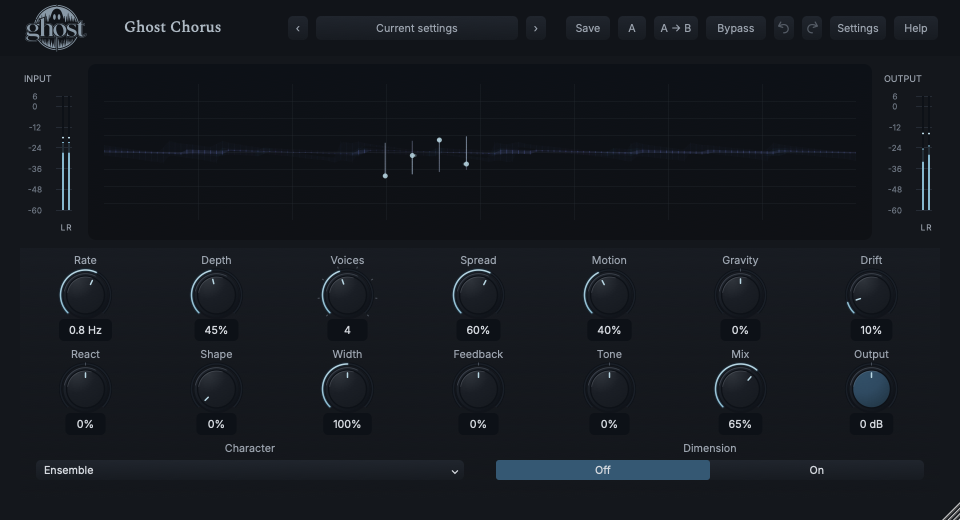
Each moving point/trace is a real chorus voice in stereo/delay space. The waveform behind it shows input activity, not a generated ensemble note.
Choose a marker, or use the complete keyboard-accessible control reference above.
Drag horizontally for Spread and vertically for Motion. Shift-vertical changes Gravity; Option makes fine adjustments. Arrows provide the same axes, Home/double-click resets Spread/Motion and Escape cancels.
Voices changes agent count; Spread separates, Motion changes independence and Gravity attracts/repels. Their trajectories can free-run in silence, but the waveform never invents input energy.
Character's ordinary choice menu contains only Clean, Analog and Ensemble. Right-click/Cmd-click opens the separate parameter-action menu. Voices is a detented knob, not a text-only input.
HEAR THE IDEA
The original pulsed chord and real Ensemble output with four Voices, Depth 45%, Spread 60% and Mix 65%. Level matching is disclosed; stereo monitoring reveals more of the relationship.
Source
Source WAVProcessed · actual Ghost DSP
Processed WAV{"voices": 4, "depth": 45, "spread": 60, "motion": 40, "character": 2, "mix": 65}. Actual native processor, stereo48k/127/double; source latency-aligned. Whole-file wet RMS gain 1.432241; common trim 1.0. Identical final20ms file fade; no listening approval inferred.
Reproduction recordUse a clean vocal or guitar phrase on a stereo-capable track.
Voices 1 · Dimension On · Depth 15% · Mix 35%
Listen for: A short spatial layer rather than a conspicuous pitch sweep.
Use a sustained synth chord.
Character Ensemble · Voices 6 · Spread 65% · Motion 40% · Gravity 20% · Drift 15%
Listen for: A richer, less rigid cluster still causally related to the chord.
GO DEEPER
With one voice, inter-voice Gravity is neutral. Dimension can still create useful spatial behavior from one voice because it changes the short-delay arrangement rather than attracting neighbors.
Fast Rate and strong Depth make intentional pitch motion, not a clean-width improvement. More voices cost more processing, especially in high-rate chains; instance capacity is not unlimited.
Thirteen continuous controls plus the discrete Dimension switch accept shared internal modulation. Voices and Character are host automation, not internal targets. Eligible MIDI CC edits bases; four shared sources add effective movement without overwriting them.
No dedicated Chorus external sidechain or tempo-sync mode exists. React follows main input. Host stops/seeks do not reset the free ensemble; configured shared modulation sources retain their own transport semantics.
Project recall retains running motion and delay history at the same rate; portable sounds retain settings/seed, not circulating audio. Normal bypass drains a finite tail; Hard bypass clears safely and Panic clears history without resetting knobs. Short audible chorus delays are not extra reported processing latency.
The preset browser offers All, Factory, User and Favorites, category/search filters and relevant Character filtering. A row's heart changes your personal favorites without loading or saving the sound. Save As creates a distinct User sound; explicit Save updates only the selected User sound. Factory content is protected. Name, category and tags support organization; deleting a User category keeps its presets as Uncategorized. Manage supports rename, duplicate, confirmed delete and individual/bulk/category import/export. Personal favorites stay on this installation rather than travelling in exported sounds.
Standalone and the matching Ghost Rack module share the same User sounds, categories and favorites. A module preset changes portable sound settings, not Rack placement, Rack wet/dry, bypass or modulation assignments. DAW recall embeds the sound settings and does not depend on a preset file remaining on disk. Rack chain presets are a different library and affect the whole chain.
Drag a knob normally, hold Shift for fine adjustment or Option for extra-fine. Double-click restores its default. Enter/context menus provide exact values, reset and value copy/paste; eligible controls also offer MIDI Learn and modulation. Tab and arrow keys provide keyboard access. A/B compares configurations; the adjacent copy button copies the active configuration to the other. Undo/Redo groups a continuous gesture into one edit. Settings provides UI scale, Reduced Motion, source configuration, portable settings and Panic. UI size/motion preferences do not change the sound.
WHEN SOMETHING ISN’T CLEAR
Use more than one Voice. Its role is interaction among voices, not extra modulation for a single delay.
Chorus Rate is intentionally free-running. There is no Sync selector; use shared modulation for other movement without pretending it changes this timing contract.
A mono output remains mono. Use a stereo-capable output for spatial behavior; Dimension changes topology but cannot make a mono output stereo.
Choose Init for the two-voice Clean starting point. Panic clears feedback/history without resetting ordinary settings.