Worn
Gradual organic erosion and imprints dominate.
 PRODUCT GUIDESLegal notices
STRESS / SCAR / RECOVER
Let the medium fail around the music.
Pass audio through a source-responsive deteriorating medium. Fine information can erode, timing can warp, continuity can fracture and lost material can leave a memory. Damage develops from the performance rather than a pasted-on crackle track.
Init is pristine. Lower Integrity and introduce Stress to hear damage; Wear alone is not an instant lo-fi switch.
START HERE / ABOUT 90 SECONDS
Insert Degrade on a drum loop, keys or a guitar phrase and choose Init.
Integrity 100% · Stress 0% · Wear 25% · Resilience 50% · Grain 25% · Retention 25% · Link 100% · Mix 100% · Output 0 dB · Character Worn · Seed 1
0 of 4 steps checked — reading progress only.
The source progressively loses or deforms information, with scars affecting later events. It should not sound like an unrelated random-noise layer.
Reduce Stress or blend dry with Mix for subtle aging. Keep Link high until you deliberately want more independent stereo damage.
LEARNING ILLUSTRATION — NOT CONNECTED TO YOUR PLUGIN
A qualitative explanation with active Stress. It does not simulate the medium or process audio.
Lower Wear allows weaknesses to recover sooner, so previous damage has less influence on later events.Moderate Wear gives a phrase a developing failure history.Higher Wear makes scars persist and affect later vulnerability. It is still a recoverable medium, not permanent preset corruption.A qualitative explanation, not a calculated response or audio preview. Use the plugin to hear the result.
PARAMETER REFERENCE
Integrity and Stress set the challenge. Wear remembers it; Resilience, Grain and Retention determine how the medium yields and what survives.
The medium's ability to preserve information. High values protect the source; lowering it exposes weaknesses. Incoming Stress and accumulated damage determine what actually fails.
Try this: Lower to 65% before raising Stress.
How aggressively incoming audio challenges the medium. It drives source-responsive weakness and failure rather than turning up a free-running glitch generator.
Try this: Compare 20% and 60% over several repeated events.
How strongly the medium remembers damage. High values prolong scars and future vulnerability; low values recover sooner. Even extreme damage ultimately recovers.
Try this: At active Stress, compare early and later hits with Wear 65%.
Yield toward Brittle: yielding material deforms progressively, while brittle material can hold and then fail more abruptly. It is not a global wet/dry amount.
Try this: Compare 25% with 75% while keeping Integrity/Stress fixed.
Fine toward Coarse: changes the structural scale of failure from distributed microscopic imperfections to larger interruptions and domains.
Try this: Try 20% for fine wear and 65% for larger breaks.
Clean toward Haunted: determines how much source-derived history, residue and incomplete erasure persist after information is lost.
Try this: Raise toward 60% on short phrases separated by gaps.
Couples stereo damage.100% favors shared/cohesive failures; 0% permits more independent L/R detail with common ancestry. It does not synthesize stereo from mono.
Try this: Begin at 100%, then try 40% on an already stereo loop.
Blends dry and damaged paths. Dry can preserve clear attacks beneath severe failures; fully wet makes the survival hierarchy easiest to hear.
Try this: Learn at 100%, then try 40% for a parallel worn layer.
Final gain after blending. It does not restore lost information or change the material's Stress.
Try this: Level-match after choosing the amount of damage.
Chooses why the medium fails. Material still controls what it is made of, and changing Character transforms rather than discards existing damage.
Try this: Compare Worn and Fractured at the same active settings.
Exact integer defining the reproducible microscopic defect topology. A different seed changes weaknesses, not the meaning of the other controls. It is host-automatable but not an internal modulation/CC target.
Try this: Use Reseed to explore another medium, then Undo to restore the previous world.
CHARACTER REFERENCE
Gradual organic erosion and imprints dominate.
Preservation warps, bends and recovers in source-related bursts.
Cracks interrupt continuity and propagate related failures.
Information disappears progressively rather than breaking violently.
Lost source material contaminates later audio through retained history.
Deeper collapse, surviving fragments and partial reconstruction cycles.
KNOW YOUR INSTRUMENT
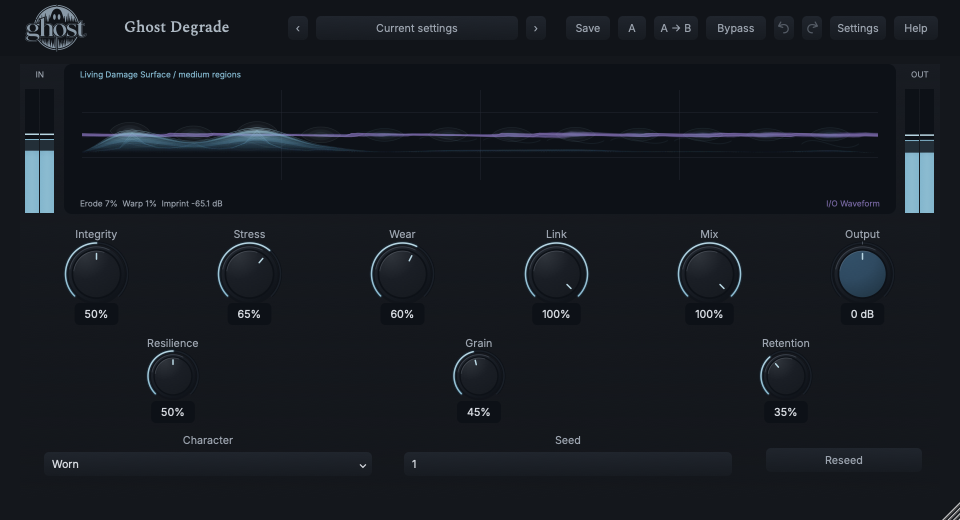
The Living Damage Surface shows the medium carrying your audio. Blue weaknesses, scars and evolving structures are distinct from the purple waveform in the same display.
Choose a marker, or use the complete keyboard-accessible control reference above.
Erode, Warp and Imprint describe actual active failure behavior. Seed structure and scars may remain after the waveform quiets; they are medium state, not fabricated audio energy.
Touch or drag to strain the same damage model used by the source. Shift is gentler and Option provides fine adjustment. Escape cancels; keyboard selection and strain actions are available.
Reseed changes microscopic topology while preserving Material. It is an undoable action; Undo restores the prior medium state. Reconstructing describes a real recovery phase, not an independent effect mode.
HEAR THE IDEA
Actual Worn Degrade with Integrity 50%, Stress 65%, Wear 60%, Grain 45% and Retention 35%. Seed 1 and the source are deterministic. This is one demonstrated failure history, not a promise that every input produces the same events.
Source
Source WAVProcessed · actual Ghost DSP
Processed WAV{"integrity": 50, "stress": 65, "wear": 60, "grain": 45, "retention": 35}. Actual native processor, stereo48k/127/double; source latency-aligned. Whole-file wet RMS gain 1.136371; common trim 1.0. Identical final20ms file fade; no listening approval inferred.
Reproduction recordUse a repeating drum loop.
Integrity 80% · Stress 30% · Grain 20% · Wear 40% · Mix 55%
Listen for: Fine source-related deterioration with clear dry rhythm underneath.
Use short pitched phrases with gaps.
Character Haunted · Integrity 45% · Stress 60% · Retention 70% · Wear 65%
Listen for: A developing memory descended from the source, not a conventional delay or unrelated ambient-noise bed.
GO DEEPER
DAW sessions, A/B and Undo retain the complete medium where required. Portable sounds retain controls and exact Seed, not a recording of accumulated damage. A new performance can therefore produce a different failure history with the same preset.
Crush intentionally reduces digital resolution. Degrade models a medium's changing ability to preserve information. Causal contamination may emerge from stressed material, but there is no independent hiss layer or generic Noise Amount control.
Nine continuous controls support internal modulation and MIDI CC learn. Character and Seed are discrete host automation only. Reseed is an action, not a modulation destination.
No dedicated external sidechain, note trigger or Free/Sync timing is provided. Stereo independence comes from damage to existing channels. Mono ignores spatial divergence.
The processor adds no algorithmic latency. Damaged memory can outlast new input but remains bounded and recovers. Panic clears the running medium without resetting ordinary controls.
The preset browser offers All, Factory, User and Favorites, category/search filters and relevant Character filtering. A row's heart changes your personal favorites without loading or saving the sound. Save As creates a distinct User sound; explicit Save updates only the selected User sound. Factory content is protected. Name, category and tags support organization; deleting a User category keeps its presets as Uncategorized. Manage supports rename, duplicate, confirmed delete and individual/bulk/category import/export. Personal favorites stay on this installation rather than travelling in exported sounds.
Standalone and the matching Ghost Rack module share the same User sounds, categories and favorites. A module preset changes portable sound settings, not Rack placement, Rack wet/dry, bypass or modulation assignments. DAW recall embeds the sound settings and does not depend on a preset file remaining on disk. Rack chain presets are a different library and affect the whole chain.
Drag a knob normally, hold Shift for fine adjustment or Option for extra-fine. Double-click restores its default. Enter/context menus provide exact values, reset and value copy/paste; eligible controls also offer MIDI Learn and modulation. Tab and arrow keys provide keyboard access. A/B compares configurations; the adjacent copy button copies the active configuration to the other. Undo/Redo groups a continuous gesture into one edit. Settings provides UI scale, Reduced Motion, source configuration, portable settings and Panic. UI size/motion preferences do not change the sound.
WHEN SOMETHING ISN’T CLEAR
It is deliberately pristine: Integrity 100% and Stress 0%. Lower Integrity and add Stress before expecting damage.
Wear and scars create a source-driven history. Seed is reproducible topology, not a guarantee of identical events for different input histories.
The surface represents material as well as active audio. A scar is not a claim of audible waveform energy.
Portable presets omit accumulated live damage/audio history. A full DAW session retains the complete world; a portable sound develops from its new input.