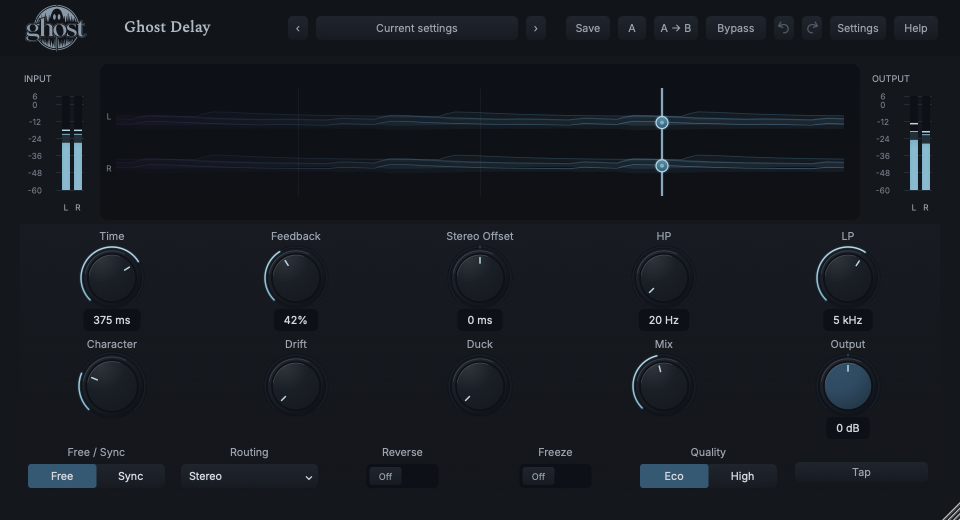
Make clean rhythmic repeats, dark dub trails, alternating stereo echoes or a circulating hold. Feedback filtering, continuous Character and Drift transform one delay network rather than switching among hardware models.
Actual plugin display · full annotated interface below
START HERE / ABOUT 90 SECONDS
Make a phrase answer itself.
Insert Delay on a short vocal, synth or guitar phrase with gaps. Choose Init and play the DAW at a known tempo.
START FROM INIT
Time (Free) 500 ms · Time (Sync) 1/4 · Free / Sync Sync · Stereo Offset 0 ms · Feedback 35% · HP 20 Hz · LP 20000 Hz · Character 0% · Drift 0% · Duck 0% · Routing Stereo · Reverse Off · Freeze Off · Mix 25% · Output 0 dB · Quality Eco
0 of 4 steps checked — reading progress only.
WHAT TO LISTEN FOR
The phrase ends and its rhythmic echoes continue. Filtering and color accumulate on repeated trips through the feedback path.
Use Mix 100% on a dedicated return. For clear vocals, add Duck around 35% so echoes move back during new input. Free mode and Tap are useful when you want milliseconds rather than host-tempo timing.
LEARNING ILLUSTRATION — NOT CONNECTED TO YOUR PLUGIN
More feedback is a longer conversation.
Qualitative guide to a normally playing forward echo. Filters, Character, Duck and Freeze also affect what you hear.
Low feedback sends little sound around again: fewer, shorter-lived repeats.Moderate feedback lets several generations answer the phrase; loop filtering and color accumulate.Near unity the network may sustain; above 100% it intentionally regenerates. Freeze has its own hold behavior. Keep Panic available.
A qualitative explanation, not a calculated response or audio preview. Use the plugin to hear the result.
PARAMETER REFERENCE
A small set of big gestures.
Time spaces the echoes, Feedback sets their life and Mix puts them beside your source. HP/LP, Character and Drift change each repeat's journey.
Time (Free)1–4000 ms · Default 500 ms
In Free mode this sets the echo interval in milliseconds, from short coloration to long repeats. Manual changes smoothly repitch existing buffer material, like changing tape speed; host-tempo changes in Sync use a different safe transition.
Try this: Set Free and 375 ms, play a short phrase, then move Time slowly while repeats are sounding.
In Sync mode this selects a shared straight, dotted or triplet musical duration, including long bar divisions. Bars follow the host time signature. Extremely long requests are capped by prepared 120-second capacity: the UI indicates the request and keeps the last valid duration rather than pretending a shorter echo is correct.
Try this: Try 1/4, then an eighth-note dotted or triplet choice while the DAW runs.
Free / SyncFree / Sync · Default Sync
Free uses milliseconds independently of host BPM; Sync follows the host tempo and signature, with a 120 BPM/4/4 fallback. Switching uses a nearby equivalent where possible; returning to Free must fit its four-second range. It does not change DAW tempo.
Try this: Choose Free to use Tap, or Sync when arranging rhythmic repeats to a DAW grid.
Stereo Offset-100–100 ms · Default 0 ms
Moves the L/R intervals oppositely around the main Time: positive values move the left earlier and right later. Very short times are limited to valid causal intervals. Mono routing ignores the saved offset; Stereo and Ping-Pong can use it.
Try this: Try +15 ms on a stereo phrase, then zero for aligned nominal timings.
Feedback0–110% · Default 35%
Returns delayed sound to the network. Below 100% repeats decay; around 100% they may sustain; above 100% they intentionally grow subject to safe containment. Filters and Character change what survives each circulation. Freeze temporarily holds internal feedback near unity without overwriting this stored value.
Try this: Compare 20% and 55%. Lower monitoring before exploring regeneration; use Panic to clear it.
HP20–2000 Hz · Default 20 Hz
High-pass filtering inside the feedback loop. Raising it removes bass from successive repeats, rather than equalizing the dry input. Its 20 Hz default is effectively open.
Try this: Try 180 Hz to keep a bass-heavy phrase's echoes lighter.
LP500–20000 Hz · Default 20000 Hz
Low-pass filtering inside the loop. Lower values progressively darken successive echoes. It interacts with Feedback and Character, so a long filtered trail need not retain the original brightness.
Try this: Compare 20 kHz and 4 kHz with Feedback around 45%.
Character0–100% · Default 0%
Continuous repeat color: zero is clean digital feedback; higher values introduce warm nonlinear softening, compression and high-frequency rounding. It affects the network, not the dry signal. It is not a Tape/BBD selector and does not add timing flutter.
Try this: Try 25% with a clear phrase, then compare against zero at similar listening level.
Drift0–100% · Default 0%
Adds smooth irregular timing movement to wet delay lines. Low values give subtle instability; high values make obvious warped pitch/stereo motion. It continues during Freeze and is separate from Character's tonal color.
Try this: Add 10% to a sustained echo before trying larger values.
Duck0–100% · Default 0%
Suppresses the audible wet return when strong main input arrives, then lets echoes recover in gaps. It does not drain the stored feedback energy. It listens to live main input even during Freeze, not an external sidechain.
Try this: Use a phrase with gaps and compare 0% with 40% at Mix 40%.
RoutingMono / Stereo / Ping-Pong · Default Stereo
Mono uses one appropriately summed network returned to both channels. Stereo keeps independent delay lines. Ping-Pong cross-feeds repeats between sides. Stereo Offset is unavailable in Mono; a stereo output is needed to hear alternating sides.
Try this: Select Ping-Pong on a stereo-capable track, leaving Offset at zero first.
ReverseOff / On · Default Off
Plays the wet echo through overlapping reverse windows tied to Time, not the dry signal. Crossfades avoid rigid gaps; very short times use a safe minimum reverse window. It can combine with feedback and Freeze.
Try this: Start with a short guitar phrase at moderate Feedback, then switch Reverse on.
FreezeOff / On · Default Off
Closes new input to the echo network while its existing contents circulate. Stored Feedback is retained; Time, filters, Character, Drift and Reverse remain useful. The dry signal still follows Mix. An empty held network is silent.
Try this: Let a phrase enter, engage Freeze while echoes exist, then stop the source. Release Freeze to admit new audio; Panic clears the hold.
Mix0–100% · Default 25%
Blends original audio and audible wet echoes. Zero is dry before Output; 100% is wet-only for a send/return. Intermediate equal-power blends may sound louder, particularly when paths are correlated.
Try this: Use 25-40% on an insert; use 100% when the dry source already has a separate route.
Output-12–12 dB · Default 0 dB
Final gain after the dry/wet blend. It does not change feedback circulation or duck-detector sensitivity. Lower it for comparison when dense trails raise the total level.
Try this: Trim the final level without changing the echo's decay or tone.
QualityEco / High · Default Eco
Eco is the economical default. High improves processing quality where the nonlinear/interpolated path benefits; it does not select a different echo model or alter the saved Time/Feedback values.
Try this: Compare High on exposed, strongly colored repeats rather than expecting a new preset.
CHARACTER REFERENCE
One focused processor.
There is no discrete Character menu. Character is one continuous repeat-color control; Drift separately adds timing instability. Routing, Reverse and Freeze change how the network operates.
KNOW YOUR INSTRUMENT
Find your way around.
The Echo Field follows real input events and the actual echo network. It is not a frequency spectrum: left/right returns and repeat generations reveal timing and circulation.
Actual native editor with the example's Free 375 ms settings. Guide markers do not operate the plugin. Open full-size capture
Select a numbered control
Choose a marker, or use the complete keyboard-accessible control reference above.
Drag horizontally for Time and vertically for Feedback. Shift-drag changes Stereo Offset. Context values appear during interaction; ordinary controls and typed entry remain available.
Tap is a Free-mode action, not a saved BPM parameter. Several taps establish an interval; too-fast taps are ignored and a pause longer than four seconds starts a new sequence. Tap can be MIDI learned.
Input/output meters show real levels. Ping-Pong motion and Freeze circulation come from actual state; hiding the editor does not stop audio.
HEAR THE IDEA
Put it into practice.
Listen past the end of the phrase
The source stops halfway through these six-second examples. Processed uses a 375 ms echo, 42% Feedback, darkened feedback and a 45% blend. Its remaining echoes are real delay output, not an added recording.
Use a short bright chord or percussion hit with gaps.
Free / Sync Free · Time (Free) 375 ms · Feedback 55% · HP 180 Hz · LP 3500 Hz · Character 35% · Mix 35%
Let one hit enter and listen to its repeats before playing more.
Raise HP to thin the low end or lower LP to soften each generation.
Move Time slowly for an intentional pitch sweep, then let it settle. Keep Feedback below unity for this first experiment.
Listen for: A colored, progressively filtered trail rather than an equalized dry hit.
Keep words clear, let gaps bloom
Use a vocal phrase with space between lines.
Duck 45% · Feedback 40% · Mix 40%
Begin with the Init quarter-note Sync time.
Compare Duck zero and 45% while the phrase plays.
Listen to the gaps: the wet return recovers, even though it was quieter under the words.
Listen for: Main-input-driven wet suppression, without shortening the network's stored decay.
GO DEEPER
Beyond the first move.
A hold is not a saved recording
Freeze holds live network contents. This Delay intentionally recalls project/A-B settings and deterministic seed with echo, reverse and held buffers empty. A recalled Freeze-On state can be silent until you release it and re-excite the network; other Ghost spectral capture products have different recall contracts.
Manual Time versus changing host tempo
Manual Time movement intentionally repitches existing repeats. Tempo-derived changes in Sync use smooth/crossfaded timing transitions to avoid an accidental dramatic tape-speed sweep. Free Tap never replaces the host BPM.
In your session
Time, Stereo Offset, Feedback, HP, LP, Character, Drift, Duck, Mix and Output support internal modulation; Reverse and Freeze also support threshold-switched discrete modulation. Free/Sync and Routing are not rapid modulation targets. Eligible context menus provide CC learn, assignment editing and exact values.
No external audio sidechain is exposed by this Delay. Duck follows main input. Mono-to-stereo operation can create genuine delay stereo behavior, but a mono output cannot present alternating sides.
Normal bypass stops new feed while echoes finish. Regenerative/Freeze states can have indefinite tails. Hard bypass removes wet processing safely; Panic clears the network without resetting ordinary controls.
The preset browser offers All, Factory, User and Favorites, category/search filters and relevant Character filtering. A row's heart changes your personal favorites without loading or saving the sound. Save As creates a distinct User sound; explicit Save updates only the selected User sound. Factory content is protected. Name, category and tags support organization; deleting a User category keeps its presets as Uncategorized. Manage supports rename, duplicate, confirmed delete and individual/bulk/category import/export. Personal favorites stay on this installation rather than travelling in exported sounds.
Standalone and the matching Ghost Rack module share the same User sounds, categories and favorites. A module preset changes portable sound settings, not Rack placement, Rack wet/dry, bypass or modulation assignments. DAW recall embeds the sound settings and does not depend on a preset file remaining on disk. Rack chain presets are a different library and affect the whole chain.
Drag a knob normally, hold Shift for fine adjustment or Option for extra-fine. Double-click restores its default. Enter/context menus provide exact values, reset and value copy/paste; eligible controls also offer MIDI Learn and modulation. Tab and arrow keys provide keyboard access. A/B compares configurations; the adjacent copy button copies the active configuration to the other. Undo/Redo groups a continuous gesture into one edit. Settings provides UI scale, Reduced Motion, source configuration, portable settings and Panic. UI size/motion preferences do not change the sound.
WHEN SOMETHING ISN’T CLEAR
Find your way back.
Why can't I hear an echo?
Use a short phrase with gaps and raise Mix to 40%. Check that Freeze is off; an empty Freeze-On network cannot admit your phrase. Very short Time can sound like coloration rather than a separate repeat.
Why does Sync not play my very long division?
If its tempo/signature duration exceeds the prepared 120-second capacity, the UI reports the request and retains the last valid timing. Choose a shorter division or faster tempo.
Why is the hold silent after reopening a session?
Delay recalls its settings/seed, not live held audio. Release Freeze, feed some source, then engage it again. This is intentional and differs from Spectral Freeze.
Why do repeats keep growing?
Feedback above 100% is intentionally regenerative. Lower it or use Panic; Output alone changes listening level rather than feedback energy.