Clean
Transparent reference behavior for conventional compression, ducking and frequency-conscious control.
 PRODUCT GUIDESLegal notices
CONTROL / DETAIL / MOVEMENT
Control the loud parts without forgetting the quiet ones.
Restrain peaks, recover useful detail, shape attacks or let an external rhythm drive the response. Down and Up share one dynamics system, with continuous frequency-region and stereo linking rather than a collection of separate compressor modes.
Init intentionally does no dynamic processing: Down and Up both start at zero. Raise Down or Up to begin.
START HERE / ABOUT 90 SECONDS
Use a drum loop or phrase with clear loud and quiet sections. Choose Init, keep Source Main and monitor comfortably.
Threshold -18 dB · Depth 100% · Down 0% · Up 0% · Time 100 ms · Contour 0% · Bands 0% · Band Link 100% · Stereo Link 100% · Source Main · Character Clean · Mix 100% · Output 0 dB · Precision Off · Attack 10 ms · Release 100 ms · Gate Amount 0% · Gate Range 60 dB · Gate Attack 1 ms · Gate Hold 50 ms · Gate Release 100 ms · Gate Hysteresis 3 dB · SC HPF 20 Hz · SC LPF 20000 Hz · Detector Trim 0 dB · Stereo Operation L/R · Lookahead 0 ms
0 of 4 steps checked — reading progress only.
Above-threshold events receive dynamic gain control. Output trim changes final level; it does not substitute for compression. Init may sound unchanged because that is its intended behavior.
For quieter musical detail, introduce Up gently after hearing Down clearly. Keep Bands Unified and Clean before exploring Density, independent bands or external ducking.
LEARNING ILLUSTRATION — NOT CONNECTED TO YOUR PLUGIN
This explanation assumes Clean, Main, Depth 100%, Up zero and input peaks above Threshold. It is not a measured compressor curve.
Little or no Down means little above-threshold restraint. Init has both Down and Up at zero, so Threshold alone need not change sound.Moderate Down increasingly controls above-threshold energy. The source must actually cross the chosen Threshold.Strong Down gives greater peak restraint. Time/Contour and Character determine how it moves; use Output for level comparison, not detector sensitivity.A qualitative explanation, not a calculated response or audio preview. Use the plugin to hear the result.
PARAMETER REFERENCE
Threshold chooses the boundary; Down controls energy above it and Up recovers information below it. Time, Contour and linking determine how that response moves.
The level boundary shared by downward and upward behavior. Lowering it makes more incoming energy eligible for Down; raising it changes the region where Up can recover quieter information. Source and detector filters determine what is measured.
Try this: With Down 50% and Up zero, lower Threshold until the loud events are visibly controlled.
Scales the overall dynamic transformation without changing the relative Down/Up balance. Zero removes dynamic gain; 100% applies the chosen relationship fully. It is not simply a ratio or an output-volume control.
Try this: Find a useful Down/Up setup, then reduce Depth to back off the whole transformation.
Controls above-threshold restraint. Zero is inactive; increasing it moves Clean from ordinary compression toward strong peak control. A low enough Threshold and an active detector are necessary for a noticeable result.
Try this: Start around 50% on a dynamic loop before trying extremes.
Recovers coherent quieter detail below Threshold with bounded, salience-aware behavior. Zero is inactive. It is not a semantic noise-removal classifier: unusual background material can still be brought forward. Gate closure takes priority over competing Up.
Try this: Add 10-20% after setting Down, comparing quieter phrases and background level.
The main response timescale. Short values follow changes quickly; long values retain energy and recover more slowly. It still influences deeper detector weighting and Character memory when Precision Attack/Release are active; it does not control the separate gate timing.
Try this: Compare 40 and 200 ms on a repeated phrase with Down already active.
Moves between Transient on the negative side, Balanced at zero and Body on the positive side. It changes the importance of leading edges versus sustained material in the response, not a separate transient-effect chain.
Try this: Compare -25% and +25% on drums while keeping Time fixed.
Moves continuously from unified broadband dynamics to three internal frequency regions. Higher values permit frequency-dependent response without user crossover, per-band threshold or per-band attack controls. At zero, begin with familiar broadband behavior.
Try this: Raise to 50% after establishing a useful broadband setup.
Controls cohesion between the three regions. Higher values draw their responses together; lower values allow greater independence. Its role becomes more evident as Bands increases.
Try this: At Bands 75%, compare 100% link and 30% on bass-heavy material.
At 100%, uses a fully linked response for image stability. At zero, left/right dynamics can genuinely differ for both Down and Up; intermediate values interpolate. It does not synthesize width or pan the source.
Try this: Start at 100%. Reduce only when program-dependent image movement is intended; mono cannot create stereo behavior.
Main derives control from the program. Sidechain uses the external detector input without mixing it into the audible signal. A missing external bus is explicitly unavailable/silent rather than silently replaced by Main.
Try this: Use Main for the first compression test. Choose Sidechain only after routing a real detector source in the DAW.
Chooses Clean, Punch, Glue, Elastic, Density or Breath. These change dynamics/envelope behavior and supporting activity-dependent coloration, not six arbitrary saturation effects. Changing modes preserves populated history through a safe handoff.
Try this: Compare Clean and Punch on drums with Down already active; modes need a dynamic transformation to reveal their role.
Blends latency-aligned dry and processed signal. Zero and 100% are exact endpoints. Equal-power intermediate blends can raise level when correlated, so judge the envelope after level comparison.
Try this: Try 50% for parallel compression after identifying the fully wet result.
Final trim after Mix. It does not change detection sensitivity, Threshold or gain-reduction strength, and is not automatic makeup gain.
Try this: Raise it modestly if compression lowers total level, then compare bypass at comfortable loudness.
Enables manual global Attack and Release. Off uses the main Time/Contour relationship. Saved Attack/Release values remain while it is off; gate timing is independent.
Try this: Leave Off for the first setup, then enable it only when explicit opening/recovery timing is needed.
Manual global gain-response attack when Precision is on. Short values react faster; longer values permit more leading edge. Time still shapes the broader memory behavior.
Try this: At Precision On compare 3 ms and 25 ms on a drum loop.
Manual global recovery when Precision is on. Short settings recover sooner; longer settings join events into a slower response. It is separate from Gate Release.
Try this: Compare 100 and 300 ms with the phrase's gaps.
Introduces ordinary below-threshold downward expansion, progressing toward strong closure. Zero disables this action. It shares Threshold/Source/linking and suppresses competing Up while closed.
Try this: Begin at 25% with a source containing real gaps, then increase if more closure is needed.
Caps how much the gate can attenuate. A small range gives gentle reduction; a large range permits deep closure. It matters only when Gate Amount and detector conditions call for attenuation.
Try this: Try 12 dB before using the full default range.
Controls how quickly the gate opens after an event. Very short values preserve an attack; longer values soften the opening. It does not use the Precision switch.
Try this: Start near 1 ms for percussion and increase only if a softer entrance is desired.
Keeps the gate open briefly after an event before closing can proceed. Longer hold can join nearby hits and avoid cutting between them.
Try this: Try 50-100 ms on a choppy part before changing Gate Release.
Controls the gate's closing movement after the hold. Short values cut gaps decisively; longer values preserve more decay. This is not global compressor Release.
Try this: Try 150 ms to retain some room or instrument decay.
Separates opening and closing boundaries so small detector fluctuations do not repeatedly toggle the gate. Higher values discourage chatter but change when closure occurs.
Try this: Start with 3 dB, then increase modestly if the gate chatters near Threshold.
High-pass filtering for both Main and Sidechain detection, not audible program EQ. Raising it reduces low-frequency influence on the response; default 20 Hz is off-equivalent.
Try this: Try 100 Hz if bass dominates detection, then compare with 20 Hz.
Low-pass filtering for both detector sources. Lowering it reduces high-frequency influence without directly darkening program audio; the resulting dynamics may still change its balance.
Try this: Try 6 kHz if bright transients dominate control.
Changes detector sensitivity before dynamics, not audible output gain. Higher values make the detector see more energy; lower values less. It interacts with Threshold and selected Source.
Try this: Leave at zero for normal setup; use modest trim to align an external detector's working level.
L/R operates on left/right information. M/S operates on existing center and side information; independent treatment can alter their balance without inventing Side content or acting as a panner. Stereo-only behavior is inactive in mono.
Try this: Begin L/R. Explore M/S only with stereo material and careful linking/level comparison.
Delays the audible path so detection can anticipate an event. Uses its actual sample-rounded delay, not a constant maximum. It changes host-reported latency and aligned dry/wet timing; it does not need to be on for normal compression.
Try this: Start at zero. Add 1-3 ms for anticipatory peak control when that trade-off is useful.
CHARACTER REFERENCE
Transparent reference behavior for conventional compression, ducking and frequency-conscious control.
Preserves leading-edge impact and brings control over the body. Useful on drums or plucked material with active Down.
Encourages neighboring events/regions to share cohesive movement. Try groups and buses; Band Link still controls regional cohesion.
Adds dynamic momentum, rebound and settling. Time shapes how that movement responds; begin with moderate Down.
Interdependent peak restraint and quiet-detail recovery. Strong Down/Up with independent bands reaches dense, OTT-adjacent behavior continuously.
Remembers sustained energy so later events react differently. Longer Time allows slower phrase-level inhaling/exhaling movement.
KNOW YOUR INSTRUMENT
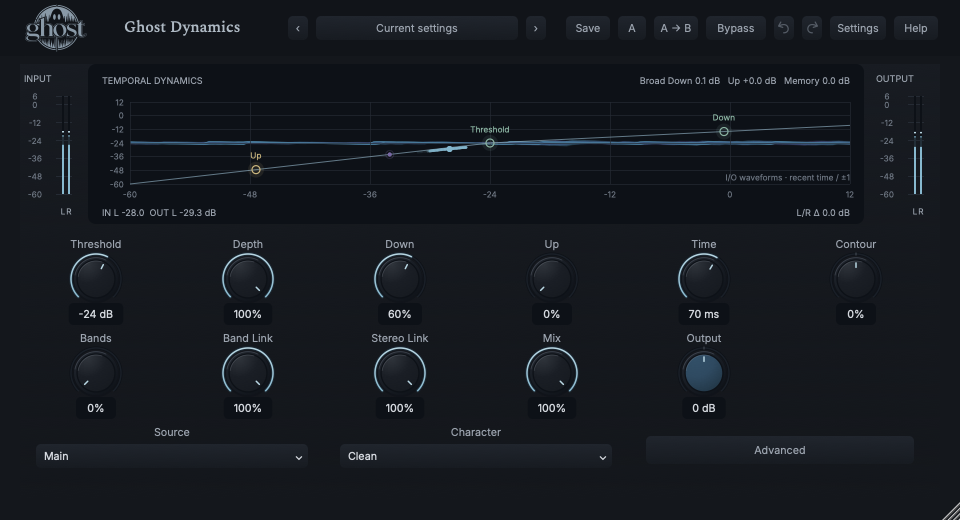
The transfer curve and operating-point trails sit over live I/O waveforms in one display. They explain related aspects of actual audio, but do not share the same axis meanings.
Choose a marker, or use the complete keyboard-accessible control reference above.
The transfer reference uses input/output level axes. Waveforms behind it use recent time and normalized amplitude, not those dB axes. Regional lanes explain detector response, not separately measured band loudness.
Green Threshold/Down handles and yellow Up handle edit those controls. Drag, arrows, Enter/exact entry, Home reset and Escape cancel provide alternatives; a nominal curve is not a prediction of every dynamic Character sample.
Advanced opens precision timing, ordinary gate/expander, detector filtering/trim, stereo operation and Lookahead. Hold Sidechain Listen to audition the actual external detector after its filters/trim; release to return. Missing external input auditions silence. Listen is temporary, not saved/automated; editor close, recall and Panic cancel it.
The Down, Up and Memory readings report measured state. Sidechain availability is explicit. Watch the actual input/output meters and compare at similar level rather than using the curve alone as proof of audible processing.
HEAR THE IDEA
Actual Clean Dynamics output at Threshold -24 dB and Down 60%, with Up zero and unified bands. Whole-file RMS matching makes changes in the pulse envelope easier to compare without relying on total loudness.
Source
Source WAVProcessed · actual Ghost DSP
Processed WAV{"threshold": -24, "down": 60, "up": 0, "depth": 100, "time": 70, "character": 0, "mix": 100}. Actual native processor, stereo48k/127/double; source latency-aligned. Whole-file wet RMS gain 1.160738; common trim 1.0. Identical final20ms file fade; no listening approval inferred.
Reproduction recordPut Dynamics on bass and route the kick into its external sidechain.
Source Sidechain · Down 50% · Up 0% · Threshold -24 dB · Time 100 ms · Bands 0%
Listen for: Kick-driven bass reduction without mixing kick audio into the bass output.
Use dynamic stereo material, beginning at a useful Clean broadband setting.
Character Clean · Down 40% · Up 15% · Bands 65% · Band Link 40% · Stereo Link 100%
Listen for: More independent frequency-region movement and salient quiet detail, not spectral-resolution gating or automatic noise removal.
GO DEEPER
Use Gate Amount with the shared Threshold and Source. Range sets maximum attenuation; Gate Attack/Hold/Release and Hysteresis shape closure separately from main dynamics timing. Increase gently on real gaps before trying hard closure.
Depth zero removes the dynamic transformation without changing Down/Up balance. Mix zero selects aligned dry audio before Output. They are different tools; detector and saved settings need not be reset by either.
Up protects silence and learned floors, but it cannot semantically identify every unwanted sound. A correlated background can resemble useful detail. Clean recordings/editing and careful Threshold/Up settings remain important.
Eleven continuous primary controls support internal modulation. Continuous Advanced settings support host automation and MIDI CC but are not initial internal modulation targets. Source, Character, Precision and L/R-M/S are discrete host automation choices, not CC/internal destinations. Free Time is not tempo-synced.
Main and external sidechain remain separate. Mono keeps stereo-only settings but does not apply stereo separation. Stereo Link zero intentionally allows independent image movement; it is not artificially locked to center.
Project state retains the defined detector/gain/gate/filter/lookahead and modulation histories; portable presets omit transient audio continuation. Lookahead reports actual delay. Bypass drains bounded history; Hard bypass terminates it safely; Panic clears history without resetting knobs.
The preset browser offers All, Factory, User and Favorites, category/search filters and relevant Character filtering. A row's heart changes your personal favorites without loading or saving the sound. Save As creates a distinct User sound; explicit Save updates only the selected User sound. Factory content is protected. Name, category and tags support organization; deleting a User category keeps its presets as Uncategorized. Manage supports rename, duplicate, confirmed delete and individual/bulk/category import/export. Personal favorites stay on this installation rather than travelling in exported sounds.
Standalone and the matching Ghost Rack module share the same User sounds, categories and favorites. A module preset changes portable sound settings, not Rack placement, Rack wet/dry, bypass or modulation assignments. DAW recall embeds the sound settings and does not depend on a preset file remaining on disk. Rack chain presets are a different library and affect the whole chain.
Drag a knob normally, hold Shift for fine adjustment or Option for extra-fine. Double-click restores its default. Enter/context menus provide exact values, reset and value copy/paste; eligible controls also offer MIDI Learn and modulation. Tab and arrow keys provide keyboard access. A/B compares configurations; the adjacent copy button copies the active configuration to the other. Undo/Redo groups a continuous gesture into one edit. Settings provides UI scale, Reduced Motion, source configuration, portable settings and Panic. UI size/motion preferences do not change the sound.
WHEN SOMETHING ISN’T CLEAR
Down and Up default to zero intentionally. Keep Depth 100%, raise Down to 50% and lower Threshold until the source crosses it. Check Source Main and Mix 100%.
Route a real external detector in the DAW and verify it is available. A missing bus is not replaced by Main. The detector must cross a relevant threshold with Down/Up or Gate active.
Attack/Release require Precision On; gate timing needs active Gate Amount; Band Link becomes more evident as Bands rises. Time still shapes broader memory even with Precision enabled.
Stereo Link zero permits genuinely independent dynamics. Raise it toward 100% for linked stability; M/S also changes the information being controlled.
Choose Init, confirm Down/Up zero, Main and Mix 100%, then use Panic to clear running history if needed. Panic does not reset ordinary controls.