Clean
Pre-filter gain without Soft/Hard coloration. Use Output for level comparison.
 PRODUCT GUIDESLegal notices
SHAPE / EMPHASIZE / DRIVE
Find the part of a sound you want to hear.
Soften a bright synth, remove rumble, isolate a vocal-like band or drive a resonant sweep. Filter combines familiar filtering with controlled saturation and an intentionally deeper self-oscillation region.
Start in SAFE mode with modest resonance. OSC can sustain after the source stops; keep Panic available.
START HERE / ABOUT 90 SECONDS
Use a bright synth chord, drum loop or guitar part with clear high-frequency content. Insert Filter and choose Init; begin at a comfortable monitoring level.
Mode LP · Slope 24 dB/oct · Cutoff 20000 Hz · Resonance 0% · Resonance Mode SAFE · Drive 0% · Drive Character Soft · Stereo Offset 0 st · Mix 100% · Output 0 dB · Quality Eco · Spectrum On
0 of 4 steps checked — reading progress only.
LP removes progressively more high-frequency content as Cutoff falls. Modest resonance emphasizes a moving region around the cutoff rather than simply turning the whole sound down.
Try HP to remove lows instead, BP for a focused telephone-like region, or Mix around 50% to retain some original brightness. Return to SAFE before experimenting with strong resonance.
LEARNING ILLUSTRATION — NOT CONNECTED TO YOUR PLUGIN
This explanation assumes LP, SAFE and modest resonance. It does not draw a measured transfer curve or play audio.
Low LP cutoff passes mainly low-frequency content and removes much of a bright source's upper range.A middle cutoff softens upper harmonics while leaving the lower body. Resonance emphasizes its boundary.High LP cutoff leaves more brightness. In HP, raising cutoff would remove more low-frequency content instead.A qualitative explanation, not a calculated response or audio preview. Use the plugin to hear the result.
PARAMETER REFERENCE
Cutoff chooses the region. Mode and Slope choose how it is shaped; Resonance emphasizes the boundary and Drive changes what reaches it.
LP passes lows, HP passes highs, BP isolates a band and Notch removes a region around Cutoff. Changing mode changes the meaning of the response curve; it does not move Cutoff automatically.
Try this: Use LP on a bright synth, then compare BP at the same cutoff for a more focused sound.
Higher values make filtering steeper. LP/HP change the roll-off; BP applies it to both skirts. Notch becomes narrower/deeper rather than removing everything above or below Cutoff.
Try this: Compare 12 and 48 dB/oct while sweeping LP at moderate resonance.
Chooses the filter's tuned frequency on a logarithmic scale. Lower LP values darken; higher HP values remove more bass. In BP/Notch it selects the center. Typed Hz/kHz and note names are supported, using A4=440 Hz; safe tuning follows the sample rate.
Try this: Enter 1 kHz, then sweep between 500 Hz and 5 kHz on a bright source.
Emphasizes the tuned region. Low values give gentle cleanup; higher values add ringing or a vocal peak. Its behavior depends on Mode, Slope and SAFE/OSC, so compare levels as you increase it.
Try this: Start at 20% in SAFE and listen while moving Cutoff.
SAFE provides bounded, compensated resonance that decays after excitation. OSC permits genuine self-oscillation at extreme resonance, excited by input rather than a separate oscillator. It can continue after the source stops, including a resonant band in Notch.
Try this: Stay SAFE for ordinary filtering. For OSC exploration lower monitoring first and use Settings → Panic to stop sustained sound.
Adds gain before the filter, up to 24 dB at the top of its percentage range. Zero is neutral. Soft/Hard add nonlinear density; Clean adds gain without their coloration. Drive is not a final-volume control.
Try this: Try 15% with Soft, then trim Output to compare.
Clean, Soft and Hard choose how pre-filter Drive behaves. They do little at Drive 0%, because coloration is bypassed there. Soft rounds the signal; Hard clips more sharply.
Try this: Raise Drive moderately before comparing the three choices.
Offsets L/R cutoffs in opposite semitone directions. Positive values raise the left cutoff and lower the right; at +12 each is an octave from the main setting, subject to tuning limits. Mono ignores separation but retains its setting.
Try this: Try +2 semitones on stereo material; return to zero for identical channel tuning.
Blends aligned original and filtered audio. Zero is dry before Output; 100% is filtered. A lower value can keep attack or brightness while adding a strong filter texture.
Try this: Compare 100% and 50% after a low, resonant LP setting.
Final gain after the blend. It changes listening level, not cutoff, resonance or drive strength. Driven or resonant settings may need attenuation for a useful comparison.
Try this: Lower Output until processed and bypassed sound are comparably comfortable.
Eco and High change nonlinear-stage quality, not your filter settings. High reduces high-frequency Drive artifacts with 2× oversampling. Both use the same reported 32-sample compensated delay.
Try this: Compare High on an exposed, strongly driven high-frequency source; Eco is the economical default.
Shows or hides the actual input spectral field. The response curve still represents the filter. This switch changes visualization only, not the sound or latency.
Try this: Turn it off to inspect the response alone, then on to compare the incoming spectrum.
CHARACTER REFERENCE
Pre-filter gain without Soft/Hard coloration. Use Output for level comparison.
Rounded saturation before the filter; useful for adding harmonic density that LP can subsequently soften.
Sharper clipping before filtering, for more assertive edges. Increase Drive to hear the distinction.
KNOW YOUR INSTRUMENT
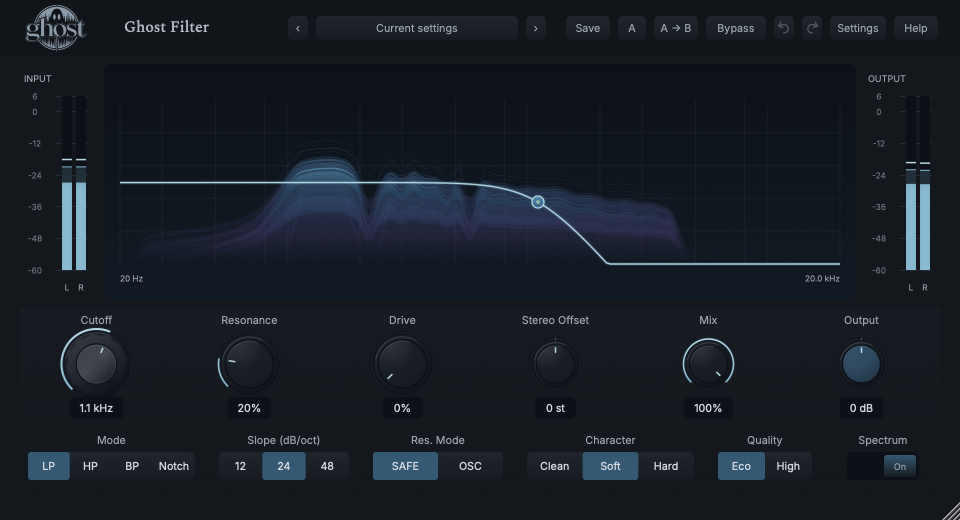
The crisp curve and handle describe the filter; the softer blue/violet field behind them follows real input energy. They are different layers, not two effects.
Choose a marker, or use the complete keyboard-accessible control reference above.
Drag the response handle horizontally for Cutoff and vertically for Resonance. This is one undoable gesture; knobs and typed entry provide the same values.
Opposite-channel offsets show two responses. With Drive or OSC, the curve is a small-signal reference, not a complete prediction of nonlinear sound.
Input/output meters show real peak/RMS levels and clearable clip indications. The spectral history recedes naturally; silence does not produce fabricated energy.
HEAR THE IDEA
The same original pulsed harmonic chord before and after a SAFE low-pass at 1.1 kHz with modest resonance. Compare timbre, not raw loudness: the processed example is explicitly RMS-matched.
Source
Source WAVProcessed · actual Ghost DSP
Processed WAV{"cutoff": 1100, "resonance": 20, "mode": 0, "slope": 1, "resonance-mode": 0, "drive": 0, "mix": 100}. Actual native processor, stereo48k/127/double; source latency-aligned. Whole-file wet RMS gain 1.06489; common trim 1.0. Identical final20ms file fade; no listening approval inferred.
Reproduction recordUse a vocal phrase or instrument part with a broad frequency range.
Mode BP · Cutoff 1400 Hz · Resonance 15% · Mix 100%
Listen for: A narrower, centered spectral region rather than a simple quieter copy.
Use a sustained bright synth chord.
Mode LP · Cutoff 1500 Hz · Resonance 25% · Drive 15% · Drive Character Soft
Listen for: A coherent moving resonant region tied to the source, not an added synth voice.
GO DEEPER
SAFE is the useful starting point for rumble removal or gentle shaping. OSC is an intentional extreme with a potentially indefinite tail. A silent input and a previously excited oscillation are different states; Panic clears ringing without resetting knobs.
Drive is before filtering. Extra harmonics can be tamed by LP; with HP or BP, a different part of that driven sound survives. Changing Output does not change the internal drive level.
Cutoff, Resonance, Drive, Stereo Offset, Mix and Output support internal modulation and MIDI CC learn. Cutoff modulation is musical pitch movement; percentages use percentage points and Output uses dB. Discrete choices are host-automatable, not internal modulation destinations.
The external sidechain is available to a shared Envelope Follower detector; it is never mixed into the audible path. A missing selected sidechain is silent, not a Main fallback. Mono operation keeps the saved offset but does not create stereo separation.
Normal bypass stops new feed while the tail finishes. Hard bypass removes it safely; Panic clears live history. Project recall preserves settings and shared modulation state, not a recording of the filter's ringing history.
The preset browser offers All, Factory, User and Favorites, category/search filters and relevant Character filtering. A row's heart changes your personal favorites without loading or saving the sound. Save As creates a distinct User sound; explicit Save updates only the selected User sound. Factory content is protected. Name, category and tags support organization; deleting a User category keeps its presets as Uncategorized. Manage supports rename, duplicate, confirmed delete and individual/bulk/category import/export. Personal favorites stay on this installation rather than travelling in exported sounds.
Standalone and the matching Ghost Rack module share the same User sounds, categories and favorites. A module preset changes portable sound settings, not Rack placement, Rack wet/dry, bypass or modulation assignments. DAW recall embeds the sound settings and does not depend on a preset file remaining on disk. Rack chain presets are a different library and affect the whole chain.
Drag a knob normally, hold Shift for fine adjustment or Option for extra-fine. Double-click restores its default. Enter/context menus provide exact values, reset and value copy/paste; eligible controls also offer MIDI Learn and modulation. Tab and arrow keys provide keyboard access. A/B compares configurations; the adjacent copy button copies the active configuration to the other. Undo/Redo groups a continuous gesture into one edit. Settings provides UI scale, Reduced Motion, source configuration, portable settings and Panic. UI size/motion preferences do not change the sound.
WHEN SOMETHING ISN’T CLEAR
LP at 20 kHz with no resonance/Drive is intentionally conservative. Lower Cutoff to 1 kHz on a bright source at Mix 100% to hear it clearly.
At Drive 0% the coloration is neutral/bypassed. Add modest Drive before comparing Clean, Soft and Hard.
OSC at strong resonance can sustain after excitation. Use Panic to clear it, or return to SAFE for ordinary decaying resonance.
Choose Init for default controls. Use Panic as well if live ringing remains; it clears history without changing the knobs.