Clean
Precise fractional-delay/feedback path with clearly defined comb relationships.
 PRODUCT GUIDESLegal notices
SWEEP / COMB / CROSS ZERO
Bend a short delay into sweeping peaks and gaps.
Make classic flange motion, metallic tuned combs or deep through-zero cancellation. Two related delay paths, signed feedback and deformable comb geometry provide the range without a per-tooth editor.
Feedback beyond unity intentionally regenerates. Output is not a safety limiter; start quietly and keep Panic available.
START HERE / ABOUT 90 SECONDS
Insert Flange on a sustained bright chord or drum loop, then choose Init.
Rate 0.2 Hz · Depth 50% · Manual 4 ms · Shape 0% · Warp 0% · Feedback 35% · Crossfeed 0% · Stereo 50% · Orbit 0% · React 0% · Lock 0% · Geometry 0% · Character Clean · Through-Zero Off · Mix 50% · Output 0 dB
0 of 4 steps checked — reading progress only.
Peaks and cancellations move through the source rather than producing separate long echoes. Manual sets the comb reference; Rate and Depth move around it.
For a stationary tuned comb, use Clean with Depth and Geometry zero, then enter Frequency or Note. For deeper dips try Through-Zero near 50% Mix, at comfortable monitoring.
LEARNING ILLUSTRATION — NOT CONNECTED TO YOUR PLUGIN
Qualitative explanation of regular Geometry with little movement. Exact frequency is 1000 divided by nonzero Manual milliseconds.
Very short periods have widely spaced comb relationships. Manual zero has no finite musical tuning.Longer periods bring the comb relationships closer together. Rate/Depth can still move around this reference.Toward 20 ms, spacing is tighter and the result can approach chorus-like coloration. Precision tuning remains a reference, not source pitch correction.A qualitative explanation, not a calculated response or audio preview. Use the plugin to hear the result.
PARAMETER REFERENCE
Manual sets the reference delay, Depth its movement and Rate its speed. Geometry changes comb spacing; Lock bends its motion toward related configurations.
Free-running sweep speed. Slower values make long sweeps; high values intentionally enter rougher, modulation-like territory. It does not follow host tempo.
Try this: Compare 0.2 and 0.4 Hz with Manual fixed.
Excursion around Manual, bounded by valid delays. At zero with regular Geometry and neutral reaction, Clean can be a stationary comb. External Manual modulation can still move its reference.
Try this: Try zero when learning precision tuning, then 50% for a conventional sweep.
Reference delay period, also representable as exact frequency or note/cents. Short values make wider-spaced metallic combs; 2-8 ms is a useful classic region. Zero is valid but has no finite frequency/note representation.
Try this: Enter 4 ms or the equivalent 250 Hz in precision view, then compare 2 ms.
Asymmetry of the cycle: zero is sine-like, negative slow rise/fast return, positive fast rise/slow return. Turns remain smoothed; it is not random timing.
Try this: Compare ±30% at a moderate Rate.
Changes travel speed within a cycle: acceleration, dwell and deceleration without random jumps. Shape changes cycle form; Warp changes how it is traversed.
Try this: Try 25% after finding a useful Shape, keeping Rate unchanged.
Signed regeneration through the delay network. Signs emphasize different comb structures. Magnitudes below 100% decay; unity/above-unity may sustain or grow after excitation. Safety contains numerical runaway, not listening loudness.
Try this: Compare +25% and -25% before testing stronger regeneration.
Feeds increasing delayed energy into the opposite channel rather than its own feedback path. It changes regeneration, not just stereo position. Mono output disables it while retaining its value.
Try this: Try 20% on stereo output with modest Feedback and Orbit.
Separates the two modulation paths. Zero keeps them synchronized/centered; higher values permit more stereo divergence. Orbit becomes more evident when Stereo is nonzero.
Try this: Begin at 50%, then compare zero in stereo monitoring.
Positive values encourage opposing trajectories; negative values create changing chasing lag. It changes how L/R paths relate, not the main Manual period. A mono output has no stereo orbit to present.
Try this: Try ±30% with Stereo 60%.
Main-input transients modify excursion: positive pushes outward, negative pulls inward then blooms during decay. It changes motion, not output level, and uses no exposed attack/release controls.
Try this: Try -25% on a plucked source to compare attack and tail.
Softly attracts moving comb relationships toward related configurations. Even at maximum it remains fluid. It does not detect input pitch, retune notes or choose a musical key.
Try this: Start at 25% while a slow sweep is audible.
Deforms comb spacing itself. Negative crowds upper teeth, positive expands them and zero is regular. This differs from Lock's attraction during motion and Manual's reference period.
Try this: With Depth low, compare ±20% around a tuned reference.
Clean, Analog and Jet change the delay/feedback topology. Analog colors each circulation; Jet emphasizes deep cancellations and resonant peaks. Changes preserve existing delay history through a safe transition.
Try this: Compare Clean and Analog first, keeping Feedback modest.
Lets the wet delay cross the delayed reference and uses inverted wet polarity for genuine deep cancellation. It is not a fake output dip. The reported fixed 20 ms reference delay remains in both modes, avoiding a latency switch.
Try this: With Clean, modest movement and Mix 50%, compare Off and On.
Linear blend of aligned original and processed paths. Zero is dry before Output, 100% wet-only. Around 50% permits deepest matching-path through-zero cancellation; adding more wet is not always stronger flanging.
Try this: Start at 50% for classic and Through-Zero experiments.
Final gain trim, independent of the regeneration loop. Lowering it changes listening level, not how much feedback energy is stored.
Try this: Reduce it before strong Feedback or Jet settings; use Panic to clear sustained energy.
CHARACTER REFERENCE
Precise fractional-delay/feedback path with clearly defined comb relationships.
Softer bandwidth and subtle nonlinear feedback, accumulating color through successive circulations.
A more intense loop/phase topology with strong peaks and two-path cancellation, useful for dramatic sweeping dips.
KNOW YOUR INSTRUMENT
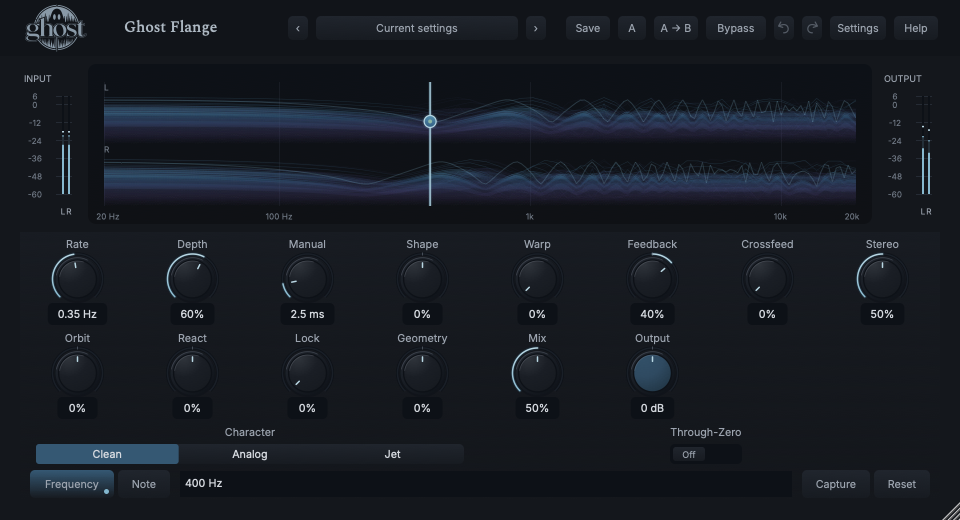
The Comb Field shows the moving delay/comb structure across frequency, not a measured input spectrum. Actual signal and feedback activity illuminate its history.
Choose a marker, or use the complete keyboard-accessible control reference above.
Drag Manual horizontally and Feedback vertically. Shift selects Geometry horizontally and Lock vertically. Option is fine movement, arrows offer the same pairs, Home/double-click resets Manual/Feedback and Escape cancels.
Precision Frequency and Note/cents are alternate views of the same Manual period. 4 ms is 250 Hz; A4 is about 2.272727 ms. Type a value and press Enter; invalid text preserves the reference, Escape discards it. Capture stores the current reference and Reset returns to it as one edit.
Precision view/reference preference belongs to the project, not portable sounds. Manual zero has no finite Hz/note display. Through-Zero markers show relative crossings; nonlinear Analog/Jet response remains an approximation, not a prediction of every output peak.
HEAR THE IDEA
Actual Clean Flange at Manual 2.5 ms, Depth 60%, Rate 0.35 Hz, Feedback 40% and Mix 50%. Source/processed examples are explicitly level-matched.
Source
Source WAVProcessed · actual Ghost DSP
Processed WAV{"rate": 0.35, "manual": 2.5, "depth": 60, "feedback": 40, "mix": 50, "character": 0}. Actual native processor, stereo48k/127/double; source latency-aligned. Whole-file wet RMS gain 1.726481; common trim 1.0. Identical final20ms file fade; no listening approval inferred.
Reproduction recordUse a bright sustained source; this does not tune it into a new played note.
Character Clean · Depth 0% · Geometry 0% · Manual 2.27272727273 ms · Feedback 45% · Mix 50%
Listen for: Stable comb spacing referenced to A4, not pitch-detected or quantized source audio.
Use a broad sustained chord or loop.
Through-Zero On · Mix 50% · Feedback 15% · Depth 60% · Rate 0.2 Hz
Listen for: Moving deep dips from actual path relationships, with the same fixed reported reference latency.
GO DEEPER
Precision sets an exact reference period. Lock bends changing comb relationships toward related configurations. Neither analyzes a key or retunes the incoming performance; movement/Geometry can deform the result around the reference.
Clean, zero feedback/depth and 50% Mix can cancel equal Through-Zero paths deeply. With movement, coloration or regeneration, they no longer match and the cancellation changes. This is expected behavior.
Fourteen continuous controls and the Through-Zero switch support internal modulation. Character is discrete host automation only. Eligible MIDI CC follows saved bases; it does not play notes or restart the free sweep.
No dedicated external-sidechain bus or tempo-sync mode exists. React follows main input; shared Rack envelope modulation can use Rack sidechain separately. Stereo, Orbit and Crossfeed are unavailable in mono without erasing saved values.
A fixed 20 ms reference delay is host-reported and aligned for dry/bypass/Rack in both Through-Zero modes. Full project/A-B state retains live history; portable sounds omit it. Normal bypass drains tails, Hard bypass clears safely and Panic stops active history without resetting controls.
The preset browser offers All, Factory, User and Favorites, category/search filters and relevant Character filtering. A row's heart changes your personal favorites without loading or saving the sound. Save As creates a distinct User sound; explicit Save updates only the selected User sound. Factory content is protected. Name, category and tags support organization; deleting a User category keeps its presets as Uncategorized. Manage supports rename, duplicate, confirmed delete and individual/bulk/category import/export. Personal favorites stay on this installation rather than travelling in exported sounds.
Standalone and the matching Ghost Rack module share the same User sounds, categories and favorites. A module preset changes portable sound settings, not Rack placement, Rack wet/dry, bypass or modulation assignments. DAW recall embeds the sound settings and does not depend on a preset file remaining on disk. Rack chain presets are a different library and affect the whole chain.
Drag a knob normally, hold Shift for fine adjustment or Option for extra-fine. Double-click restores its default. Enter/context menus provide exact values, reset and value copy/paste; eligible controls also offer MIDI Learn and modulation. Tab and arrow keys provide keyboard access. A/B compares configurations; the adjacent copy button copies the active configuration to the other. Undo/Redo groups a continuous gesture into one edit. Settings provides UI scale, Reduced Motion, source configuration, portable settings and Panic. UI size/motion preferences do not change the sound.
WHEN SOMETHING ISN’T CLEAR
At matching Through-Zero paths near 50% Mix, deep cancellation is intentional. Try less Depth or switch Through-Zero off to compare the mechanism.
Zero time is not a finite frequency. Use a positive period, exact Hz or a valid note to set a tunable reference.
It needs separated stereo paths; raise Stereo above zero and use a stereo output. Mono cannot present the spatial relationship.
Reduce Feedback or use Panic. Output trims listening level but does not clear stored loop energy; Init restores default controls.