Pure
Precise translation and clean recursive relationships.
 PRODUCT GUIDESLegal notices
TRANSLATE / RECUR / FOLD
Move every frequency by the same number of hertz.
Use tiny translations for beating and animation, or larger shifts for metallic spectra. Feedback repeats the translation; Cascade, Gravity and Fold shape where those generations travel.
Frequency shifting is not pitch shifting. Adding 100 Hz changes harmonic spacing; it does not transpose everything by a musical interval.
START HERE / ABOUT 90 SECONDS
Use held keys, guitar or a drum loop. Choose Init and monitor quietly.
Shift 0 Hz · Direction 0% · Feedback 0% · Cascade 0% · Gravity 0% · Fold 0% · Motion 0% · Spread 0% · Character Pure · Mix 100% · Output 0 dB
0 of 4 steps checked — reading progress only.
The same additive-Hz process spans slow movement and unfamiliar metallic relationships. Recursion can continue after the input ends.
Reduce Mix for a parallel layer. Keep Feedback modest while learning Cascade/Fold and use Panic for sustained regeneration.
LEARNING ILLUSTRATION — NOT CONNECTED TO YOUR PLUGIN
A qualitative explanation with nonzero Feedback, not a calculated spectrum or plugin connection.
Negative Cascade reduces translation across later generations, encouraging convergence.At zero, each recursive generation receives the same additive-Hz shift.Positive Cascade expands later shifts; Fold can return material that meets a spectral boundary.A qualitative explanation, not a calculated response or audio preview. Use the plugin to hear the result.
PARAMETER REFERENCE
Learn Shift with Feedback at zero. Add recursion gradually, then change the geometry of those generations.
Additive frequency translation, with a strong exact-zero center and very fine resolution near zero. Positive and negative move opposite directions.
Try this: Compare +2 Hz with +100 Hz at Feedback 0%.
Zero is clean single-sideband translation according to Shift's sign. Positive adds the opposite sideband, reaching symmetric dual-sideband at +100%; negative adds it inverted.
Try this: Compare 0% and +40% at a clearly audible Shift.
Re-translates recursive passes. Opposite signs change reinforcement/cancellation; near±100% energy lasts longer and beyond it controlled regeneration is possible.
Try this: Begin at 25–35%, not above unity. Keep Panic available.
Changes translation across successive generations: zero keeps equal-Hz steps, positive expands them and negative converges them. It needs recursive energy to reveal its role.
Try this: With moderate Feedback, compare±30%.
Positive attracts translated structures toward harmonic relationships; negative repels them. It preserves the frequency-shifting mechanism, not hard scale quantization.
Try this: Compare±25% on a recursive source.
Returns translated energy by reflection at usable spectral boundaries. Zero lets out-of-range components disappear; this is not ordinary amplitude wavefolding.
Try this: Use a larger Shift and gradually raise Fold if energy is leaving the audible range.
Signed deterministic evolution around Shift/Cascade/Direction relationships. Negative complements/reverses positive evolution without resetting it. It is not an exposed internal LFO.
Try this: Try +20%, then -20%, over a sustained source.
Positive creates opposing L/R translation trajectories; negative makes one follow the other. Neutral/unavailable for mono output.
Try this: Try +20% in stereo and compare at zero.
Selects six translation/feedback laws. Their differences often become clearer when recursive energy exists; they are not post-EQ presets.
Try this: Compare Pure and Glass with moderate Feedback.
Blends aligned dry audio with the complete translated result. It is not a feedback or sideband-direction control.
Try this: Try 40% for a metallic layer under a recognizable source.
Final gain trim. Regenerative examples need conservative monitoring; trim does not reset the recursive structure.
Try this: Level-match after changing Feedback or Character.
CHARACTER REFERENCE
Precise translation and clean recursive relationships.
Controlled quadrature imperfections, softened bandwidth and nonlinear feedback.
Clear upper structures and crystalline recursive trails.
Dense inharmonic recursive interaction for clangorous textures.
Less uniform, branching recursive generations.
Weak generations disappear faster while stronger spectral objects persist.
KNOW YOUR INSTRUMENT
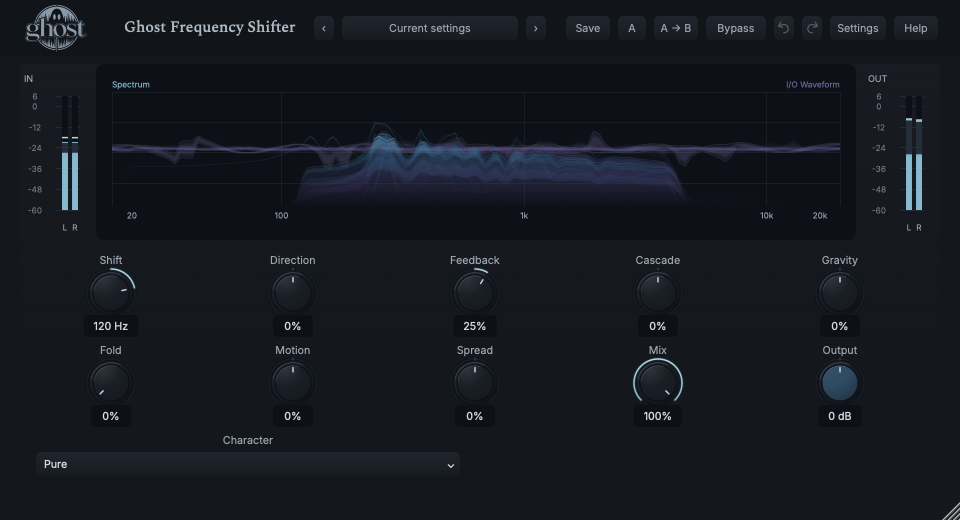
The shared graph shows measured source material, projected translated branches and real I/O waveform context. A projected branch spectrum is not a separate final-output FFT.
Choose a marker, or use the complete keyboard-accessible control reference above.
Horizontal/vertical drags change Shift/Gravity; Shift-horizontal/vertical changes Cascade/Feedback. Pulling a generation maps to existing parameters, not a new per-generation editor.
At nonzero shifts up to 10 Hz, Micro focuses around a measured source region. Its local linear-Hz axis magnifies translation; interpolation is not a claim of extra analyzer resolution.
Full-range spectral frequency/level and waveform time/amplitude share one canvas with different meanings. Tab/arrows/Enter/Escape provide field keyboard control; ordinary knobs remain available.
HEAR THE IDEA
Actual Pure Frequency Shifter at +120 Hz and Feedback 25%, otherwise neutral. The source stops early to expose remaining recursive energy. This is not a musical pitch-shift interval.
Source
Source WAVProcessed · actual Ghost DSP
Processed WAV{"shift": 120, "feedback": 25, "mix": 100}. Actual native processor, stereo48k/127/double; source latency-aligned. Whole-file wet RMS gain 0.968392; common trim 1.0. Identical final20ms file fade; no listening approval inferred.
Reproduction recordUse held keys or a pad.
Shift 1.5 Hz · Feedback 20% · Spread 20% · Mix 45%
Listen for: Slow beating and related L/R motion from small frequency differences.
Use short pitched phrases with gaps.
Character Glass · Shift 90 Hz · Feedback 55% · Cascade -35% · Gravity 30%
Listen for: A related recursive structure converging and reorganizing, not a conventional pitched delay.
GO DEEPER
Beyond±100% Feedback, seeded energy may deliberately sustain or regenerate under bounded protection. Normal bypass stops new feed and releases tails; hard bypass/Panic end energy safely. A large Output reduction is not the same as clearing the state.
The processor reports framing latency and aligns dry/Rack paths. Full same-rate project recall restores recursive energy and phases. Portable sounds intentionally load without an old live tail; rate changes rebuild incompatible history safely.
Ten continuous controls support internal modulation and MIDI CC learn. Character is discrete host automation only. No note trigger, external audio sidechain, Free/Sync, Rate or Seed control is provided.
Stereo trajectories require stereo output. Boundary behavior is finite-window processing, not a guarantee of ideal mathematical rejection at every edge frequency.
High-rate multi-instance stress is a documented capacity limitation, not a promise of unlimited simultaneous instances. No lighter Character or extra latency mode replaces the approved sound.
The preset browser offers All, Factory, User and Favorites, category/search filters and relevant Character filtering. A row's heart changes your personal favorites without loading or saving the sound. Save As creates a distinct User sound; explicit Save updates only the selected User sound. Factory content is protected. Name, category and tags support organization; deleting a User category keeps its presets as Uncategorized. Manage supports rename, duplicate, confirmed delete and individual/bulk/category import/export. Personal favorites stay on this installation rather than travelling in exported sounds.
Standalone and the matching Ghost Rack module share the same User sounds, categories and favorites. A module preset changes portable sound settings, not Rack placement, Rack wet/dry, bypass or modulation assignments. DAW recall embeds the sound settings and does not depend on a preset file remaining on disk. Rack chain presets are a different library and affect the whole chain.
Drag a knob normally, hold Shift for fine adjustment or Option for extra-fine. Double-click restores its default. Enter/context menus provide exact values, reset and value copy/paste; eligible controls also offer MIDI Learn and modulation. Tab and arrow keys provide keyboard access. A/B compares configurations; the adjacent copy button copies the active configuration to the other. Undo/Redo groups a continuous gesture into one edit. Settings provides UI scale, Reduced Motion, source configuration, portable settings and Panic. UI size/motion preferences do not change the sound.
WHEN SOMETHING ISN’T CLEAR
Shift is exactly 0 Hz with neutral geometry/feedback. Request a translation to begin.
An additive-Hz move intentionally changes harmonic spacing. Use Pitch Shifter for musical interval transposition.
It governs successive recursive translations. Introduce a modest nonzero Feedback amount first.
Micro mode uses a labelled local linear-Hz region to reveal small motion, not a different audio algorithm.