Pure
Precise grains for recognizable source manipulation.
 PRODUCT GUIDESLegal notices
CAPTURE / POPULATION / TIME
Turn recorded moments into a moving population.
Reassemble incoming sound as grains inside captured history, from recognizable fragments to merged streams and independent swarms. Source material remains the substance; deeper behavior comes from its relationships in time.
Feed audio before closing Freeze. A newly empty frozen field has no source material to play.
START HERE / ABOUT 90 SECONDS
Use a short loop, speech or a clearly articulated instrument. Insert Granulator and choose Init.
Position 100% · Size 80 ms · Density 35% · Scatter 0% · Pitch 0 st · Shape 0% · Gravity 0% · Flow 100% · Freeze 0% · Fracture 0% · Character Pure · Mix 100% · Output 0 dB
0 of 4 steps checked — reading progress only.
Captured audio becomes a moving population. Freeze prevents new source entry; it does not stop the grains' time or movement.
Lower Freeze to admit fresh source again. For recognizable fragments, increase Size and reduce Scatter/Fracture before exploring extremes.
LEARNING ILLUSTRATION — NOT CONNECTED TO YOUR PLUGIN
Qualitative explanation after audio has been captured. It does not record or play sound itself.
At 0%, new source material enters the rolling capture and can displace older moments.Partial Freeze reduces entry while established populations survive longer.At 100%, the existing world is closed. Grains still move under Flow and their relationships; an empty world remains silent.A qualitative explanation, not a calculated response or audio preview. Use the plugin to hear the result.
PARAMETER REFERENCE
Position chooses a temporal neighborhood, Size the grain scale and Density the population pressure. Scatter, Gravity, Flow and Fracture decide how that population lives.
Temporal attractor from oldest available material at 0% to newest/live edge at 100%. Existing grains respond to its movement; a fast gesture can inject a wake rather than simply relocating all grains.
Try this: After capturing, move from 100% toward 60%.
Central grain duration from tiny particles to recognizable long fragments. Existing grains can complete while newly forming grains adopt the changed size, layering temporal scales.
Try this: Compare 30 ms with 200 ms before trying phrase-length fragments.
Population pressure from isolated events toward interacting clouds/mass. It is not a literal grains-per-second readout or unlimited grain count.
Try this: Compare 25% and 60% at a fixed Size.
Possibility-field extent across time, stereo, timing, micro-pitch and size. It expands freedom without choosing a new unrelated source.
Try this: Try 30% and increase only after the captured material is recognizable.
Central transposition of the population in semitones. Existing grains can lag and reorganize; pointer detents do not prohibit fractional automation or exact values.
Try this: Try -12 st, then sweep back to zero while grains are active.
Negative favors fused/fluid morphology and overlapping boundaries; positive emphasizes discrete particles and sharper events. It is not a grain-window preset menu.
Try this: Compare -40% and +40% with the same Size/Density.
Positive gathers grains in time and compatible pitch families; negative repels and resists simple alignment. Local clusters can become temporary attractors.
Try this: Compare±30% after adding some Scatter.
Directional current through history: negative reverse, zero stationary current, positive forward. Crossing zero preserves momentum rather than instantly reversing every grain.
Try this: Move gradually from +50% through zero to -50%.
Permeability to the present.0% admits input; 100% closes the captured world. Internal Flow, collisions and population movement continue.
Try this: Feed a phrase before closing to 100%, then reopen to admit new material.
How independently descendants move from their family. High values split persistent sub-populations without losing all source ancestry.
Try this: Try 25% with moderate Density before a fully fractured swarm.
Six population laws change merging, collisions, inheritance and competition. They are not merely coloration or a new source selection.
Try this: Compare Pure, Fluid and Particle at identical active settings.
Blends original and granular paths. A dry layer can preserve timing/identity beneath a strongly scattered population.
Try this: Use 100% to learn the grains, then 40% for a parallel texture.
Final gain after blending. It does not change population pressure or repair missing source capture.
Try this: Trim after changing Density/Character and compare at a similar level.
CHARACTER REFERENCE
Precise grains for recognizable source manipulation.
Soft boundaries, merged streams and collective motion.
Discrete grains, sharp interactions and deflecting trajectories.
Stronger source-sensitive families and gradual inheritance.
Structural stress more readily propagates into branching sub-populations.
Competition opens gaps as stronger clusters suppress weaker material.
KNOW YOUR INSTRUMENT
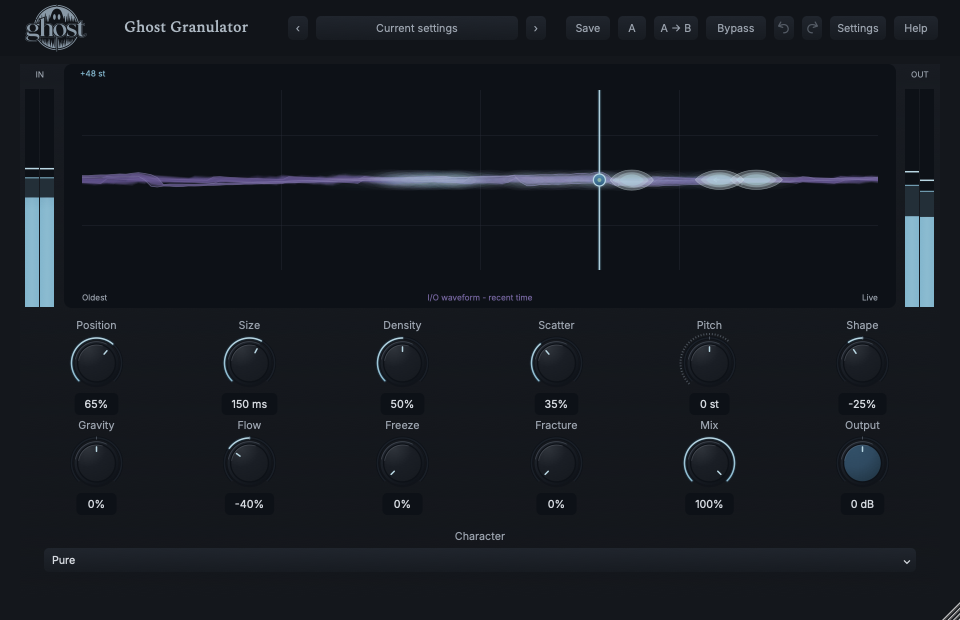
The Temporal Field shows real grain populations across captured time and pitch. Blue object geometry and purple recent I/O waveform context occupy one display but describe different information.
Choose a marker, or use the complete keyboard-accessible control reference above.
Horizontal grain position follows oldest history to live edge; object width represents duration relative to capture, vertical position pitch, small ticks stereo placement and connections ancestry/clusters. Waveform context is recent amplitude, not the entire captured history.
Horizontal/vertical drag edits Position/Pitch; Shift edits Scatter/Gravity. Grab and release a cluster with motion to throw it; Option-drag disturbs a region with a temporary wake.
Arrows edit Position/Pitch, Shift-arrows Scatter/Gravity, Enter/Space applies a local wake. Escape cancels; paired reset and ordinary numeric controls remain available. These gestures alter real population state.
HEAR THE IDEA
Actual Pure Granulator with Position 65%, Size 150 ms, Density 50%, Scatter 35%, Shape -25% and Flow -40%. Freeze remains open so the example can build its own captured history.
Source
Source WAVProcessed · actual Ghost DSP
Processed WAV{"position": 65, "size": 150, "density": 50, "scatter": 35, "shape": -25, "flow": -40, "mix": 100}. Actual native processor, stereo48k/127/double; source latency-aligned. Whole-file wet RMS gain 1.71117; common trim 1.0. Identical final20ms file fade; no listening approval inferred.
Reproduction recordUse guitar, mallet or keys with recognizable attacks.
Character Fluid · Size 180 ms · Density 60% · Shape -50% · Scatter 25% · Mix 60%
Listen for: A source-derived stream rather than an unrelated reverb tail.
Feed several seconds of speech or a pitched phrase.
Size 450 ms · Density 40% · Position 50% · Flow -50% · Scatter 30%
Listen for: Existing fragments continue moving inside captured time, without a sample browser or per-grain editor.
GO DEEPER
Scatter sets the possibility field; Fracture sets how strongly descendants stop obeying their population. Stress is the emergent disagreement among forces, not another hidden control. Gravity can gather fractured families again.
Same-rate DAW recall retains captured audio, frozen populations, motion and deterministic continuation. Portable sounds retain settings, not live capture. At a different sample rate, incompatible live capture starts empty. Factory Freeze sounds leave enough entry for your source; close fully after feeding them.
All twelve continuous controls support internal modulation and MIDI CC learn. Character is discrete host automation only. No separate grain sequencer, note-trigger instrument, sample browser or direct external audio sidechain is provided.
The processor reports zero algorithmic latency, though grains deliberately address past time. Mono/stereo follows the source/output layout and population geometry.
Held captured activity can continue without new input. Panic safely ends it; normal bypass and hard bypass follow the declared tail policy. High-rate multi-instance stress remains a documented capacity limit, not an unlimited-instance promise.
The preset browser offers All, Factory, User and Favorites, category/search filters and relevant Character filtering. A row's heart changes your personal favorites without loading or saving the sound. Save As creates a distinct User sound; explicit Save updates only the selected User sound. Factory content is protected. Name, category and tags support organization; deleting a User category keeps its presets as Uncategorized. Manage supports rename, duplicate, confirmed delete and individual/bulk/category import/export. Personal favorites stay on this installation rather than travelling in exported sounds.
Standalone and the matching Ghost Rack module share the same User sounds, categories and favorites. A module preset changes portable sound settings, not Rack placement, Rack wet/dry, bypass or modulation assignments. DAW recall embeds the sound settings and does not depend on a preset file remaining on disk. Rack chain presets are a different library and affect the whole chain.
Drag a knob normally, hold Shift for fine adjustment or Option for extra-fine. Double-click restores its default. Enter/context menus provide exact values, reset and value copy/paste; eligible controls also offer MIDI Learn and modulation. Tab and arrow keys provide keyboard access. A/B compares configurations; the adjacent copy button copies the active configuration to the other. Undo/Redo groups a continuous gesture into one edit. Settings provides UI scale, Reduced Motion, source configuration, portable settings and Panic. UI size/motion preferences do not change the sound.
WHEN SOMETHING ISN’T CLEAR
No source has entered the capture. Reopen Freeze, feed audio, then close it again.
Existing generations retain their geometry and can lag/reorganize while new grains take the changed settings.
Zero is a stationary current, not a command to stop momentum, collisions or every grain.
Portable sounds do not contain another performance's captured audio. Feed your own source before closing the field.