Clean
Precise transparent allpass network with sharp definition.
 PRODUCT GUIDESLegal notices
PHASE / SWIRL / REORGANIZE
Make a sound swirl through its own cancellations.
Blend a moving phase-shifted network with your source for familiar sweeps or deform it into liquid, clustered and regenerative structures. It reshapes phase rather than creating ordinary echoes.
Keep Mix near the middle for obvious cancellation. Feedback beyond unity can sustain an excited sound; start quietly.
START HERE / ABOUT 90 SECONDS
Use a sustained bright chord, pad or bass phrase. Insert Phaser and choose Init.
Rate 0.25 Hz · Depth 50% · Center 1000 Hz · Stages 8 · Shape 0% · Spread 50% · Geometry 0% · Twist 0% · Gravity 0% · React 0% · Resonance Lock 0% · Feedback 30% · Stereo 35% · Character Clean · Mix 50% · Output 0 dB
0 of 4 steps checked — reading progress only.
A moving pattern of emphasis and cancellation rather than a repeated phrase. Dry/wet interaction is fundamental to the familiar phaser sound.
Try fewer Stages for a simpler sweep. For a static phase texture, neutralize movement/reactivity and use Depth zero before adjusting Center/Spread.
LEARNING ILLUSTRATION — NOT CONNECTED TO YOUR PLUGIN
Qualitative explanation with Rate nonzero and other movement controls neutral; no live response curve or audio is generated.
Small Depth keeps stages near Center. At zero with neutral movement, this can be a static phase sculptor.Moderate Depth moves the network across a useful region. Center and Spread place that region.Strong Depth makes a broader sweep; Twist, Gravity and React can reorganize it. The dry/wet blend still determines the cancellations you hear.A qualitative explanation, not a calculated response or audio preview. Use the plugin to hear the result.
PARAMETER REFERENCE
Center places the network, Stages sets its complexity and Spread its width in frequency. Depth and Rate supply movement; Geometry, Twist and Gravity reorganize it.
Free-running sweep speed. Lower values evolve slowly; higher values create rapid modulation. There is no tempo-sync mode, and stopping/seeking does not reset physical sweep history.
Try this: Try 0.25 and 0.6 Hz on a sustained chord.
Movement around Center. Low values keep the network near its reference; high values travel farther. Zero can make a static phase sculptor when other motion/reactivity is neutral, although external Center modulation can still move it.
Try this: Compare 20% and 65% before adding Twist or React.
Logarithmic middle frequency of the stage network. It places the area of phase activity rather than acting as a low-pass cutoff. Spread and Geometry determine how stages surround it.
Try this: Sweep 500 Hz to 2 kHz to find an audible region in the source.
Detented integer stage count, including odd values. More stages change phase complexity and notch density, not merely depth or gain. Live changes preserve surviving stage history.
Try this: Compare four and eight before exploring larger counts.
Biases sweep rise/return smoothly. Zero is sinusoidal; opposite signs reverse directional asymmetry without a sawtooth jump. It changes the trajectory, not stage count.
Try this: Compare -25% and +25% at a steady Rate.
Distance in frequency between stage regions. Low values cluster near Center; high values span more of the spectrum. It is different from Stereo movement.
Try this: Try 25% and 75% with Center fixed.
Baseline stage distribution. Negative concentrates lower, positive higher, zero is regular. Unlike Gravity, it places the network rather than applying attraction between moving neighbors.
Try this: At modest Depth compare ±30% with Gravity zero.
Positive values send low/high regions in opposing trajectories; negative values create cascading/chasing motion. Zero is coordinated. Its effect uses the active movement and remains bounded by the network's range.
Try this: Try +30% with moderate Depth and Spread.
Positive values attract neighboring stages into temporary clusters; negative values repel close neighbors into gaps. Zero adds no force. Geometry still establishes their underlying distribution.
Try this: Compare ±25% with Resonance Lock around 20%.
Main-input transients/envelope change the moving network: positive excites/expands, negative contracts then blooms during decay. It is not amplitude compression and has no external-sidechain selector.
Try this: Try -30% on plucked material and compare the decay.
Softly attracts stages toward harmonic relationships. It remains fluid even at maximum, without detecting pitch, selecting a key or quantizing notes. Gravity can cluster or repel while these relationships remain favored.
Try this: Raise to 25% while comparing positive and negative Gravity.
Signed regeneration through the phase network. Positive and negative values create different interference patterns. Magnitudes below 100% decay; unity and above-unity regions can sustain/regenerate an excited sound.
Try this: Start around 30%. Lower monitoring and keep Panic ready before testing unity extremes.
Zero links L/R movement, positive values encourage opposition and negative values chasing motion. Mono output neutralizes the spatial movement while retaining the saved setting.
Try this: Try +35% on stereo output, then zero to compare coordinated movement.
Selects Clean, Analog, Deep or Liquid stage behavior. Their differences are structural and dynamic, not simply hidden EQ or extra Feedback. They retain the existing history through a safe transition.
Try this: Compare Clean and Analog first, then Liquid at moderate movement.
Blends original with phase-shifted audio. Zero is dry before Output; 100% is wet-only. Cancellation often becomes strongest at an intermediate blend, not at the wet endpoint.
Try this: Start at 50% before assuming more Mix means more phasing.
Post-blend level trim, independent of feedback and network movement. Use it for comparison; it is not a Drive control.
Try this: Lower level for resonant or regenerative settings.
CHARACTER REFERENCE
Precise transparent allpass network with sharp definition.
Component-like variation, softened bandwidth and subtle nonlinear stage/feedback response, without a branded hardware claim.
A more complex per-stage response for pronounced cancellation and dense movement, not simply louder Feedback.
Frequency-dependent inertia: stages lag, stretch and catch up at different rates as the network moves.
KNOW YOUR INSTRUMENT
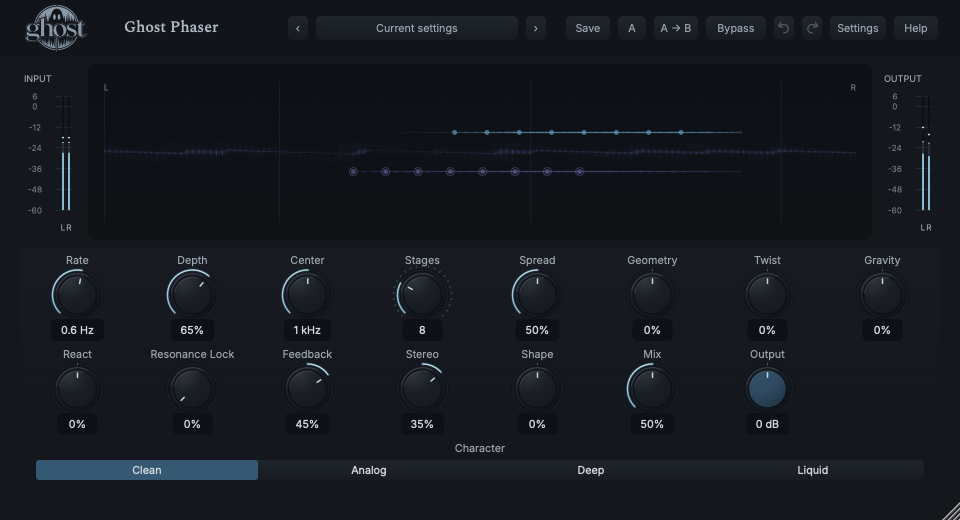
Nodes locate the actual stage network across frequency; the blue/violet waveform behind them gives incoming audio context. The waveform is time-domain information, not an FFT spectrum.
Choose a marker, or use the complete keyboard-accessible control reference above.
Frequency increases horizontally; separate L/R lanes and node shapes show stereo motion. Stages changes count, Gravity relationships and Liquid inertia come from real telemetry.
Drag Center horizontally and Spread vertically; Shift edits Geometry horizontally and Gravity vertically. Option is fine adjustment, arrows offer the same axes, Home/double-click resets Center/Spread and Escape cancels.
The waveform's time positions are independent of the frequency positions of stage nodes. Silence adds no waveform energy; modulation may continue. Input/output meters report actual levels.
HEAR THE IDEA
Actual Clean Phaser with eight Stages, Rate 0.6 Hz, Depth 65%, Feedback 45% and a 50% blend. Source/processed levels are explicitly matched for comparison.
Source
Source WAVProcessed · actual Ghost DSP
Processed WAV{"rate": 0.6, "depth": 65, "feedback": 45, "mix": 50, "character": 0}. Actual native processor, stereo48k/127/double; source latency-aligned. Whole-file wet RMS gain 1.04048; common trim 1.0. Identical final20ms file fade; no listening approval inferred.
Reproduction recordUse guitar or a bright chord.
Character Analog · Stages 4 · Rate 0.2 Hz · Depth 45% · Feedback 25% · Mix 50%
Listen for: A simpler, slower phase pattern rather than separate echoes.
Use a sustained pad.
Character Liquid · Spread 65% · Twist 25% · Gravity -25% · Resonance Lock 25%
Listen for: Fluid, source-related changes in phase relationships without key quantization.
GO DEEPER
Resonance Lock organizes relationships among phase stages. It does not detect a fundamental or correct notes. Geometry places the network, Gravity changes neighbor interaction, and Center can be independently automated.
Fresh empty silence remains silent. Excited unity/above-unity feedback may persist after input stops. Normal bypass does not necessarily erase that history; Panic clears it without resetting controls.
Every continuous control supports shared internal modulation in its appropriate domain; Stages and Character are host automation only. Eligible controls support saved MIDI CC learn. MIDI does not play notes or restart the free sweep.
No external sidechain or tempo-sync mode is exposed. React follows linked main input. Mono-to-stereo can use two phase networks; mono output retains but neutralizes Stereo.
Project/A-B recall retains physical phase, feedback and transitions for same-rate continuation. Portable settings omit live history. No extra reported processing latency is added. Normal bypass drains tails; Hard bypass clears safely and Panic resets running history, not knobs.
The preset browser offers All, Factory, User and Favorites, category/search filters and relevant Character filtering. A row's heart changes your personal favorites without loading or saving the sound. Save As creates a distinct User sound; explicit Save updates only the selected User sound. Factory content is protected. Name, category and tags support organization; deleting a User category keeps its presets as Uncategorized. Manage supports rename, duplicate, confirmed delete and individual/bulk/category import/export. Personal favorites stay on this installation rather than travelling in exported sounds.
Standalone and the matching Ghost Rack module share the same User sounds, categories and favorites. A module preset changes portable sound settings, not Rack placement, Rack wet/dry, bypass or modulation assignments. DAW recall embeds the sound settings and does not depend on a preset file remaining on disk. Rack chain presets are a different library and affect the whole chain.
Drag a knob normally, hold Shift for fine adjustment or Option for extra-fine. Double-click restores its default. Enter/context menus provide exact values, reset and value copy/paste; eligible controls also offer MIDI Learn and modulation. Tab and arrow keys provide keyboard access. A/B compares configurations; the adjacent copy button copies the active configuration to the other. Undo/Redo groups a continuous gesture into one edit. Settings provides UI scale, Reduced Motion, source configuration, portable settings and Panic. UI size/motion preferences do not change the sound.
WHEN SOMETHING ISN’T CLEAR
Much of the familiar cancellation is interaction between dry and phase-shifted audio. Try Mix around 50%, then place Center in a useful region.
It attracts stage relationships, not source notes. There is no pitch detector or key/scale control.
They describe different things: recent input amplitude versus stage frequencies. They share the display, not axis meaning.
Lower Feedback or use Panic to clear the live network. Choose Init to restore ordinary controls as well.