Clean
Precise transformation; voices cross cleanly.
 PRODUCT GUIDESLegal notices
TRANSPOSE / BRANCH / ATTRACT
Start with one shifted voice. Grow a moving pitch family.
Transpose precisely, adjust the apparent spectral envelope independently, then introduce a source-derived population whose pitches can spread, orbit, attract and rebound.
Scale Gravity organizes generated descendants. It does not correct the original input or move the primary Pitch setting onto a scale.
START HERE / ABOUT 90 SECONDS
Use a clear instrument or vocal phrase. Insert Pitch Shifter and choose Init.
Pitch 0 st · Fine 0 ct · Formant 0% · Voices 0% · Spread 0% · Shape 0% · Gravity 0% · Gravity Target Harmonic · Key C · Scale Chromatic · Polarity 0% · Orbit 0% · Elastic 0% · Tension 0% · Fracture 0% · Character Clean · Mix 100% · Output 0 dB
0 of 4 steps checked — reading progress only.
One control makes a conventional transposition; population controls extend that same processor into an ensemble rather than a manually programmed harmonizer.
Use small Fine and Spread for restrained detune. For scale relationships, select Gravity Target Scale and the actual song Key/Scale before raising Gravity.
LEARNING ILLUSTRATION — NOT CONNECTED TO YOUR PLUGIN
Qualitative guide; no voices or audio are calculated here. Spread and other controls still determine whether descendants separate audibly.
At 0%, one primary shifted voice remains. This is the ordinary pitch-shifting case.Moderate values grow a small family that can separate when Spread is active.High values create a denser bounded population; they do not promise unlimited voices or individually editable harmony parts.A qualitative explanation, not a calculated response or audio preview. Use the plugin to hear the result.
PARAMETER REFERENCE
Pitch/Fine establish the root. Voices grows the family, Spread its extent, Shape its distribution. The remaining physics matter when that family exists.
Primary transposition in semitones. Pointer detents make exact intervals convenient; continuous entry, automation and modulation can travel between them.
Try this: Set +12 st with Voices 0% to learn the simple case.
Cents offset relative to Pitch; 100 cents equals one semitone. It remains independently bounded from the main transposition.
Try this: Try +8 cents for a small detune instead of moving Pitch a whole semitone.
Changes apparent spectral-envelope size/brightness independently of pitch: negative darker/larger, positive brighter/smaller. Applied to generated voice geometry, useful beyond vocals.
Try this: At a fixed octave, compare±20%.
Smoothly grows a bounded population around the primary voice.0% is one voice, not silence; new descendants fade in/out rather than appearing abruptly.
Try this: Try 35% before spreading the family.
Extent of pitch and stereo relationships. Positive expands symmetrically; negative creates asymmetric/chasing structures. Zero gathers around the primary pitch.
Try this: At Voices 40%, compare +30% and -30%.
Distribution within the available pitch space. Positive gathers toward the primary with separated outer voices; negative evacuates the center toward boundaries.
Try this: Keep population/extent fixed while comparing±30%.
Positive bends generated descendants toward harmonic or scale attractors; zero ignores them; negative repels. It never scale-corrects the input or primary Pitch.
Try this: With a spread population, compare 0% and +50%.
Harmonic uses intervals around the primary voice. Scale uses absolute Key/Scale destinations for generated descendants.
Try this: Choose Scale only when you know the piece's key/collection.
Root for Scale gravity, C through B. Retained but inactive for Harmonic target; changing it retargets existing attractors smoothly.
Try this: Use C with Major for a simple first scale test.
Shared ten-collection library: Chromatic, Major, Natural/Harmonic/ascending Melodic Minor, Dorian, Mixolydian, Major/Minor Pentatonic and Minor Blues. It defines attractions, not a piano-roll sequence.
Try this: Compare Major and Minor Pentatonic with Scale target and positive Gravity.
Interaction between voices: positive attraction, negative repulsion, zero independence. This is not audio sign inversion and differs from Gravity's musical destinations.
Try this: Try±25% with a moving family, leaving Gravity fixed.
Circulates voices through the geometry in either direction. Zero stops the current without resetting positions. The engine owns the timescale; there is no separate Rate knob.
Try this: Try +20%, then reverse through zero to -20%.
Lag, overshoot and rebound as pitches seek their geometry. Zero is precise tracking; higher values let a short disturbance keep settling afterward.
Try this: Raise toward 50% and briefly move Spread.
Coupling through parent/child ancestry. Positive tethers descendants; negative loosens and can oppose their movement. Zero is the normal ancestry relationship.
Try this: Compare±30% with Elastic and Orbit active.
Descendants diverge in pitch, timing and formant while retaining ancestry. Reducing it reconstructs the family rather than choosing unrelated random detuning.
Try this: Try 25% before extreme branching.
Changes pitch-engine and crossing laws, preserving the running family. Differences need an active population/movement to be fully apparent.
Try this: Compare Clean and Elastic after raising Voices/Spread.
Blends aligned original and generated paths. Zero is dry before Output; intermediate blends retain original context underneath transposition.
Try this: Use 100% for the first octave test, then try 40% for parallel harmony.
Final gain after blending. A denser family can change perceived level; this is not population strength or a hidden limiter.
Try this: Trim after settling on Voices and Mix.
CHARACTER REFERENCE
Precise transformation; voices cross cleanly.
Emphasizes stretching, rebound and momentum exchange.
Separated bright voices with crystalline convergence/reinforcement.
Softer transient behavior and subtly differentiated formants.
More independent branches and irregular temporal interactions.
Weaker descendants can fade while stronger branches persist, opening moving gaps.
KNOW YOUR INSTRUMENT
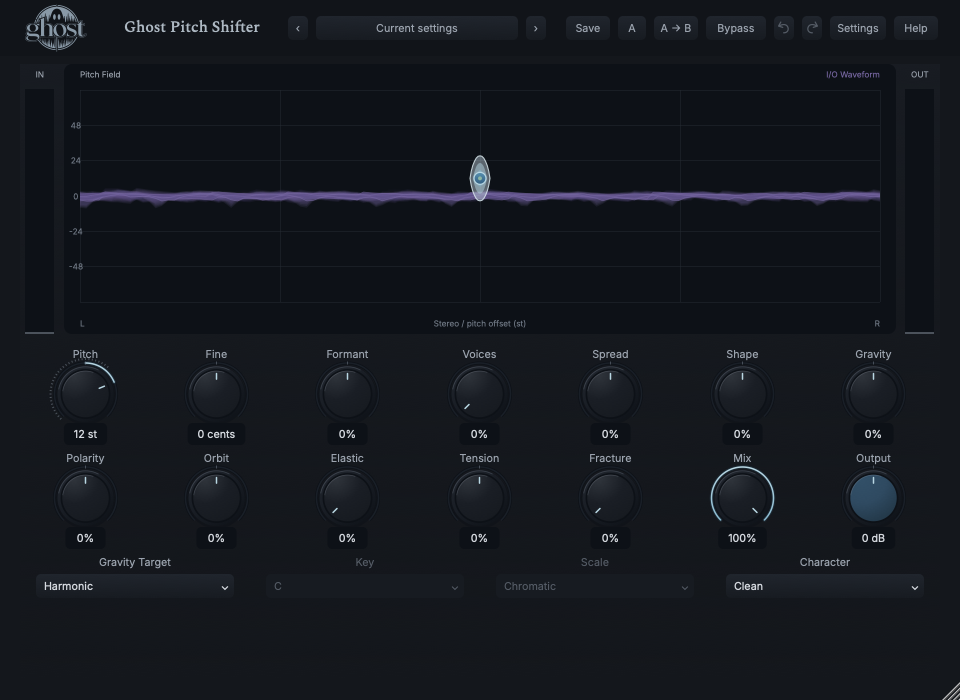
Blue nodes and ancestry represent actual pitch-family state. Purple I/O waveform context occupies the same display but shows recent time/amplitude, not pitch or a separate FFT.
Choose a marker, or use the complete keyboard-accessible control reference above.
Node horizontal position means stereo location and vertical position means pitch offset in semitones. Scale target adds subtle destination lanes; it is not a piano-roll editor.
Horizontal/vertical drag edits Spread/Gravity; Shift edits Shape/Tension. Pulling a generated node requests changes to this shared geometry, not a hidden individual voice parameter.
After release the real family settles according to Elastic, Gravity, Polarity and Tension. Tab/arrows/Enter/Home/Escape provide keyboard editing, reset and cancellation.
HEAR THE IDEA
Actual Clean Pitch Shifter at +12 semitones, Voices 0% and Formant 0%, fully processed. The source is latency-aligned to the measured processing path and level matching is disclosed below.
Source
Source WAVProcessed · actual Ghost DSP
Processed WAV{"pitch": 12, "voices": 0, "formant": 0, "mix": 100}. Actual native processor, stereo48k/127/double; source latency-aligned. Whole-file wet RMS gain 1.396241; common trim 1.0. Identical final20ms file fade; no listening approval inferred.
Reproduction recordUse bass, guitar or a vocal phrase.
Pitch -12 st · Voices 0% · Formant 0% · Mix 35%
Listen for: An octave layer, not source pitch correction.
Use a clear pitched phrase in C major.
Voices 45% · Spread 40% · Gravity Target Scale · Key C · Scale Major · Gravity 60% · Orbit 15% · Elastic 30%
Listen for: Generated descendants favor scale tones while the original and primary Pitch remain where they were set.
GO DEEPER
Gravity relates voices to musical destinations; Polarity relates voices to one another. Elastic supplies inertia, while Tension propagates movement through ancestry. A short parameter disturbance can leave bounded motion after the control returns.
Voices 0%, neutral formant/geometry and a chosen Pitch make a conventional single-voice shifter. Character differences can be modest there because there are no descendant collisions to change. Full sessions retain the family/history; portable sounds do not carry a previous performance.
Fourteen continuous controls support internal modulation and MIDI CC learn. Gravity Target, Key, Scale and Character are discrete host automation only. Effective values stay within approved ranges.
No external audio sidechain, MIDI-note generator, per-voice mixer, internal sequencer or separate Sync/Rate is provided. Mono/stereo behavior follows the available output layout.
Processing latency is reported and dry/Rack paths align. Buffered material drains after input; no unrelated sound is generated from silence. Normal bypass drains history; hard bypass/Panic ends it safely.
The preset browser offers All, Factory, User and Favorites, category/search filters and relevant Character filtering. A row's heart changes your personal favorites without loading or saving the sound. Save As creates a distinct User sound; explicit Save updates only the selected User sound. Factory content is protected. Name, category and tags support organization; deleting a User category keeps its presets as Uncategorized. Manage supports rename, duplicate, confirmed delete and individual/bulk/category import/export. Personal favorites stay on this installation rather than travelling in exported sounds.
Standalone and the matching Ghost Rack module share the same User sounds, categories and favorites. A module preset changes portable sound settings, not Rack placement, Rack wet/dry, bypass or modulation assignments. DAW recall embeds the sound settings and does not depend on a preset file remaining on disk. Rack chain presets are a different library and affect the whole chain.
Drag a knob normally, hold Shift for fine adjustment or Option for extra-fine. Double-click restores its default. Enter/context menus provide exact values, reset and value copy/paste; eligible controls also offer MIDI Learn and modulation. Tab and arrow keys provide keyboard access. A/B compares configurations; the adjacent copy button copies the active configuration to the other. Undo/Redo groups a continuous gesture into one edit. Settings provides UI scale, Reduced Motion, source configuration, portable settings and Panic. UI size/motion preferences do not change the sound.
WHEN SOMETHING ISN’T CLEAR
At Voices 0% there is only the primary voice. Grow Voices and Spread before expecting descendant geometry or scale attraction.
Scale Gravity intentionally applies to generated descendants, not the original or your primary Pitch setting.
They are retained but used only with Gravity Target Scale.
Elastic and the family's relationships retain real bounded momentum. This is not a stuck control or decorative animation.