Pure
Precise multiplication and the cleanest carrier at neutral geometry.
 PRODUCT GUIDESLegal notices
CARRIER / SIDEBANDS / SYNTHESIS
Pull a sound between multiplication and synthesis.
Multiply incoming audio by a tuned carrier for classic ring modulation, then reshape its sidebands or turn that same carrier into an audio-controlled monophonic synth.
Source changes what Ring produces. Mix blends that complete result with dry audio. They are deliberately different controls.
START HERE / ABOUT 90 SECONDS
Use a held instrument note or simple phrase. Insert Ring and choose Init; monitor quietly.
Carrier 440 Hz · Ratio 1:1 · Track 0% · Source 0% · Follow 100% · Shape 0% · Fracture 0% · Fold 0% · Gravity 0% · Flux 0% · React 0% · Bias 0% · Depth 100% · Stereo 0% · Character Pure · Mix 100% · Output 0 dB
0 of 4 steps checked — reading progress only.
Fixed Carrier makes intentionally inharmonic relationships; trusted tracking with a rational Ratio relates those sidebands to the played note.
Add a little Fold or Fracture only after hearing the simple carrier. A dense chord is not a valid polyphonic tracking test.
LEARNING ILLUSTRATION — NOT CONNECTED TO YOUR PLUGIN
A qualitative topology guide, not a sound generator or remote plugin control.
Input territory preserves the original source; interaction controls become less prominent at this endpoint.Ring territory multiplies input by carrier, producing related sum/difference sidebands.Synth territory makes the carrier independently audible. Follow determines source articulation versus Drone.A qualitative explanation, not a calculated response or audio preview. Use the plugin to hear the result.
PARAMETER REFERENCE
Begin with Carrier and Source. Add Track/Ratio for pitch relationships, then Shape, Fracture, Fold and Gravity for spectral structure.
Fixed oscillator frequency when Track is zero. As Track rises, the relationship blends in pitch space toward trusted input pitch×Ratio. At 100% Track this knob adds no extra offset.
Try this: Compare 110 Hz with 440 Hz at Track 0%.
Continuous tracked-pitch relationship with twelve useful magnetic rational ratios. Intermediate non-rational values remain valid; fine entry, automation and modulation do not quantize them.
Try this: With Track 100% on one note, compare 1:1 and 3:2.
Fixed carrier toward dominant-fundamental following. Confidence-aware retention avoids wild jumps on unreliable input; this is not polyphonic resynthesis.
Try this: Raise to 100% on a clean monophonic phrase, not a full mix.
Input at -100%, true Ring at 0%, independently audible Synth at +100%, with continuous relationships between them. It changes topology rather than the final dry/wet blend.
Try this: Compare the three endpoints at a moderate monitoring level.
Synth's response to source amplitude.100% articulates from the source; 0% is a continuously audible Drone. It does not replace Ring multiplication or React's timbral response.
Try this: At Source Synth, compare 100% and 50%; use Panic after a Drone test.
Continuously changes carrier geometry from sine through triangle-like, saw-like and pulse-like regions. It feeds both Ring and Synth.
Try this: Start near zero and add 25% before introducing Fold.
Signed asymmetric deformation before Fold. Opposite directions expose different partial relationships, not just more harmonic quantity.
Try this: Compare±25% at fixed Carrier and Shape.
Folds the fractured carrier into denser harmonic structure. It is wavefolding of the carrier, not an audio-buffer feedback amount.
Try this: Try 15% and listen before exploring the upper range.
Attracts generated sidebands/partials toward related harmonic positions above zero; repels them below zero. It is neither pitch correction nor a conventional resonator bank.
Try this: Compare±30% on an active Ring or Synth sound.
Bounded deterministic evolution of carrier geometry around your settings. It does not arbitrarily retune the fundamental or restart when its amount changes.
Try this: Try 20% with moderate Fracture and listen over several seconds.
Positive attacks disturb geometry and complexity; negative attacks temporarily organize it so complexity returns in the decay. It changes timbre, not Synth envelope following.
Try this: Compare±30% on plucked material, leaving Follow unchanged.
Zero is bipolar ring multiplication. Positive moves toward AM and more source identity; negative creates alternate asymmetric cancellation relationships.
Try this: Compare zero with +35% before changing Source.
Strength of the interaction within the current Source topology. At the exact Input endpoint it is intentionally neutral. It is not another external Mix.
Try this: Reduce to 50% in Ring territory and compare with reducing Mix.
Positive opposes the carrier structures across L/R; negative makes one chase the other's evolution. Neutral in mono, not a balance control.
Try this: Try +25% on stereo output, then return to zero.
Four different carrier/multiplication laws apply in Ring and Synth. They preserve evolving history rather than switching on unrelated post-effects.
Try this: Compare Pure and Analog first; then Metal/Void with active geometry.
Blends the complete Ring result against latency-aligned dry audio. It remains independent of Input/Ring/Synth Source.
Try this: Try 60% to retain clean pitch context under metallic sidebands.
Final gain trim after blending. Monitor conservatively for Synth/Drone or dense folded spectra.
Try this: Match levels after changing Source or Character.
CHARACTER REFERENCE
Precise multiplication and the cleanest carrier at neutral geometry.
Controlled asymmetry, saturation and nonlinear multiplication.
Dense upper families and stronger Fold/Fracture interaction.
Weak components yield to dominant shifting sidebands, creating sparse structures.
KNOW YOUR INSTRUMENT
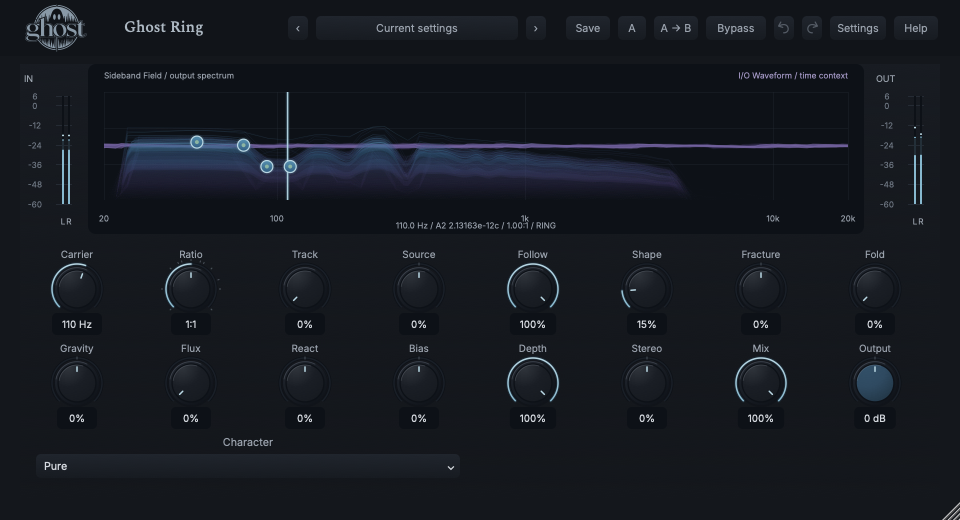
The Sideband Field superimposes measured spectral structures and recent I/O waveform context in one graph. Carrier markers and partial handles are controls, not extra audio energy.
Choose a marker, or use the complete keyboard-accessible control reference above.
Spectrum uses logarithmic frequency/level; waveform uses recent time/amplitude. The legend identifies organized pre-Mix/Output analysis or delivered-output measurement when that path is inactive.
Horizontal/vertical drag edits Carrier/Gravity. Shift changes Fracture/Fold. Dragging a prominent measured partial resolves onto existing geometry, not hidden per-partial parameters.
Tab selects field axes; arrows adjust, Enter offers exact entry, Home resets and Escape cancels. Hidden/reduced-motion views reduce visual work without changing sound.
HEAR THE IDEA
Actual Pure Ring at 110 Hz, Track 0%, Source Ring and Shape 15%, fully processed. A fixed carrier deliberately changes the original chord's harmonic relationships; this is not a pitch-shift interval.
Source
Source WAVProcessed · actual Ghost DSP
Processed WAV{"carrier": 110, "track": 0, "source": 0, "shape": 15, "depth": 100, "mix": 100}. Actual native processor, stereo48k/127/double; source latency-aligned. Whole-file wet RMS gain 1.47758; common trim 1.0. Identical final20ms file fade; no listening approval inferred.
Reproduction recordUse a clear single-note bass or vocal phrase.
Source 100% · Track 100% · Follow 100% · Ratio 1:1 · Shape 25%
Listen for: Pitch and amplitude from the source play a monophonic carrier instrument, not MIDI notes or polyphonic harmonization.
Use keys or percussion with clear attacks.
Character Metal · Carrier 220 Hz · Fold 25% · Gravity -25% · Flux 20% · Mix 45%
Listen for: A source-related changing sideband layer, not a second oscillator or unrelated effect chain.
GO DEEPER
Source Synth with Follow 0% intentionally generates continuously without input. Start quietly. Panic stops held generation without resetting ordinary settings; new source articulation can restart it. Normal bypass releases generation, while hard bypass removes it.
The tracker follows one trustworthy dominant fundamental, retaining a meaningful relationship when confidence falls. Full sessions/A/B preserve carrier, spectral history and deterministic evolution. Portable sounds keep settings, not a previous live performance.
Sixteen continuous controls support internal modulation and MIDI CC learn. Character is discrete host automation only. There is no MIDI-note synth keyboard, external audio sidechain or tempo-sync section.
Mono, stereo and meaningful mono-to-stereo processing are supported; Stereo is neutral for mono output. Reported fixed processing latency aligns dry/wet and Rack paths.
Source, Depth and Follow are separate responsibilities. Drone and near-held spectral energy require deliberate monitoring; Panic is a safety action, not Init.
The preset browser offers All, Factory, User and Favorites, category/search filters and relevant Character filtering. A row's heart changes your personal favorites without loading or saving the sound. Save As creates a distinct User sound; explicit Save updates only the selected User sound. Factory content is protected. Name, category and tags support organization; deleting a User category keeps its presets as Uncategorized. Manage supports rename, duplicate, confirmed delete and individual/bulk/category import/export. Personal favorites stay on this installation rather than travelling in exported sounds.
Standalone and the matching Ghost Rack module share the same User sounds, categories and favorites. A module preset changes portable sound settings, not Rack placement, Rack wet/dry, bypass or modulation assignments. DAW recall embeds the sound settings and does not depend on a preset file remaining on disk. Rack chain presets are a different library and affect the whole chain.
Drag a knob normally, hold Shift for fine adjustment or Option for extra-fine. Double-click restores its default. Enter/context menus provide exact values, reset and value copy/paste; eligible controls also offer MIDI Learn and modulation. Tab and arrow keys provide keyboard access. A/B compares configurations; the adjacent copy button copies the active configuration to the other. Undo/Redo groups a continuous gesture into one edit. Settings provides UI scale, Reduced Motion, source configuration, portable settings and Panic. UI size/motion preferences do not change the sound.
WHEN SOMETHING ISN’T CLEAR
At 100% Track the trusted input fundamental×Ratio fully determines the carrier. Lower Track for a fixed-frequency contribution.
Source toward Synth with low Follow can be an intentional Drone. Use Panic or hard bypass to stop held generation.
It is a dominant-note/monophonic tracker, not polyphonic pitch recovery. Start with one clear note.
Source changes Input/Ring/Synth topology. Mix adds external dry audio to that entire result.