Clean
Precise wide-band motion with restrained coloration, emphasizing Doppler and space.
 PRODUCT GUIDESLegal notices
ROTATE / ACCELERATE / ORBIT
Put the low and high parts of a sound into motion.
From warm organ rotation to impossible spatial trajectories, Rotary treats a low rotor and high horn as one acoustic machine. Pitch, level, shadow and proximity all follow that motion rather than unrelated added effects.
Speed is a target: the machine takes time to accelerate. Changing Accel does not teleport its velocity.
START HERE / ABOUT 90 SECONDS
Use sustained organ, guitar or keys. Insert Rotary and choose Init; stereo monitoring reveals the microphone geometry.
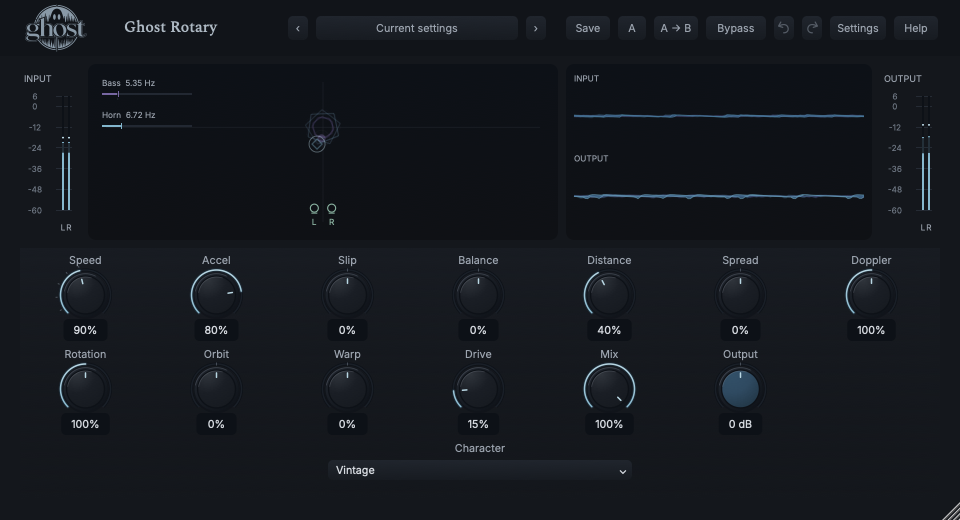
Speed 10% · Accel 50% · Slip 0% · Balance 0% · Distance 40% · Spread 0% · Doppler 100% · Rotation 100% · Orbit 0% · Warp 0% · Drive 15% · Character Vintage · Mix 100% · Output 0 dB
0 of 4 steps checked — reading progress only.
Related low/high motion develops over time, with both pitch and level consequences. The horn responds more lightly than the heavier bass rotor.
For pitch-only motion reduce Rotation; for rotary tremolo reduce Doppler. Explore small Slip or Orbit changes only after the conventional machine is recognizable.
LEARNING ILLUSTRATION — NOT CONNECTED TO YOUR PLUGIN
Qualitative guide; this slider neither spins the real machine nor simulates its acceleration. Accel determines how it approaches the target.
Lower targets give slower motion; zero stops only after deceleration.10% is the Slow/Chorale landmark.Toward conventional fast territory, pitch and level movement develop as the two rotors accelerate.90% is Fast/Tremolo.Above 100% intentionally exceeds conventional machine speeds. Use comfortable monitoring; Accel and Character still shape how the target is reached.A qualitative explanation, not a calculated response or audio preview. Use the plugin to hear the result.
PARAMETER REFERENCE
Start with Speed, Accel and Mix. Doppler and Rotation independently scale pitch and level consequences; Orbit, Slip and Balance change the machine more deeply.
Target rotational speed, not instantaneous velocity. Zero stops after slowing; 10% is Slow/Chorale and 90% Fast/Tremolo. Five magnetic pointer landmarks are 10/30/50/70/90%; intermediate values remain continuous. Above 100% exceeds conventional machinery.
Try this: Move from 10 to 90% and wait for the different bass/horn acceleration.
How quickly a new speed is reached. Low feels heavy and takes longer; high responds quickly. The bass rotor remains heavier/slower than the horn. It changes the ramp, not the target speed.
Try this: Compare 30% and 80% while changing Speed between the same two targets.
Changes the speed relationship: positive lets the horn outrun bass; negative lets bass catch/overtake the horn. Zero retains conventional coupling. It is not a stereo pan control.
Try this: Try±20% at a steady Speed before exploring extreme separation.
Changes relative prominence and frequency ownership of bass/horn, including crossover overlap. Negative expands bass ownership upward; positive expands horn ownership downward. It is more than a two-way volume mix.
Try this: Try±20% with modest Slip to hear which region follows each machine.
Moves the virtual listener/microphones outward. Close emphasizes proximity and direct motion; far softens it and presents more of the object in space. Short early reflections belong to the acoustic machine, not a separate reverb.
Try this: Compare 20% and 65% with Orbit neutral.
Changes stereo microphone geometry. Positive widens separation; negative crosses the geometry. Mono retains but does not apply its stereo spread. It is not a simple phase-inversion trick.
Try this: Try +25% on stereo output, then check mono.
Scales the pitch consequence of rotation independently of amplitude/shadow. Zero removes rotational pitch shift, 100% is the physical reference and 200% exaggerates it. The rotors can still move at zero.
Try this: Set Rotation zero briefly to isolate Doppler, then restore it.
Scales level movement and directional acoustic shadow independently of Doppler. Zero removes that consequence, not the machine's motion. Values above 100% exaggerate rotary pumping/shadow.
Try this: Reduce Doppler to zero to hear rotation-derived tremolo alone.
Deforms the shared path: positive stretches circular motion toward deeper approach/recede trajectories; negative folds/crosses it. This coherently affects distance, pitch, level and space rather than adding an autopanner.
Try this: Try±20% before using Impossible Character for deeper geometry.
Surges within each revolution while preserving average Speed. Positive speeds approach and slows recession; negative reverses that timing. Horn/bass still have distinct physical relationships.
Try this: Compare±25% at steady Speed rather than changing both together.
Embedded cabinet/horn nonlinearity, stronger with proximity and different in low/high systems. It is not generic output distortion. Balance and the moving geometry influence which coloration is prominent.
Try this: Start at 15%, then reduce to hear cleaner motion before increasing it.
Selects Clean, Air, Vintage, Heavy, Broken or Impossible machine behavior: mass, directionality, geometry and nonlinear response. It preserves motion/history through a short handoff rather than resetting the machine.
Try this: Compare Vintage and Clean, then allow Heavy time to accelerate.
Equal-power blend with aligned dry audio. Zero is dry before Output; 100% the acoustic machine. Intermediate correlated blends can rise in level, so compare using Output.
Try this: Try 40% for a supportive motion layer behind clean keys.
Final level after the blend, without automatic loudness matching. It does not change cabinet Drive, target Speed or physical inertia.
Try this: Trim after changing Drive, Character or Mix.
CHARACTER REFERENCE
Precise wide-band motion with restrained coloration, emphasizing Doppler and space.
Light, responsive rotors and a directional high horn for open, quick movement.
Balanced traditional cabinet/horn behavior, softened bandwidth, shadow and restrained early reflections.
Larger mass, slower transitions and stronger proximity-dependent nonlinear movement. Wait for its ramp.
Deterministic eccentric mechanics and unequal relationships, not a random noise overlay.
More extreme Slip, folded Orbit/Warp and spectral overlap while remaining tied to the input and rotating geometry.
KNOW YOUR INSTRUMENT
The top-down Rotor Field follows the real low rotor, horn and microphones. Adjacent I/O waveforms describe actual audio, a different relationship from the machine geometry.
Choose a marker, or use the complete keyboard-accessible control reference above.
The bass disk, horn diamond and L/R microphone markers identify the machine. Rate bars compare actual and target speeds; pitch/shadow/proximity indications follow actual state. Geometry may keep moving in silence without inventing waveform energy.
Drag background horizontally for Orbit and vertically for Distance; Shift selects Spread/Warp. Grabbing a trajectory edits Orbit/Warp. Option makes fine movement, arrows offer alternatives, Home/double-click resets Orbit/Distance and Escape cancels.
Speed's magnetic landmarks apply only to normal pointer dragging. Fine dragging, exact entry, automation and modulation remain continuous. Mono disables stereo Spread while keeping its value; ordinary controls remain available.
HEAR THE IDEA
Actual Vintage Rotary targeting Speed 90% with Accel 80%, Doppler/Rotation 100% and Mix 100%. The physical ramp and moving response are real processor output; explicit RMS matching is for comparison only.
Source
Source WAVProcessed · actual Ghost DSP
Processed WAV{"speed": 90, "accel": 80, "character": 2, "drive": 15, "mix": 100}. Actual native processor, stereo48k/127/double; source latency-aligned. Whole-file wet RMS gain 0.974456; common trim 1.0. Identical final20ms file fade; no listening approval inferred.
Reproduction recordUse a sustained organ chord.
Character Heavy · Speed 10% · Accel 30% · Mix 100%
Listen for: An evolving physical transition, not a sudden LFO-rate switch.
Use keys or a sustained guitar phrase.
Speed 70% · Doppler 100% · Rotation 0% · Drive 5%
Listen for: Two consequences of one rotating system, independently scaled rather than separate effect modules.
GO DEEPER
Balance changes which material belongs to the low rotor and horn, including overlap. With Slip, related frequencies can follow different trajectories. Start with modest changes to identify the cause before using Impossible extremes.
Speed zero is a target for deceleration. It does not erase audio history or reset other controls. Panic clears active history through safety fades; Init restores the ordinary starting controls.
All thirteen continuous controls support internal modulation and saved MIDI CC learn; Character is discrete host automation only. Speed modulation drives acceleration, not instantaneous velocity. No tempo-sync selector, audible sidechain, per-rotor editor or cabinet browser is exposed.
Rotation free-runs independently of host tempo and seeks. Stereo geometry needs a stereo output; mono remains mono. Doppler/Rotation scaling can remove a consequence without stopping the physical motion.
The causal pitch path reports a 15 ms reference delay, rounded to samples, and dry/Rack follow it. Full same-rate project state retains motion and populated histories; portable sounds retain settings rather than a captured performance. Normal bypass drains a short tail; Hard bypass/Panic terminate it safely without resetting knobs.
The preset browser offers All, Factory, User and Favorites, category/search filters and relevant Character filtering. A row's heart changes your personal favorites without loading or saving the sound. Save As creates a distinct User sound; explicit Save updates only the selected User sound. Factory content is protected. Name, category and tags support organization; deleting a User category keeps its presets as Uncategorized. Manage supports rename, duplicate, confirmed delete and individual/bulk/category import/export. Personal favorites stay on this installation rather than travelling in exported sounds.
Standalone and the matching Ghost Rack module share the same User sounds, categories and favorites. A module preset changes portable sound settings, not Rack placement, Rack wet/dry, bypass or modulation assignments. DAW recall embeds the sound settings and does not depend on a preset file remaining on disk. Rack chain presets are a different library and affect the whole chain.
Drag a knob normally, hold Shift for fine adjustment or Option for extra-fine. Double-click restores its default. Enter/context menus provide exact values, reset and value copy/paste; eligible controls also offer MIDI Learn and modulation. Tab and arrow keys provide keyboard access. A/B compares configurations; the adjacent copy button copies the active configuration to the other. Undo/Redo groups a continuous gesture into one edit. Settings provides UI scale, Reduced Motion, source configuration, portable settings and Panic. UI size/motion preferences do not change the sound.
WHEN SOMETHING ISN’T CLEAR
It sets a target for the acceleration model. Raise Accel for faster response, and allow the heavier bass rotor more time.
Check Doppler above zero, active Speed and enough Mix. Rotation alone changes level/shadow; it does not restore the pitch consequence.
Mono output keeps the saved value but cannot present stereo microphone separation. Use a stereo-capable output.
Choose Init for Vintage/Speed 10% and the original geometry. Panic clears live history without resetting ordinary parameters.