Soft
Smooth symmetric saturation: the simplest predictable starting point for warmth and odd-harmonic enrichment.
 PRODUCT GUIDESLegal notices
WARMTH / EDGE / TRANSFORMATION
Push the sound, then choose how it pushes back.
Add modest density or reshape a waveform dramatically. Eight Characters range from smooth saturation and dynamic softening to folding, slew restriction and controlled malfunction, all driven by your source.
Drive is not automatically level-compensated. Compare using Output, not just the louder setting.
START HERE / ABOUT 90 SECONDS
Use bass, a bright synth or a drum loop. Insert Saturate and choose Init at a comfortable monitoring level.
Drive 6 dB · Character Soft · Tone 0% · Bias 0% · Mix 100% · Output 0 dB · Quality Eco
0 of 4 steps checked — reading progress only.
Drive changes harmonic density and peak shape, with different responses from the eight Characters. Output only balances final level.
Use small Drive for everyday enhancement. For a clear extreme, try Fold with modest Bias and reduced Mix; start quietly and do not interpret a louder result as better.
LEARNING ILLUSTRATION — NOT CONNECTED TO YOUR PLUGIN
This qualitative explanation assumes Soft with Tone/Bias neutral. No audio is generated and no plugin setting is changed.
Less Drive keeps more of an ordinary source near the gentler part of Soft's response. Source level still matters.More Drive pushes more peaks into nonlinearity, adding density and harmonic change. Use Output for a fair comparison.Strong Drive substantially reshapes the source. Other Characters can fold or restrict slew rather than simply round peaks; lower monitoring before exploring.A qualitative explanation, not a calculated response or audio preview. Use the plugin to hear the result.
PARAMETER REFERENCE
Drive feeds the nonlinear behavior. Character defines that behavior; Tone and Bias refine it before the final blend.
Adds gain into the chosen nonlinear mechanism. Increasing it moves more of the signal into saturation, clipping, folding or slew restriction according to Character. There is no automatic loudness compensation; Output is separate.
Try this: Try 6, 12 and 18 dB with Soft, matching final level each time.
Chooses eight different nonlinear behaviors, not presets with unrelated hidden effect chains. Tube and Tape include dynamic response; the modes remain source-related. Bias, Tone and Drive keep their values while you compare.
Try this: Compare Soft, Tube and Tape on a repeated phrase, then explore Fold at lower monitoring.
A post-saturation bipolar contour. Negative values darken/round; positive values add brightness/presence. Zero is neutral for this control, not removal of a Character's own spectral behavior. Tape can still soften highs at Tone zero.
Try this: Start with ±15% after choosing the amount of saturation.
Shifts the nonlinear operating point and balance between positive and negative treatment. It is particularly expressive with Tube, Diode, Fold and Broken, and can be subtler in other modes. DC protection does not turn it into a general tone control.
Try this: Try ±20% with Tube or Fold, leaving Tone zero to isolate the difference.
Blends aligned original and processed paths. Zero is dry before Output; 100% is fully nonlinear. Intermediate equal-power blends preserve some clean attack but can be louder when correlated.
Try this: For strong Fold or Hard, compare 100% and 35% rather than reducing Drive before the mechanism.
Final trim after Mix, independent of the gain feeding saturation. Lower it when Drive increases so peak shape and color can be compared without a loudness bias.
Try this: Match comfortable bypassed level after each substantial Drive change.
Eco and High trade processing cost for anti-aliasing quality. Eco uses lower-cost 2× processing; High uses 4× to reduce unwanted artifacts under strong nonlinear treatment. Both have the same 48-sample compensated delay and preserve the Character/settings.
Try this: Compare High for exposed Hard, Fold, Diode or Broken at strong Drive; do not expect it to load a different sound.
CHARACTER REFERENCE
Smooth symmetric saturation: the simplest predictable starting point for warmth and odd-harmonic enrichment.
Sharper symmetric clipping and stronger transient flattening as Drive increases. Try parallel Mix to keep some clean attack.
Asymmetric harmonics and source-dependent compression/recovery. Bias is particularly useful here.
Rounded peaks, dynamic compression and progressive high-frequency softening with Drive. Tone still shapes the result afterward.
Turns peaks back on themselves for increasingly complex harmonics. Explore Drive and Bias slowly with comfortable monitoring.
Sharper unequal-polarity clipping, distinct from Tube's gentler dynamic behavior.
Restricts how fast the waveform can move, rounding rapid transitions and high-frequency movement differently from clipping.
Bounded source-driven sag, asymmetric folding and signal-history instability. It does not add random hiss or unrelated dropout.
KNOW YOUR INSTRUMENT
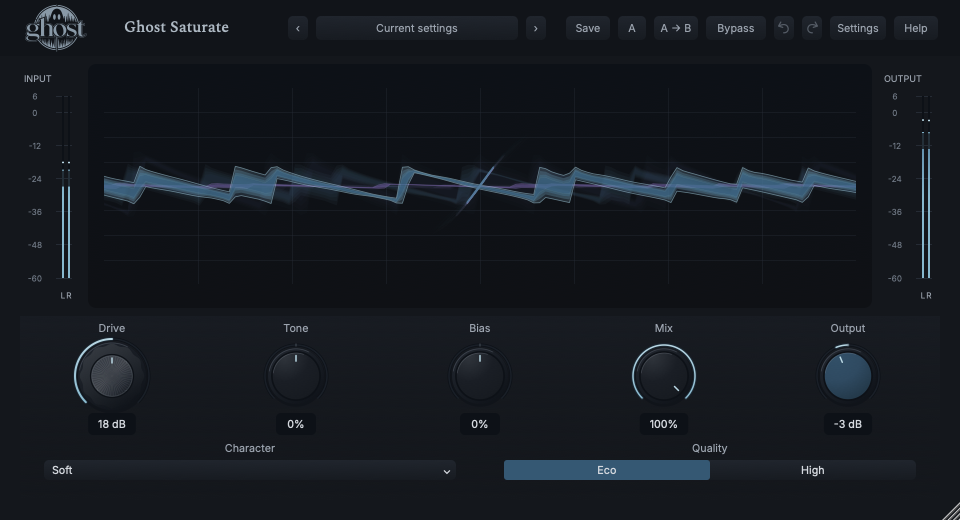
The Transfer Field brings source/output waveform context and the nonlinear relationship together. It reflects actual signal and controls, not a decorative oscillator.
Choose a marker, or use the complete keyboard-accessible control reference above.
Drag horizontally for Drive and vertically for Bias. Shift-drag changes Tone; knobs and exact entry provide the same controls. One continuous gesture is one undo edit.
Fold can visibly turn peaks back, Slew rounds fast transitions and dynamic Characters respond over time. Treat the transfer reference as explanation, not a complete prediction of every dynamic sample.
Watch input/output meters while comparing. The blue-graphite Output knob remains a final level trim; the Drive face does not change its parameter behavior.
HEAR THE IDEA
The source and actual Soft output at 18 dB Drive. Explicit RMS matching helps compare harmonic and peak changes rather than raw gain. This is not a hardware-emulation claim.
Source
Source WAVProcessed · actual Ghost DSP
Processed WAV{"drive": 18, "character": 0, "tone": 0, "bias": 0, "mix": 100, "output": -3}. Actual native processor, stereo48k/127/double; source latency-aligned. Whole-file wet RMS gain 0.207001; common trim 1.0. Identical final20ms file fade; no listening approval inferred.
Reproduction recordUse drums with clear transients.
Character Hard · Drive 12 dB · Mix 35% · Tone -10%
Listen for: A denser distorted layer alongside original transients, not automatic peak normalization.
Use an exposed monophonic synth or bass phrase.
Character Fold · Drive 15 dB · Bias 20% · Mix 40%
Listen for: Harmonic restructuring tied to the phrase rather than a separate generated sound.
GO DEEPER
The same Drive setting responds differently to a quiet bass and a hot drum bus. Dynamic Tube/Tape behavior also depends on recent signal. Use a repeatable phrase and match Output when comparing Characters.
Bias changes how the mechanism treats the waveform; Tone shapes its result. A bright or asymmetric change can therefore remain at Tone zero. Neither control creates a multiband processor or cabinet simulation.
Drive, Tone, Bias, Mix and Output support internal modulation and MIDI CC learn. Drive/Output use dB and the other targets percentage points. Character/Quality are discrete host automation, not ordinary internal modulation destinations.
Mono and stereo are supported with independent channel histories and common controls. A shared Envelope Follower may use external sidechain for control; that signal is never mixed into the sound. Silence does not create an autonomous output.
Project state retains the defined processing/modulation history; portable presets/settings omit running audio. Normal bypass lets histories drain, Hard bypass clears safely and Panic clears history without resetting ordinary settings.
The preset browser offers All, Factory, User and Favorites, category/search filters and relevant Character filtering. A row's heart changes your personal favorites without loading or saving the sound. Save As creates a distinct User sound; explicit Save updates only the selected User sound. Factory content is protected. Name, category and tags support organization; deleting a User category keeps its presets as Uncategorized. Manage supports rename, duplicate, confirmed delete and individual/bulk/category import/export. Personal favorites stay on this installation rather than travelling in exported sounds.
Standalone and the matching Ghost Rack module share the same User sounds, categories and favorites. A module preset changes portable sound settings, not Rack placement, Rack wet/dry, bypass or modulation assignments. DAW recall embeds the sound settings and does not depend on a preset file remaining on disk. Rack chain presets are a different library and affect the whole chain.
Drag a knob normally, hold Shift for fine adjustment or Option for extra-fine. Double-click restores its default. Enter/context menus provide exact values, reset and value copy/paste; eligible controls also offer MIDI Learn and modulation. Tab and arrow keys provide keyboard access. A/B compares configurations; the adjacent copy button copies the active configuration to the other. Undo/Redo groups a continuous gesture into one edit. Settings provides UI scale, Reduced Motion, source configuration, portable settings and Panic. UI size/motion preferences do not change the sound.
WHEN SOMETHING ISN’T CLEAR
There is no automatic gain compensation. Drive feeds the mechanism; use Output after Mix to compare at a comfortable level.
Its effect depends on Character and source level. Try Tube, Diode, Fold or Broken with enough Drive to engage the nonlinear behavior.
Tone zero removes its extra contour, not Tape's intrinsic high-frequency softening. Reduce Drive or use a small positive Tone if appropriate.
Choose Init for Soft/6 dB and default controls. Panic clears running history without changing those settings.