Turn a moment of sound into a world you can keep playing.
Catch the tone inside a chord, voice or texture. Hold it after the original sound stops, then let its harmonics drift, separate and combine. Start with a simple sustained layer; go deeper when you want an evolving atmosphere rather than a static loop.
An audio effect, not a sound generator: capture some input before closing Freeze. No sidechain or MIDI notes are needed.
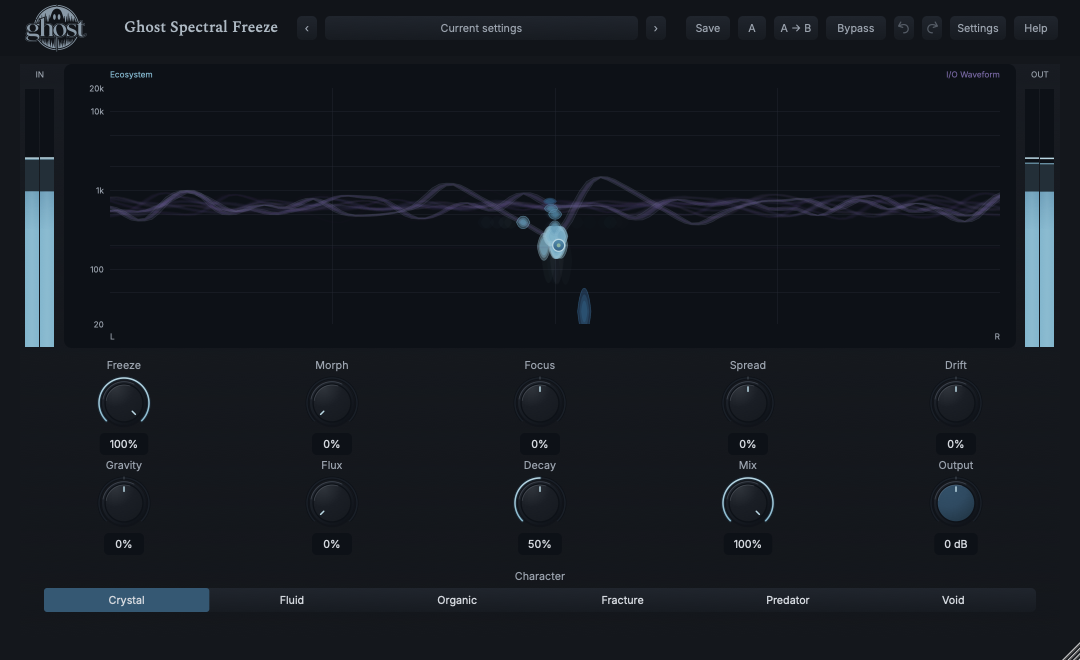
Actual plugin display · full annotated interface below
START HERE / ABOUT 90 SECONDS
Hold a chord in about 90 seconds.
Put Spectral Freeze on a track playing a sustained piano, synth or guitar chord. A clean, clearly pitched sound makes the first result easy to recognize. Keep monitoring at a comfortable level.
The original chord ends, but its captured tonal material remains. Drift adds movement; positive Gravity encourages related harmonics to organize. This is a changing spectral texture, not a repeated recording of the chord's attack.
For a cleaner first hold, leave every transformation control at zero. For a layer behind the original performance, restart the source and lower Mix to about 30%. To start a genuinely new capture, Panic first; returning a movement knob to zero does not rewind the old world.
LEARNING ILLUSTRATION — NOT CONNECTED TO YOUR PLUGIN
Closing the door is not clearing the room.
YOUR INPUTNew sound
→
ADMISSIONOpen
→
CAPTURED MATERIALEmpty
This is a learning illustration, not the running plugin.
PARAMETER REFERENCE
A small set of big gestures.
Freeze decides what can enter. The other controls change what happens to the sound already inside. Make one small move at a time: this instrument remembers its history.
Freeze0–100% · Default 0%
Controls how freely new input can join the captured sound. At 0%, the world is open to your source. Intermediate values admit material selectively while retaining more history. At 100%, admission closes completely, but the material already inside can keep moving and changing. Closing an empty capture stays silent; Freeze is not a playback-volume control.
Try this: Play a chord for two seconds at 0%, then move directly to 100% before stopping the source. Reopen to about 65% to blend new material into the old.
Morph0–100% · Default 0%
Changes how captured identities interact. Low values keep them relatively distinct; increasing Morph permits contamination, related hybrids and eventually deeper recombination. Spread and Drift determine which structures meet, so Morph may do little to a tiny, isolated capture. Descendants already created remain when you lower Morph.
Try this: Capture a chord, set Freeze around 65%, add a different chord and try Morph 35%. Close Freeze again to work with the combined material.
Focus-100–100% · Default 0%
Sets which existing material gets an advantage. Positive values favor strong, established identities. Negative values give quieter material and traces of earlier captures a better chance to return. Zero is balanced. Focus cannot recover a history that was never captured or has been cleared; its effect depends on what is inside.
Try this: After admitting several contrasting sounds, try Focus -30% to expose quieter history, then +30% to favor the dominant material.
Spread-100–100% · Default 0%
Changes the distance between captured groups and their stereo territories. Positive values separate families; negative values compress them together and encourage encounters. At zero, native relationships are retained. Compression can make Morph more active, while separation lets groups evolve apart. This is not a conventional width knob or a fixed frequency-to-pan map.
Try this: With a held chord and Morph 25%, move Spread slowly from -25% to +25%. Use stereo monitoring to follow separation; a mono output remains mono.
Drift-100–100% · Default 0%
Adds directional motion to the captured material. Positive values encourage upward/outward movement; negative values encourage downward/inward movement. Bigger magnitudes add more energy. Heavy structures resist changes longer than light ones. At zero, no new directional current is injected, but retained momentum does not vanish instantly.
Try this: Hold a chord, use +15% for a few seconds, then move through zero toward -15%. Listen for a transition rather than an instantaneous reversal.
Gravity-100–100% · Default 0%
Changes attraction between local harmonic relationships. Positive values encourage nearby material to settle around related frequencies. Negative values repel simple relationships toward more inharmonic spaces; this is organized repulsion, not random detuning. Zero adds neither attraction nor repulsion. Strong captured groups act as local centers, and earlier moves may leave lasting consequences.
Try this: Start at +20% on a moving chord capture. Compare with -20% while keeping Drift modest so the relationship is easier to hear.
Flux0–100% · Default 0%
Lets captured identities change under pressure. At zero, inheritance is faithful. Increasing Flux allows more variation and increasingly plastic relationships when structures collide, compete or stretch. It is not an independent randomizer: without material or meaningful interaction, there may be little to change.
Try this: Establish a capture with Morph 30%, Spread -20% and modest Drift, then add Flux 15%. Raise it gradually for less stable descendants.
Decay0–100% · Default 50%
Controls how quickly unsupported material is lost and how strongly the world retains memory. Lower values favor turnover; higher values retain older identities and relationships longer. The amount of sustain also depends on Character, reinforcement and the capture itself. Decay is not a release time in milliseconds and does not reopen a closed Freeze.
Try this: Compare 25% and 75% over several seconds on the same kind of capture. If you need an immediate clean stop rather than a shorter memory, use Panic.
Chooses the rules governing the captured world. The six modes change organization, movement, inheritance and energy exchange rather than simply adding different effects after a freeze. Switching Character transforms the existing material and preserves its history; it does not load a fresh capture. Character supports host automation, not internal modulation or MIDI CC learn.
Try this: Hold the same chord and compare Crystal, Fluid and Fracture. To compare truly fresh starts, clear and recapture between modes; otherwise you are hearing the history of each transition.
Mix0–100% · Default 100%
Blends the original, latency-aligned audio with the processed world. At 0% you hear dry input; at 100% you hear the effect. Intermediate settings make a captured layer sit behind a live performance. Lowering Mix is not the same as stopping capture, and a stopped source has no dry sound to contribute.
Try this: Use 100% while learning to hear the hold clearly. Restart your source and try 25-35% for a background texture.
Output-12–12 dB · Default 0 dB
Sets the final level after the dry/wet blend. Positive values raise it; negative values lower it. It does not change capture pressure or the relationships inside the world. Dense, reinforced material can become louder than a simple hold, so watch OUT and reduce Output before comparing settings.
Try this: Begin at 0 dB. If a new texture is louder, lower Output until comparison is comfortable rather than judging the louder setting as better.
CHARACTER REFERENCE
Choose a character.
Crystal
The clearest starting point for a pitched hold. Favors narrow, phase-coherent structures and harmonic lattices. Tension can crack those relationships, and new transients can excite them. Start here when you want to recognize the chord you captured.
Fluid
Redistributes captured energy through flowing fields, currents and filaments. Drift, compression and local attraction help shape the flow. Use it to turn an established capture into a more continuous moving texture.
Organic
Emphasizes related families, inheritance and memory. Reinforced material can gain influence while older traces remain relevant. Try admitting contrasting phrases through partial Freeze, then let their relationships develop.
Fracture
Accumulates stress and faults before producing related fragments. Repeated stress can create finer debris. Build tension with motion or separation, then try Gravity or another Character to reorganize the same material.
Predator
Makes competition and energy transfer central. Strong families can consume weaker material, but a shortage of resources can also undermine the winners. Focus changes who has the advantage; the effect needs a populated capture, not silence.
Void
Makes remembered gaps active: absent regions can affect nearby motion and spectral energy, expand, heal or be recolonized. It shapes what is missing from a real capture; it does not create sound from an empty world.
KNOW YOUR INSTRUMENT
Find your way around.
Read the blue captured material and the purple I/O waveform together. They share one display but describe different things: the blue world is the captured sound; the purple trace is recent audio activity.
Actual native editor render, version 0.1.0, 1080 × 660. Crystal with a captured C-major chord, Freeze 100%. Numbered annotations are guide overlays, not plugin controls. Open full-size capture
Select a numbered control
Choose a marker, or use the complete keyboard-accessible control reference above.
In the blue ecosystem, higher frequencies sit higher on the logarithmic vertical scale. Left/right position follows stereo and relationships, not a timeline. Glyph width communicates relative mass; it is not a calibrated dB measurement. Families, connections, faults and gaps reflect the existing captured state.
The purple I/O waveform supplies recent-time amplitude context in the same graph. Do not read its position as the frequency of the blue material. Blue selection handles are interaction targets, not extra energy. Empty input does not generate decorative signal.
Drag a blue structure to move it; release quickly to throw. Shift-drag toward another structure pushes; Shift-Option pulls. Drag empty territory to make a wake; Option-drag empty territory disturbs a void. These gestures affect the actual sound and are grouped into undoable edits, not just animation.
Keyboard alternative: Left/Right selects a structure, Up/Down throws, Shift-Right pushes, Shift-Option-Right pulls, Space wakes and Option-Enter disturbs a void. Escape cancels a gesture; right-click offers the same actions. On Windows keyboards, use Alt where this guide says Option.
The top header provides presets, Save, A/B, copy A to B, bypass, undo/redo, Settings and Help. IN and OUT meters show input/output level; click a clipped meter indication to reset it. Knobs support exact entry and fine adjustment through the shared Ghost controls. Reduced Motion changes secondary display movement, not the audio.
HEAR THE IDEA
Put it into practice.
Hear the source stop. Hear the capture stay.
Two eight-second files from the same original synthetic chord. It plays for 2.25 seconds. In Processed, Freeze closes at about two seconds, before the chord ends; compare the remaining silence in Source with the held material in Processed. Start either player yourself. These examples do not control the plugin.
Actual Ghost Spectral Freeze native processor, Crystal Init: Decay 50%, Mix 100%, Output 0 dB, other transformation controls 0%. Freeze 0% until the first 127-sample block at or after 2 s, then 100%. Stereo 48 kHz, double precision. Source aligned by the reported 3072-sample latency. Lead-in RMS matching gain and common trim are both 1.0; tail is not normalized. PCM16 with a shared final 20 ms presentation fade. Original ghostVST-generated chord; no external samples. Audible usefulness awaits prototype review.
Start fresh with Init and a sustained synth or guitar chord.
Character Crystal · Freeze 0% · Decay 65% · Mix 100% · Output 0 dB
Play the chord for two seconds, then close Freeze to 100% while it is still sounding.
Stop the source briefly to identify the held layer. If it is empty, reopen and capture again.
Restart the source and lower Mix to 30%. Keep Morph, Drift and Flux at zero for the clearest first layer.
Use Output to compare at a comfortable level. Reopen Freeze when the harmony changes, rather than stacking unrelated chords indefinitely.
Listen for: A sustained harmonic bed behind the original performance, rather than an obvious repeating attack. The dry source contributes only while it is playing.
Let two phrases become related
Use two contrasting pitched phrases or chords, one after the other. Begin with a cleared capture.
Let the first phrase enter, then play the second through the partially open capture.
Give the compressed groups a few seconds to meet. Morph permits inheritance; it cannot combine material that has not entered.
Close Freeze to 100% to exclude further input. Compare Focus -25% and +25% to change which captured material has the advantage.
Return Morph to zero if you want to stop encouraging further hybridization. Already-created descendants are not deleted.
Listen for: A history-dependent relationship between your two sources. The exact descendants depend on the material and the sequence of interactions, not just the final knob positions.
Move from order into fragments
Start with a fresh, recognizable chord captured in Crystal at Freeze 100%.
Switch to Fracture without clearing the chord. Add the movement and separation gradually rather than jumping every control to maximum.
Allow stress to accumulate. Follow the actual faults/fragments in the field; their timing depends on the captured state.
Try Crystal with Gravity +25% to encourage a new harmonic organization of the surviving material.
Use Undo for an unwanted gesture, or Panic and recapture for a truly fresh comparison. Changing Character alone does not restore the original chord.
Listen for: Related fragments and reorganization rather than an unrelated noise generator. A quiet or simple capture may need time or a richer source before stress has a noticeable consequence.
GO DEEPER
Beyond the first move.
Perform the capture, not just the final settings
Close Freeze quickly to emphasize a recent moment, or more slowly to retain a wider history. Partly reopen to admit new phrases without erasing the world. For repeatable comparisons, use the same source, capture timing and gesture sequence; identical final values alone do not imply identical captured history.
Separate motion from memory
Returning Drift to zero stops adding a directional current; it does not stop every structure instantly. Lowering Morph stops encouraging the same degree of inheritance; it does not delete descendants. Returning Gravity or Spread to zero does not undo prior reorganizations. Use Undo for an edit or Panic for a clean captured world.
Use fossils only when there is a past to reveal
Negative Focus can bring quieter traces forward after you have admitted contrasting material. It is not a hidden sound library or an unlimited recording buffer. Clearing the capture removes the material it could otherwise reveal.
Make a portable starting point versus save this exact world
Save As stores a portable sound setup, not your held audio. When someone loads it, they capture their own source. Save the DAW project to retain the complete captured world. A/B and undo also retain the full world; copying portable Settings does not. This distinction prevents a silent preset from being mistaken for a missing synthesizer.
In your session
Presets: All, Factory, User and Favorites are browser views; category, search and relevant Character filters help find sounds. The 192 Factory setups are immutable starting points, not recordings. Play your source into a partly open capture, then close Freeze when ready. Save As creates a new User sound; explicit Save updates a selected User sound. Name, category and tags travel with portable sounds; personal favorites do not.
Library management: the right-side heart toggles favorites without loading a sound. User sounds/categories can be renamed, duplicated, recategorized or deleted through management; deleting a category does not delete its sounds. Import/export supports individual and bulk sounds. Factory content cannot be overwritten. Standalone and the matching Rack module share the same User library and favorites.
Rack and recall: loading a module preset changes portable module settings, not its Rack slot, Rack wet/dry, bypass or assignments. A saved DAW/Rack session retains the captured material and its history. Preset browsing and Copy Settings intentionally do not transfer held audio. Use Init plus Panic when you want both default settings and an empty capture.
Automation and movement: all ten continuous controls support host automation, internal modulation and MIDI CC learn through the existing knob context menu. Modulation changes the effective value without rewriting the base knob setting. Character is host-automatable but is not an internal-modulation or CC destination. MIDI notes do not trigger this effect.
Channels and timing: no external audio sidechain is required or exposed. Mono-to-mono remains mono; meaningful mono-to-stereo and stereo operation allow relational movement. Host tempo and musical position provide soft conditions for the world, not a note-division sequencer. There is no Rate/Sync selector; transport jumps do not recapture the source.
Stopping safely: normal bypass stops new capture while the existing tail can continue. Hard bypass clears it; Panic clears captured material without resetting ordinary knobs. A populated closed world can sustain indefinitely, so stopping the source or lowering Decay is not an emergency stop. Watch output level and use Panic when needed.
WHEN SOMETHING ISN’T CLEAR
Find your way back.
Why is there silence at Freeze 100%?
The capture may be empty. Reopen Freeze to 0%, play a sustained source for two seconds, confirm activity on IN and in the blue world, then close it while the source is sounding. A preset contains settings, not a hidden recording. Check routing, bypass, Mix and Output too.
Why can't I hear a difference?
At fresh Init the clean open path is intentionally conservative. Use Mix 100%, capture a chord and close Freeze before stopping the source. If the chord sustains, the effect is working. Then move just Drift or Gravity modestly. A simple or isolated capture may not give Morph, Focus or Flux much to act on.
Why does it keep sounding after I stop playback?
You have captured material that can sustain. Stopping the source does not clear that world, and Freeze 100% closes admission rather than muting output. Use Panic to clear it without resetting the knobs, or Hard bypass when you need that behavior.
Why is the output quieter or louder now?
Capture history, loss, reinforcement, competition and the Mix balance change how much material is audible. This is not automatic loudness normalization. Watch OUT and compare using Output at a comfortable level. If clipping is indicated, reduce Output and review the capture/settings.
Why doesn't Spread make my mono track wide?
A mono-to-mono output must remain mono. Spread still changes relationships and encounters inside the capture, but stereo divergence needs a stereo-capable output layout. It is not a conventional width enhancer.
Why do the same settings give a different result?
The world remembers what entered, when it entered and how you moved it. Final knob values are only part of its state. Save the DAW session for full-world recall; a portable sound stores a reusable setup and intentionally captures new input.
How do I get back to a clean start?
Choose Init to restore the default controls, then use Panic in Settings to clear captured material. Reopen Freeze to 0% before feeding the next source. Undo can restore an earlier edit when appropriate; setting movement knobs to zero is not a history reset.
Does this guide change the running plugin?
No. Checkboxes track reading, numbered markers explain the screenshot, the admission model is a learning illustration and the audio players play local example files. Use the actual plugin controls to change your session.