Sculpt
Clean stable structures, precise boundaries and coherent exclusions.
 PRODUCT GUIDESLegal notices
SURVIVAL / RELATION / NEGATIVE SPACE
Decide which structures in a sound get to remain.
Remove less significant spectral material while retaining coherent musical structures, then explore cooperation, competition and source-driven moving gaps. This is not a broadband gate split into fixed bands.
Threshold is perceptual existence pressure, not a raw dB threshold. Begin conservatively; Depth and Mix decide how exposed the removal becomes.
START HERE / ABOUT 90 SECONDS
Use a drum loop, voice or textured chord. Insert Spectral Gate and choose Init.
Threshold 20% · Selectivity 25% · Relation 0% · Attack 5 ms · Release 150 ms · Motion 0% · Depth 100% · Character Sculpt · Mix 100% · Output 0 dB
0 of 4 steps checked — reading progress only.
Coherent source regions remain while less-supported material becomes negative space. The result depends on the input's structure, not just recording level.
Use positive Relation to support families or negative Relation to encourage competition. If articulation chatters or disappears too quickly, revisit Attack/Release before driving every creative control.
LEARNING ILLUSTRATION — NOT CONNECTED TO YOUR PLUGIN
Qualitative explanation with active source structures; no spectrum or gate output is calculated here.
Negative Relation lets structures compete for territory, creating source-related cavities and alternation.At zero, structures primarily qualify independently against Threshold.Positive Relation allows meaningful relationships to support weak existing evidence. It cannot create missing notes or absent partials.A qualitative explanation, not a calculated response or audio preview. Use the plugin to hear the result.
PARAMETER REFERENCE
Threshold asks what survives, Selectivity how narrowly, and Relation whether structures help or compete. Attack/Release shape their arrival and disappearance.
Evidence needed for a perceptual structure to remain. Higher values progressively challenge survival, considering significance and relationships as well as energy. It is not measured in dB.
Try this: Move from 20% toward 45% while listening to which material disappears.
Precision of surviving boundaries: broad forgiving regions toward fine structures and spectral skeletons. It is not a user FFT-size control.
Try this: At one Threshold, compare 25% and 60%.
Zero favors independent survival. Positive lets meaningful families support existing weak evidence; negative encourages competition and exclusion. It never synthesizes absent partials.
Try this: Compare±30% with clearly active carving.
How quickly qualified structures claim presence. Short favors articulation; long can assemble a sound from stable cores outward. Structures need real current evidence.
Try this: Try 5 ms versus 150 ms on a sustained phrase.
How reluctantly structures surrender permission. Long values leave spectral afterimages but are not an indefinite hold or playback buffer.
Try this: Compare 80 ms and 500 ms on separated events.
Source-locked at zero; positive propagates openings through real relationships, negative contracts toward important centers. It is not a fixed sweep or clock.
Try this: Try±25% once Threshold/Selectivity create clear islands.
Completeness of removal inside the processed signal. Zero leaves denied structures audible; high values create deeper absence. Different from adding dry audio with Mix.
Try this: Compare 40% and 100% at a fixed carved topology.
Six existence laws interpret survival, relationships, motion and envelopes differently, preserving current islands/relationships on change.
Try this: Compare Sculpt and Pulse on a rhythmic source, then Bloom with longer Attack.
Linear blend of latency-aligned original and processed signal. A dry contribution can fill gaps deliberately created on the wet path.
Try this: Learn removal at 100%, then try 50% for parallel articulation.
Final gain after blending. It changes level, not which structures qualify to survive.
Try this: Compare at similar perceived level after adjusting Depth/Mix.
CHARACTER REFERENCE
Clean stable structures, precise boundaries and coherent exclusions.
Emphasizes attacks and recurrence already in the source; it extracts rhythm rather than generating a clock.
Structures assemble and dissolve from coherent cores outward.
Competing survival pressures fragment source structures into related shards.
Extends the transition between audible structures and faint ghost traces.
Exposes coherent secondary material masked by dominant structures, not simply the weakest noise.
KNOW YOUR INSTRUMENT
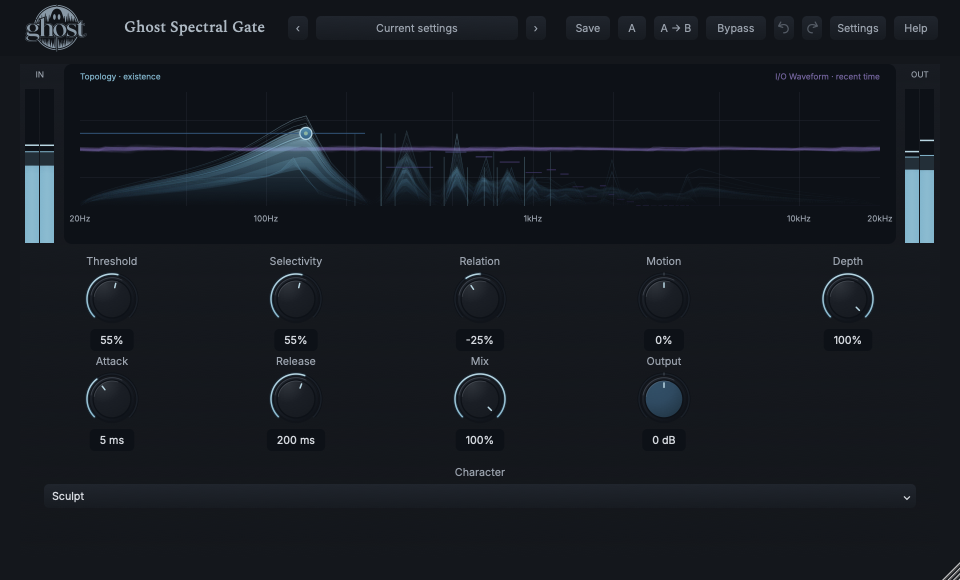
Frequency runs horizontally. Solidity, height and intensity describe existence—not a dB spectrum with a threshold line. Purple I/O waveform context shares the canvas with its separate recent-time/amplitude meaning.
Choose a marker, or use the complete keyboard-accessible control reference above.
Dominant/exposed structures are clear; suppressed material recedes into residue or negative space. Only strong relationships/fronts are shown. The selected handle is an interaction overlay, not an audio peak.
Drag upward into a structure to Push, downward to Suppress and horizontally to Sweep. Shift-drag between structures Connects temporarily; Option-drag Carves. These pressures decay and never create a permanent paint graph.
Left/right selects, Up/Down pushes/suppresses, Shift-Right connects, Enter sweeps and Option-Enter carves. Context actions provide equivalents; Escape cancels and one gesture is one undo transaction.
HEAR THE IDEA
Actual Sculpt Spectral Gate with Threshold 55%, Selectivity 55%, Relation -25%, Attack 5 ms and Release 200 ms, fully processed. Rejected material is not replayed or replaced by generated audio.
Source
Source WAVProcessed · actual Ghost DSP
Processed WAV{"threshold": 55, "selectivity": 55, "relation": -25, "attack": 5, "release": 200, "depth": 100, "mix": 100}. Actual native processor, stereo48k/127/double; source latency-aligned. Whole-file wet RMS gain 1.216227; common trim 1.0. Identical final20ms file fade; no listening approval inferred.
Reproduction recordUse a voice or instrument with wanted signal and residual material.
Threshold 25% · Selectivity 25% · Relation 15% · Attack 5 ms · Release 180 ms · Depth 55%
Listen for: A restrained reduction of less-supported material, not guaranteed semantic noise separation.
Use a textured sustained chord.
Threshold 60% · Selectivity 65% · Relation -40% · Motion 30% · Release 350 ms
Listen for: Moving negative space descended from the source, not a sequenced moving filter.
GO DEEPER
An optional external sidechain influences survival through existing Relation polarity: compatible structures can encourage or suppress presence. It is never mixed into output. Without it, the gate analyzes Main; no dedicated sidechain threshold/EQ or Source selector is needed.
Short-lived identity and relationship traces let current evidence re-emerge smoothly. Long Release does not freeze vanished sound. Full projects retain the running world; portable presets retain settings rather than temporary gesture pressure or live spectral history.
Nine continuous controls support internal modulation and MIDI CC learn. Character is discrete host automation only. There is no module randomizer, note triggering, Rate/Sync or per-band editor.
Mono remains mono and stereo preserves source relationships. Tempo/source recurrence provides only soft settling context, not quantization or a generated clock.
Spectral latency is reported and dry/Rack paths align. Normal bypass drains reconstruction; hard bypass/Panic clears running energy safely without resetting settings. Closed/reduced-motion views do not change audio.
The preset browser offers All, Factory, User and Favorites, category/search filters and relevant Character filtering. A row's heart changes your personal favorites without loading or saving the sound. Save As creates a distinct User sound; explicit Save updates only the selected User sound. Factory content is protected. Name, category and tags support organization; deleting a User category keeps its presets as Uncategorized. Manage supports rename, duplicate, confirmed delete and individual/bulk/category import/export. Personal favorites stay on this installation rather than travelling in exported sounds.
Standalone and the matching Ghost Rack module share the same User sounds, categories and favorites. A module preset changes portable sound settings, not Rack placement, Rack wet/dry, bypass or modulation assignments. DAW recall embeds the sound settings and does not depend on a preset file remaining on disk. Rack chain presets are a different library and affect the whole chain.
Drag a knob normally, hold Shift for fine adjustment or Option for extra-fine. Double-click restores its default. Enter/context menus provide exact values, reset and value copy/paste; eligible controls also offer MIDI Learn and modulation. Tab and arrow keys provide keyboard access. A/B compares configurations; the adjacent copy button copies the active configuration to the other. Undo/Redo groups a continuous gesture into one edit. Settings provides UI scale, Reduced Motion, source configuration, portable settings and Panic. UI size/motion preferences do not change the sound.
WHEN SOMETHING ISN’T CLEAR
It is evidence pressure for spectral structures, not a broadband amplitude threshold.
A lower Depth retains denied material, and a dry Mix contribution remains audible. Check both before raising Threshold further.
It extracts recurring relationships already in the source. No sequencer, clock or division control is provided.
No. Return requires real current/recent evidence; hidden identity metadata is not an audio recording.