Body
Coherent source-derived modes, natural excitation and controlled damping.
 PRODUCT GUIDESLegal notices
DISCOVER / EXCITE / RESONATE
Let a sound reveal the instrument inside it.
Discover resonant structures in incoming audio and energize them as source-derived bodies. Start with supportive ringing, then explore sympathetic networks, changing material and traveling resonant energy.
No sidechain is required. Main builds and plays the instrument. An optional sidechain can play that discovered structure differently.
START HERE / ABOUT 90 SECONDS
Play a chord or percussion phrase on Main. Insert Resonator and choose Init; use gaps to hear remaining energy.
Excite 0% · Material 0% · Shape 0% · Coupling 20% · Motion 0% · Decay 50% · Character Body · Mix 35% · Output 0 dB
0 of 4 steps checked — reading progress only.
Your source defines an audible resonant contribution. It can be restrained on some inputs; an energized body and useful wet level are more informative than an unrelated fixed-pitch test.
Use short percussive input for impact behavior or held harmonic input for sustained playing. Sidechain is a later routing option, not a prerequisite.
LEARNING ILLUSTRATION — NOT CONNECTED TO YOUR PLUGIN
Qualitative explanation after source-derived bodies are energized. It does not synthesize or simulate resonance.
At low Coupling, bodies respond more independently to compatible excitation.Moderate Coupling allows sympathy and short energy-transfer chains.High Coupling can produce collective/bonded behavior where relationships support it. Every transfer loses energy; it is not infinite feedback.A qualitative explanation, not a calculated response or audio preview. Use the plugin to hear the result.
PARAMETER REFERENCE
Excite chooses playing emphasis, Material its loss/rigidity, Shape its geometry and Coupling its relationships. Motion moves existing energy; Decay gives it time to unfold.
How the existing instrument is played: negative favors impacts/transients, zero natural source significance, positive sustained compatible structures. It is not an output gain.
Try this: Compare -40% on percussion with +40% on a held note.
Negative gives softer, broader, more lossy bodies; positive tighter, more rigid/reflective modes. It changes existing physics without restarting ringing energy.
Try this: Compare±40% with Decay high enough to hear the consequence.
Negative converges modes toward strong centers; positive expands source-derived modal relationships. It changes internal geometry, not a global pitch interval or room-size control.
Try this: Compare±30% after a body is ringing.
Energy exchange among compatible resonant bodies: independent, sympathetic, networked and more collective behavior. Transfers remain lossy; high values do not guarantee every body bonds.
Try this: Compare 20% and 70% with moderate/high Decay.
Negative directs energy inward, zero leaves directional trajectories stationary, positive unfolds outward through compatible relationships. Coupling still operates at zero; it is not a panning LFO.
Try this: Try±30% after an active network forms.
Persistence macro for resonant energy and its opportunity to interact. Material/body structure determines the detailed contour. Maximum eventually loses energy; increasing it cannot recover energy already gone.
Try this: Use 85% to learn the tail, then shorten for a musical fit.
Six resonant physical laws act on current bodies, not a bank of unrelated reverb/saturation effects. Source and playing determine which behaviors are excited.
Try this: Compare Body, String and Glass at a useful wet level.
Blend of dry source and its correlated resonant enhancement. The conservative default can be subtle; 100% helps isolate the contribution for learning.
Try this: Compare 35% and 100% before deciding whether a setting is doing anything.
Final gain trim. It does not strengthen the excitation or discover a body in silence.
Try this: Match levels after choosing Mix and the resonant network.
CHARACTER REFERENCE
Coherent source-derived modes, natural excitation and controlled damping.
Tension and traveling vibration, with gentle compatible interval relationships rather than scale snapping.
Narrow brittle modes, stress-sensitive splitting and energy redistribution.
Source modes interpreted as an implied cavity, not an appended conventional reverb.
Excited bodies deform their spacing/loss/relationships and relax as energy falls.
Latent and dying structures leave short traces through which remaining energy can migrate; no recorded audio or indefinite hold.
KNOW YOUR INSTRUMENT
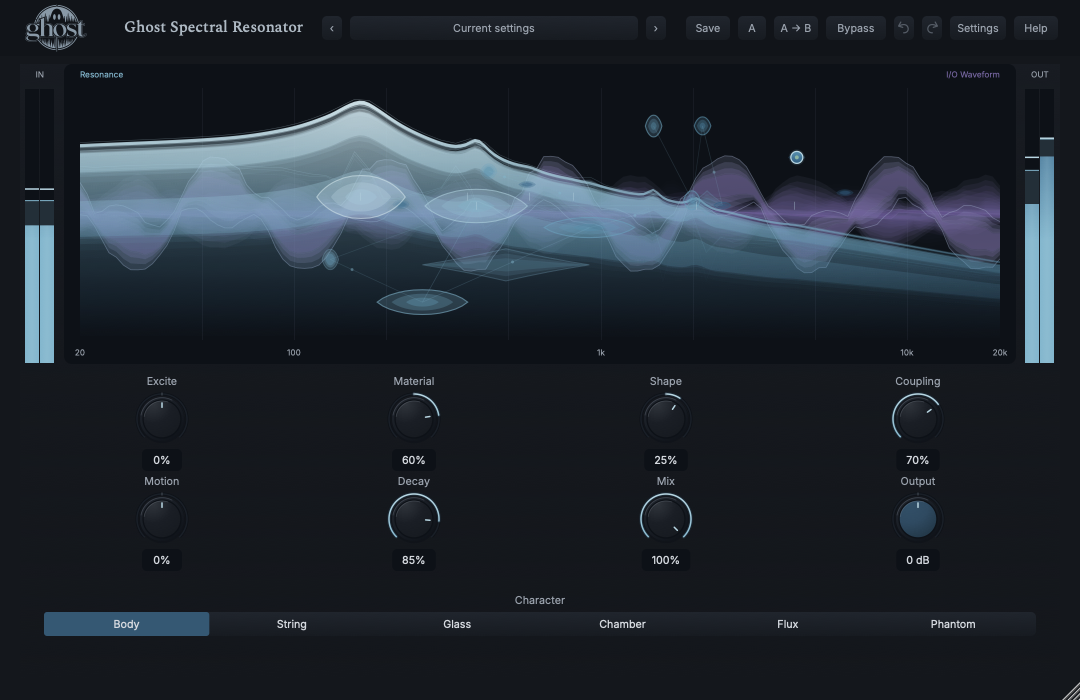
Horizontal body position follows spectral frequency; vertical placement follows source stereo ancestry. Blue forms show actual modal extent, stability and stored energy over violet I/O waveform context in one display.
Choose a marker, or use the complete keyboard-accessible control reference above.
Solidity represents stability, brightness energy and width modal extent. Only strong actual bonds/fronts are shown. Faint traces expire and do not store recorded sound; waveform coordinates remain recent time/amplitude.
Tap an existing body to Strike; drag/release to Pluck or flick to Throw. Shift-hold Damps, Option-drag toward another body Couples and Command-drag Separates a bond. Shift-Option vertical drag squeezes/expands local geometry.
Left/right selects; Space Strikes, P Plucks, D Damps, C Couples, X Separates, Up/Down Throws and+/− changes local shape. Context actions provide equivalents. Empty/expired targets cannot create an instrument; Escape cancels and closure releases held damping.
HEAR THE IDEA
Actual Body Resonator with Material 60%, Shape 25%, Coupling 70%, Decay 85% and Mix 100%. Main alone supplies architecture/excitation and stops at 3.1 seconds. The finite example exposes remaining ringing energy; it does not claim infinite sustain.
Source
Source WAVProcessed · actual Ghost DSP
Processed WAV{"material": 60, "shape": 25, "coupling": 70, "decay": 85, "mix": 100}. Actual native processor, stereo48k/127/double; source latency-aligned. Whole-file wet RMS gain 0.192047; common trim 1.0. Identical final20ms file fade; no listening approval inferred.
Reproduction recordUse drums, mallets or plucked instrument with gaps.
Excite -40% · Material 45% · Coupling 45% · Decay 70% · Mix 60%
Listen for: Source-related resonance, not a fixed-note resonator keyboard or guaranteed drum retuning.
Put sustained keys/pad on Main and route percussion to the optional sidechain.
Excite -50% · Coupling 60% · Decay 80% · Mix 100%
Listen for: The external playing source energizes Main-derived architecture, not directly audible sidechain audio or a second arbitrary synthesizer.
GO DEEPER
Main defines the instrument and remains able to excite it when an enabled but unrouted/silent auxiliary bus supplies no audio. Actual external excitation progressively takes priority when present. Silence itself adds no energy; sidechain alone does not discover an arbitrary instrument.
Full same-rate/layout projects, A/B and Undo retain bodies, bonds, phases and traveling energy. Portable presets retain settings only and need your own source to build the instrument. Changing rate/layout preserves controls while safely rebuilding incompatible physical history.
Eight continuous controls support internal modulation and MIDI CC learn. Character is discrete host automation only. No note keyboard, Key/Scale, resonator-frequency editor or per-mode controls are provided.
Main and optional sidechain support their declared mono/stereo layouts. Performed rhythm/host tempo are soft landmarks, not a Sync/Rate sequencer. Resonance always ultimately loses energy without new excitation.
Reported spectral latency and dry/Rack alignment remain in effect. Normal bypass stops new excitation while the instrument drains; hard bypass/Panic clears energy safely without resetting sound settings. Closing the editor changes observation, not the instrument.
The preset browser offers All, Factory, User and Favorites, category/search filters and relevant Character filtering. A row's heart changes your personal favorites without loading or saving the sound. Save As creates a distinct User sound; explicit Save updates only the selected User sound. Factory content is protected. Name, category and tags support organization; deleting a User category keeps its presets as Uncategorized. Manage supports rename, duplicate, confirmed delete and individual/bulk/category import/export. Personal favorites stay on this installation rather than travelling in exported sounds.
Standalone and the matching Ghost Rack module share the same User sounds, categories and favorites. A module preset changes portable sound settings, not Rack placement, Rack wet/dry, bypass or modulation assignments. DAW recall embeds the sound settings and does not depend on a preset file remaining on disk. Rack chain presets are a different library and affect the whole chain.
Drag a knob normally, hold Shift for fine adjustment or Option for extra-fine. Double-click restores its default. Enter/context menus provide exact values, reset and value copy/paste; eligible controls also offer MIDI Learn and modulation. Tab and arrow keys provide keyboard access. A/B compares configurations; the adjacent copy button copies the active configuration to the other. Undo/Redo groups a continuous gesture into one edit. Settings provides UI scale, Reduced Motion, source configuration, portable settings and Panic. UI size/motion preferences do not change the sound.
WHEN SOMETHING ISN’T CLEAR
No. Main alone builds and plays the instrument. Sidechain is an optional alternate excitation source.
Start with a real source, Mix 100%, Material +60%, Decay 85% and Coupling 70%, then compare the tail in gaps. Return to a lower blend afterward.
Output is only final gain. Check Main activity, Mix, a useful Decay and source-compatible Excite. An empty instrument cannot ring merely because a knob is high.
Gestures play existing discovered bodies; they do not create arbitrary fixed resonators or new energy without a valid target.
No. Resonator is ultimately lossy. Spectral Freeze owns indefinite suspension.