Natural
Preserves original position and coherence most strongly.
 PRODUCT GUIDESLegal notices
POSITION / SEPARATION / COHERENCE
Reshape the space already inside a stereo recording.
Expand or converge existing spatial relationships, stabilize the foundation and clarify localization without hiding chorus, Haas delay or reverb inside a widener.
A truly mono source stays mono. Width cannot invent stereo information that was never there.
START HERE / ABOUT 90 SECONDS
Use a genuinely stereo pad, room recording or mix. Insert Stereo and choose Init.
Width 100% · Foundation 0% · Definition 50% · Gravity 0% · Response 50% · Character Natural · Mix 100% · Output 0 dB · Balance 0% · Mono-Bass Frequency 120 Hz · Mono-Bass Off
0 of 4 steps checked — reading progress only.
Existing spatial structures separate while their degree of focus remains independently adjustable. Results depend on the coherence and width already in the source.
Use Stable Response for a bus. Keep Gravity centered until you deliberately want asymmetrical perceptual pull.
LEARNING ILLUSTRATION — NOT CONNECTED TO YOUR PLUGIN
Qualitative spatial explanation at a fixed Width. This diagram neither measures nor controls your plugin.
Lower Definition lets boundaries soften into a more continuous field without simply narrowing it.The middle preserves the source's natural degree of spatial distinction.Higher Definition emphasizes localization boundaries, not necessarily greater distance between structures.A qualitative explanation, not a calculated response or audio preview. Use the plugin to hear the result.
PARAMETER REFERENCE
Width is separation; Definition is distinction. Foundation anchors lows, Gravity changes perceptual pull, and Response sets the field's memory.
Changes separation among meaningful spatial structures.100% preserves source relationships; 0% asks for coherent convergence and 200% for maximum viable expansion. It is not a literal Side-gain multiplier.
Try this: Compare 100% and 140% before touching Definition.
Adaptively anchors lower-frequency structures toward a stable center while leaving useful higher spatial relationships. This is not just a fixed mono-bass crossover.
Try this: Try 30% when widening a stereo bass-rich loop.
Changes how distinctly spatial structures feel separated, independently of their distance. High values clarify localization; lower values let boundaries soften into a continuous field.
Try this: At fixed Width 140%, compare 30% with 70%.
Pulls the field's perceptual center of mass left or right without rigidly panning every structure. Zero preserves natural asymmetry rather than auto-centering it.
Try this: Try±20% and compare the literal Balance control separately.
Stable gives spatial relationships inertia; Reactive follows attacks and changing instrumentation faster. The source drives the changes, not a hidden motion generator.
Try this: Try 25% on a mix and 75% on changing stereo percussion.
Selects a spatial organization law rather than an added modulation effect. Changes preserve the existing field's state.
Try this: Compare Natural, Solid and Open with identical moderate Width.
Blends aligned dry and processed paths. Zero is dry before Balance/Output; lower values temper a strong spatial reorganization.
Try this: Learn the field at 100%, then reduce if the new image is too emphatic.
Final level trim. It does not increase Width or alter the field's analysis.
Try this: Compare at similar perceived level after choosing the spatial settings.
Literal L/R level balance: attenuates the opposite side, with unity at center and no endpoint boost. It is different from perceptual Gravity.
Try this: Use only when an actual channel-level correction is needed.
Frequency for the conventional low-frequency mono override, active only when its enable switch is On. The retained default is 120 Hz.
Try this: Enable the override, then compare 80 Hz and 150 Hz on stereo lows.
Off leaves adaptive Foundation in charge. On explicitly makes the low region mono below the chosen frequency, independently of Foundation amount.
Try this: Keep Off for the first adaptive pass; use On when a fixed LF boundary is required.
CHARACTER REFERENCE
Preserves original position and coherence most strongly.
Prioritizes stable anchors and center integrity.
Favors negative space and separation without merely maximizing Width.
Strengthens localization boundaries in complex material.
Lets relationships yield and redistribute as the source changes.
Allows deeper reorganization while respecting the source's viable stereo relationships.
KNOW YOUR INSTRUMENT
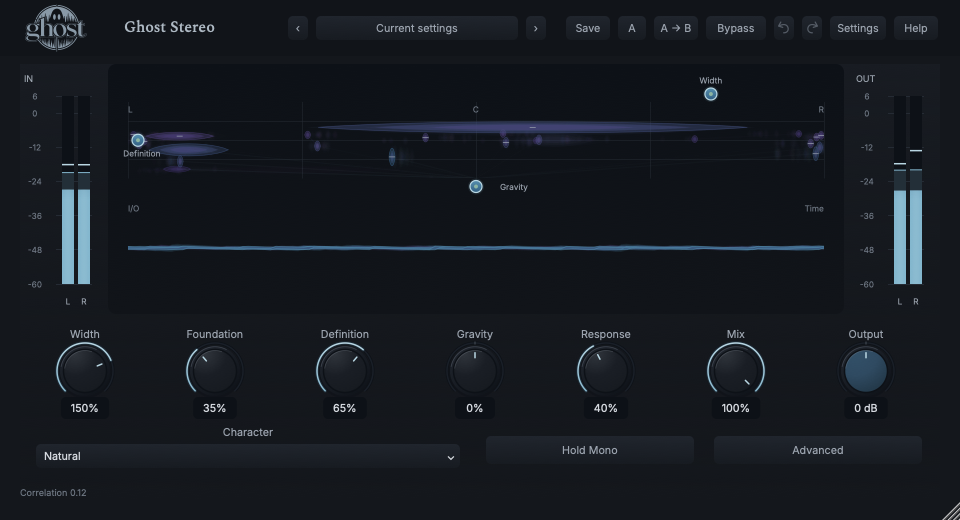
The Spatial Field represents location horizontally, frequency vertically, and the extent, coherence and prominence of real source structures. It is not just a conventional vectorscope.
Choose a marker, or use the complete keyboard-accessible control reference above.
The processed field is measured before Mix, Balance, Output and temporary mono monitoring. The I/O waveform context reflects delivered audio, so those views answer different questions.
Width, Gravity and Definition handles reshape the real controls. Lateral gestures influence spatial pull/separation; Option extent gestures affect Definition. Keyboard/exact entry/reset are available and Escape cancels.
Correlation is read-only, not an automatic instruction to narrow the image. Mono Audition is a momentary monitoring action, released on closure, not a saved latch or automation parameter.
HEAR THE IDEA
Actual Natural Stereo with Width 150%, Foundation 35%, Definition 65% and Response 40%. The original chord has different L/R content. Listen on stereo speakers or headphones; mono playback cannot demonstrate the full spatial change.
Source
Source WAVProcessed · actual Ghost DSP
Processed WAV{"width": 150, "foundation": 35, "definition": 65, "response": 40}. Actual native processor, stereo48k/127/double; source latency-aligned. Whole-file wet RMS gain 1.04417; common trim 1.0. Identical final20ms file fade; no listening approval inferred.
Reproduction recordUse a stereo pad containing low notes and upper ambience.
Width 145% · Foundation 40% · Response 25%
Listen for: A larger existing image with a more cohesive base, not new stereo from mono.
Use a stereo drum or percussion loop.
Character Precise · Definition 70% · Width 120% · Response 65%
Listen for: More distinct localization of existing structures rather than a hidden chorus or transient panner.
GO DEEPER
Foundation adapts its low-frequency anchoring to the source. The explicit Mono-Bass override supplies a conventional frequency boundary when that is the task. They are not two names for the same control.
Low or negative correlation is not automatically a bad recording. Mono Audition lets you hear the actual consequence. Width 0 requests coherent convergence; use Mono Audition or Utility's exact matrix for an explicit mathematical mono check.
All nine continuous controls support internal modulation and MIDI CC learn. Character and Mono-Bass Enable are discrete host automation only. Correlation and Mono Audition are not modulation destinations.
There is no dedicated external audio sidechain, note trigger or tempo-sync section. Truly mono input remains mono. Use Ghost Utility for exact static M/S and channel mathematics.
Reported processing latency and dry compensation are preserved. Sessions/A/B restore spatial history; portable sounds begin with fresh analysis of the new source. Closing the field does not alter audio.
The preset browser offers All, Factory, User and Favorites, category/search filters and relevant Character filtering. A row's heart changes your personal favorites without loading or saving the sound. Save As creates a distinct User sound; explicit Save updates only the selected User sound. Factory content is protected. Name, category and tags support organization; deleting a User category keeps its presets as Uncategorized. Manage supports rename, duplicate, confirmed delete and individual/bulk/category import/export. Personal favorites stay on this installation rather than travelling in exported sounds.
Standalone and the matching Ghost Rack module share the same User sounds, categories and favorites. A module preset changes portable sound settings, not Rack placement, Rack wet/dry, bypass or modulation assignments. DAW recall embeds the sound settings and does not depend on a preset file remaining on disk. Rack chain presets are a different library and affect the whole chain.
Drag a knob normally, hold Shift for fine adjustment or Option for extra-fine. Double-click restores its default. Enter/context menus provide exact values, reset and value copy/paste; eligible controls also offer MIDI Learn and modulation. Tab and arrow keys provide keyboard access. A/B compares configurations; the adjacent copy button copies the active configuration to the other. Undo/Redo groups a continuous gesture into one edit. Settings provides UI scale, Reduced Motion, source configuration, portable settings and Panic. UI size/motion preferences do not change the sound.
WHEN SOMETHING ISN’T CLEAR
Stereo intentionally does not invent Side information. Supply genuine stereo content or use a separate, explicit stereo-generating effect first.
It changes perceptual spatial pull. Use the secondary Balance control for literal channel-level balancing.
Its spatial analysis precedes final delivery controls. The meters/waveform show the delivered result.
No. Width is a relational macro. Ghost Utility provides the exact static M/S width transform.