Natural
Transparent reference behavior, preserving source identity most strongly.
 PRODUCT GUIDESLegal notices
FOUNDATION / ORIENTATION / OPENNESS
Move the weight of a sound, not just its EQ curve.
Reshape a source's perceived mass, spectral orientation and upper detail using one adaptive tonal model. Start with small moves for everyday balance, then explore deeper source-related reorganization.
Natural Init is neutral. Analysis alone does not change the sound; move Weight, Tilt or Air to begin.
START HERE / ABOUT 90 SECONDS
Insert Tone on a full-range instrument, drum loop or mix and choose Init.
Weight 0% · Tilt 0% · Air 0% · Response 50% · Character Natural · Mix 100% · Output 0 dB · Pivot Override Off · Pivot 1000 Hz · Stereo Link 100% · Compensation On
0 of 4 steps checked — reading progress only.
The source's tonal priorities change while its musical identity remains recognizable. Sparse input cannot reveal upper or lower structures that are not present.
Use smaller macro moves on a finished mix. Choose a different Character only after hearing the Natural relationship clearly.
LEARNING ILLUSTRATION — NOT CONNECTED TO YOUR PLUGIN
A qualitative explanation, not a calculated spectrum or a connection to your plugin.
Stable favors a consistent tonal balance across short changes in the performance.The middle balances persistent identity with changing articulation.Reactive follows source changes more closely; it is not an independent LFO or automatic animation.A qualitative explanation, not a calculated response or audio preview. Use the plugin to hear the result.
PARAMETER REFERENCE
Weight anchors, Tilt redistributes prominence, and Air opens fine structure. Response determines how quickly that shared tonal picture follows your source.
Changes perceived mass and anchoring using the source's foundation and related harmonic cues. Positive is not unlimited bass gain; negative releases anchoring rather than merely cutting lows.
Try this: Compare +20% and -20% with Tilt/Air neutral.
Reorients spectral prominence around an adaptive Center of Gravity. Positive leans upward and negative downward, using source relationships rather than a fixed pair of shelves.
Try this: Try±20% on a full-range phrase and hear which structures become more prominent.
Opens or closes meaningful upper detail and the space around it. Positive reveals source-related fine structure; negative closes that structure without acting as a simple low-pass filter.
Try this: Try +20% on articulated keys, then return to zero before comparing negative values.
Stable gives tonal identity longer memory; Reactive follows changing notes and articulation more closely. It does not create movement in an otherwise unchanging source.
Try this: Use 25% on a bus and 75% on a changing solo phrase.
Selects the rules of spectral organization. Natural is the reference; the other modes prioritize different relationships rather than adding a separate saturation stage.
Try this: Compare Solid and Open at identical moderate macro settings.
Blends latency-aligned dry and processed signals. Reduce it for a gentler parallel version; zero is dry before Output.
Try this: Learn the tonal changes at 100%, then try 70%.
Final gain after the blend. It is separate from Compensation and does not change spectral analysis or macro strength.
Try this: Match a bypass comparison after choosing the tonal settings.
Enables the secondary fixed Pivot override. Off uses the adaptive Center of Gravity; enabling it does not create an EQ band.
Try this: Leave Off for the first pass, then enable only when a fixed fulcrum is useful.
Retained logarithmic tonal fulcrum used only when Pivot Override is enabled. Its stored value remains available while the override is Off.
Try this: With Tilt active, enable Pivot and compare 500 Hz with 2 kHz.
Sets strongly unified treatment at 100% versus greater independent spatial adaptation at 0%. Tone does not pan or synthesize Side information. Neutral/unavailable for mono.
Try this: Keep 100% on a mix before exploring lower values on stereo ambience.
Optional slow, bounded input/output measurement-based level matching, On by default. It is not loudness normalization, a compressor or a way to erase deliberate tonal balance. Silence never asks it for more gain.
Try this: Compare On and Off after a meaningful Weight or Air move.
CHARACTER REFERENCE
Transparent reference behavior, preserving source identity most strongly.
Prioritizes foundation and authoritative body relationships.
Favors separation, articulation and spectral breathing room.
Softens harsh competition while retaining fine detail.
Emphasizes contrast and definition among meaningful structures.
Permits deeper source-derived reorganization of spectral hierarchy.
KNOW YOUR INSTRUMENT
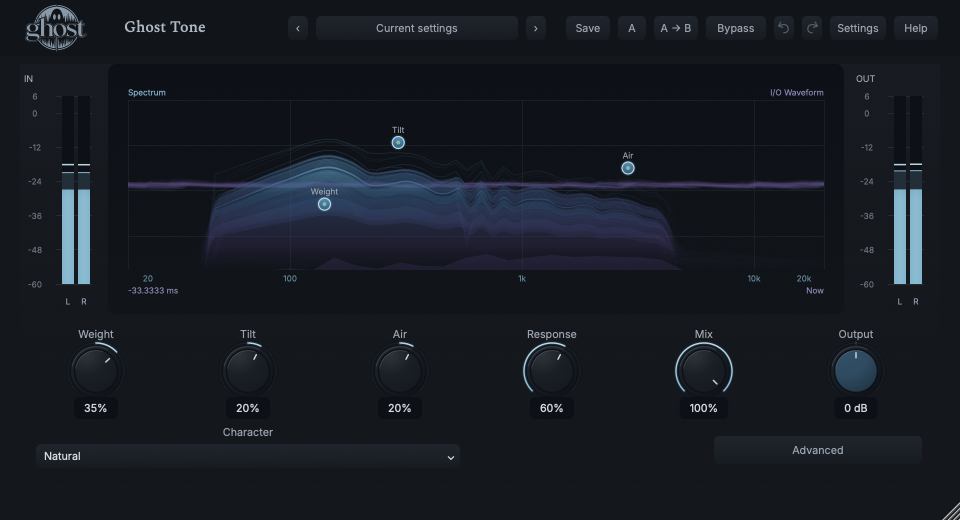
The spectrum is the primary foreground layer. A subdued I/O waveform provides time-domain context behind it in the same graph. Weight, Tilt and Air markers sit above both.
Choose a marker, or use the complete keyboard-accessible control reference above.
Frequency runs logarithmically across the spectrum. The background waveform describes time/amplitude, not frequency. Do not read its horizontal position as a spectral measurement.
Spectrum reflects the tonal process before Compensation, Mix and Output; the output waveform reflects the delivered result. A gain change need not move the spectral field in the same way.
Weight and Air handles drag vertically; Tilt drags horizontally. Fine modifiers, arrow keys, exact entry and reset follow shared controls; Escape cancels. Advanced holds Pivot Override, Stereo Link and Compensation.
HEAR THE IDEA
Actual Natural Tone with Weight 35%, Tilt 20%, Air 20% and Response 60%. Compensation is On; the files also use the disclosed offline whole-file level match. Compare spectral balance rather than overall loudness.
Source
Source WAVProcessed · actual Ghost DSP
Processed WAV{"weight": 35, "tilt": 20, "air": 20, "response": 60, "compensation": 1}. Actual native processor, stereo48k/127/double; source latency-aligned. Whole-file wet RMS gain 0.998701; common trim 1.0. Identical final20ms file fade; no listening approval inferred.
Reproduction recordUse a bright bass, piano or guitar phrase.
Weight 25% · Tilt -10% · Response 35%
Listen for: Greater perceived anchoring, not an unlimited sub-bass boost.
Use a sustained stereo pad or layered keys.
Character Open · Air 30% · Tilt 10% · Stereo Link 100%
Listen for: A different emphasis on existing upper structure and separation, not synthetic stereo widening.
GO DEEPER
Weight, Tilt and Air share the source's evolving tonal identity. A fixed Pivot changes the fulcrum of that relationship; it does not add a parametric frequency, Q or independent gain band.
DAW sessions and A/B retain the running tonal state. Portable presets retain sound settings rather than a recorded analysis history, so they develop their tonal picture from the new input.
Weight, Tilt, Air, Response, Pivot Frequency, Stereo Link, Mix and Output support internal modulation and MIDI CC learn. Character, Pivot Enable and Compensation use discrete host automation only.
No external audio sidechain, note trigger, Source selector or Free/Sync timing is provided. Shared modulation sources may still use suite transport facilities. Mono remains mono; Tone is not a stereo generator.
Processing reports its latency and aligns the dry blend. Closing the editor does not change the sound. Panic clears running analysis safely without choosing a new tonal preset.
The preset browser offers All, Factory, User and Favorites, category/search filters and relevant Character filtering. A row's heart changes your personal favorites without loading or saving the sound. Save As creates a distinct User sound; explicit Save updates only the selected User sound. Factory content is protected. Name, category and tags support organization; deleting a User category keeps its presets as Uncategorized. Manage supports rename, duplicate, confirmed delete and individual/bulk/category import/export. Personal favorites stay on this installation rather than travelling in exported sounds.
Standalone and the matching Ghost Rack module share the same User sounds, categories and favorites. A module preset changes portable sound settings, not Rack placement, Rack wet/dry, bypass or modulation assignments. DAW recall embeds the sound settings and does not depend on a preset file remaining on disk. Rack chain presets are a different library and affect the whole chain.
Drag a knob normally, hold Shift for fine adjustment or Option for extra-fine. Double-click restores its default. Enter/context menus provide exact values, reset and value copy/paste; eligible controls also offer MIDI Learn and modulation. Tab and arrow keys provide keyboard access. A/B compares configurations; the adjacent copy button copies the active configuration to the other. Undo/Redo groups a continuous gesture into one edit. Settings provides UI scale, Reduced Motion, source configuration, portable settings and Panic. UI size/motion preferences do not change the sound.
WHEN SOMETHING ISN’T CLEAR
That is intentional. Natural with Weight/Tilt/Air at zero is neutral; analysis alone must not reshape the source.
The source needs meaningful upper structure. Tone does not fill every sparse region with unrelated energy.
Enable Pivot Override and make a Tilt move. The retained frequency is inactive while the override is Off.
No. It is time-domain activity behind the foreground frequency-domain field, superimposed in one graph.