Clean
Transparent, precise gain contours and full bandwidth.
 PRODUCT GUIDESLegal notices
PULSE / SWELL / ALTERNATE
Shape rhythm by bending one volume cycle.
Add gentle tremolo, stereo alternation, sharp cuts or folded sub-events. It remains a deformable amplitude cycle rather than a step sequencer, with optional host sync and source-responsive depth.
Depth must be active to hear amplitude movement. Hard edges and fast rates deliberately create modulation sidebands.
START HERE / ABOUT 90 SECONDS
Use sustained keys, guitar or a pad. Insert Tremolo and choose Init.
Rate 4 Hz · Phase 0 deg · Depth 50% · Shape 0% · Symmetry 0% · Smooth 25% · Fold 0% · Gravity 0% · Dynamics 0% · Stereo 0% · Motion 0% · Character Clean · Mix 100% · Output 0 dB · Free/Sync Free · Sync Division 1/8
0 of 4 steps checked — reading progress only.
The source's level follows a repeating contour. Sync changes the cycle timing; Shape/Symmetry change how long and how sharply it is heard.
For gentle guitar tremolo, reduce Depth and Shape. For stereo alternation, raise positive Stereo on a stereo output. Lower Mix if clean sustain should remain under hard pulses.
LEARNING ILLUSTRATION — NOT CONNECTED TO YOUR PLUGIN
Qualitative guide with a sustained source and pulse-like Shape. No gain curve is calculated here and the plugin is not controlled.
At little Depth, the volume remains relatively steady even if Shape is pulse-like.Moderate Depth creates a clear rise/fall while retaining sound in the quieter parts.Strong Depth and suitable Shape/Fold can reach true silence on the wet path. Dry added by Mix can remain audible, so check the blend.A qualitative explanation, not a calculated response or audio preview. Use the plugin to hear the result.
PARAMETER REFERENCE
Rate sets the fundamental cycle. Shape, Symmetry and Smooth define its contour; Fold and Gravity reorganize events inside that cycle.
Fundamental cycle speed in Free mode. Low values make slow swells; high values create fast amplitude modulation. Shape/Fold can add events without changing this fundamental rate.
Try this: Start at 4 Hz, then slow to 2 Hz while holding a note.
Positions the cycle relative to its start/grid. In Sync it offsets the host-grid relationship. Zero and 360 degrees are equivalent endpoints, not different speeds.
Try this: Try 90 degrees in Sync to move where the loud portion falls.
Intensity of level movement. Zero is steady amplitude; high values with pulse-like shapes can reach true silence. Dynamics can alter its effective strength from the source.
Try this: Compare 30% with 85% on a held chord.
Continuous sine-like through triangle-like to pulse-like contour. It is not a waveform menu. Symmetry changes duration and Smooth rounds its corners.
Try this: Move toward 65% for a clearly rhythmic cut, then soften it with Smooth.
Negative shortens the loud phase and lengthens the quiet one; positive does the reverse. At pulse-like Shape it is a useful continuous pulse-width relationship.
Try this: Compare±30% with Shape 70% and high Depth.
Rounds corners and pulse transitions. Low preserves hard edges; high makes more flowing movement. It does not change the fundamental Rate.
Try this: Try 10% for cuts and 50% for gentler swells.
Adds amplitude events inside the same cycle by folding its contour. It is continuous, not a discrete rate multiplier or step editor. Shape, Symmetry and Smooth still apply.
Try this: Try 25% after hearing one simple pulse clearly.
Warps event distribution inside a cycle without changing its overall Rate/division. Positive gathers events toward the center; negative pushes toward boundaries. It becomes especially useful with Fold.
Try this: At Fold 30%, compare±25%.
Main-input envelope/transients change effective modulation depth. Positive strengthens movement on loud input; negative preserves attacks and lets the decay bloom. It is not a conventional compressor or external-sidechain detector.
Try this: Try -30% on plucked material to hear a steadier attack and moving tail.
Zero moves L/R amplitude together. Positive encourages opposition/autopan; negative creates chasing motion. Mono retains the value but disables the spatial effect.
Try this: Use +50% on stereo pads, then zero to compare ordinary tremolo.
Introduces slow bounded evolution in cycle relationships such as Fold/Gravity/Symmetry/stereo timing. It never changes the fundamental Rate or selected division.
Try this: Try 15% only after the basic rhythm is established.
Chooses Clean, Analog, Pulse or Elastic amplitude behavior. They change the gain mechanism and its response, not an independent effect chain. Changes preserve current control motion.
Try this: Compare Clean and Pulse on the same Shape, then Elastic with moderate Fold.
Blends original and amplitude-shaped paths. Zero is dry before Output; 100% is fully shaped. Intermediate equal-power blends may raise correlated level and prevent a wet true-zero region from silencing the dry layer.
Try this: Use 100% to learn hard gating, then lower Mix if original sustain should remain.
Final level after blending, with no automatic compensation. It does not change the modulation Depth or detector sensitivity.
Try this: Trim after changing Mix or using Elastic overshoot.
Free runs independently while processing; Sync follows host BPM/PPQ and holds the grid position when stopped. UI switching finds a nearby equivalent; automation/recall preserve their explicitly saved timing values. Fallback tempo is 120 BPM.
Try this: Choose Sync when arranging to a DAW grid; use Free for an independent tremolo speed.
Musical duration used in Sync, from long bars to short notes with dotted/triplet choices. The retained starting division is 1/8. Fold can add pulses within it without changing the selected division.
Try this: Try 1/8 in Sync before adding Fold.
CHARACTER REFERENCE
Transparent, precise gain contours and full bandwidth.
Softer nonlinear amplitude response with inertia, not a named hardware model.
Sharper rhythmic movement and true-zero gating while respecting Smooth.
Momentum, controlled overshoot and rebound; especially expressive with Fold and Gravity.
KNOW YOUR INSTRUMENT
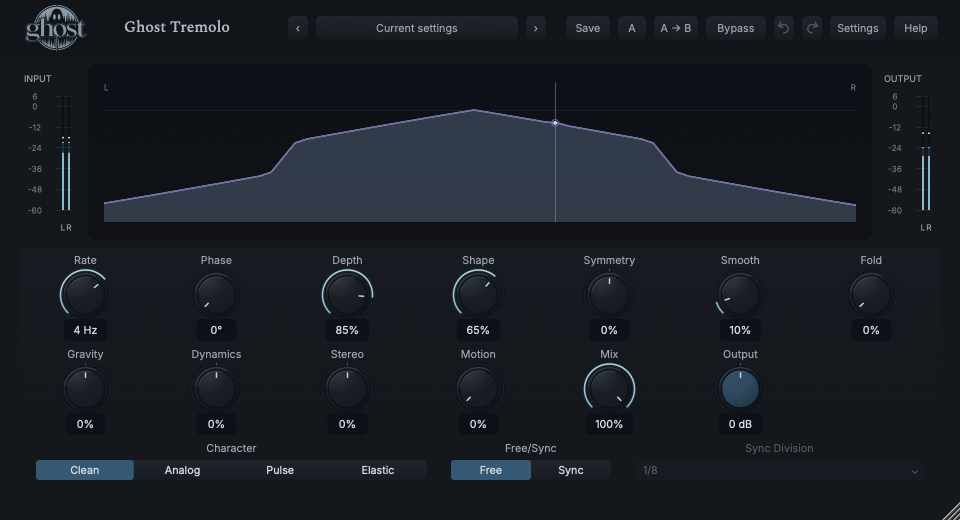
The Pulse Field shows amplitude gain across the cycle, not an audio waveform or FFT spectrum. It explains the rhythm being applied to your source.
Choose a marker, or use the complete keyboard-accessible control reference above.
Only traversed portions of the measured cycle are drawn; very slow rates take longer to reveal it. The baseline is true zero gain, and overshoot may sit above unity. L/R markers identify actual phase-dependent gains.
Drag Fold horizontally and Depth vertically. Shift edits Gravity/Symmetry instead. Option is fine adjustment; arrows offer the same pairs, Home/double-click resets Fold/Depth and Escape cancels.
Sync adds a restrained beat grid. Reduced Motion removes history, not the sound; closing the view never changes the cycle. Side meters show actual input/output peak and RMS.
HEAR THE IDEA
Actual Clean Tremolo at 4 Hz, Depth 85%, Shape 65% and Smooth 10%, fully processed. Explicit level matching makes the rhythmic contour comparable without hiding its quiet portions.
Source
Source WAVProcessed · actual Ghost DSP
Processed WAV{"mode": 0, "rate": 4, "depth": 85, "shape": 65, "smooth": 10, "mix": 100}. Actual native processor, stereo48k/127/double; source latency-aligned. Whole-file wet RMS gain 1.25845; common trim 1.0. Identical final20ms file fade; no listening approval inferred.
Reproduction recordUse sustained chords and a running DAW transport.
Free/Sync Sync · Sync Division 1/8 · Depth 90% · Shape 80% · Symmetry -25% · Smooth 15%
Listen for: Rhythmic amplitude cuts tied to host timing, not MIDI-triggered notes.
Use a stereo-capable plucked pad or guitar phrase.
Dynamics -30% · Stereo 50% · Depth 65% · Motion 15%
Listen for: More stable attacks with a spatially moving decay, rather than a separate autopan processor.
GO DEEPER
Fold and Gravity redistribute events within a cycle. Motion evolves their relationships. None is a disguised change to the fundamental Rate; in Sync major boundaries remain transport anchored.
The Pulse Field shows actual modulation gains, so it can move even with no audible source. That is not fabricated waveform energy. Input/output meters establish whether audio is present.
Thirteen continuous controls support internal modulation and MIDI CC learn. Character, Free/Sync and Sync Division are discrete host automation, not internal targets. Shared source settings/mappings are saved; MIDI notes do not make this effect an instrument.
Dynamics listens to linked main input; there is no dedicated external sidechain. Stereo requires a stereo output. Free timing does not reset on ordinary host seeks; Sync uses deterministic host position and tempo.
No processing latency or audio tail is added. Full same-rate recall retains the live cycle/detector/transitions; portable sounds omit that performance history. Bypass uses safe fades and Panic clears running state without resetting ordinary settings.
The preset browser offers All, Factory, User and Favorites, category/search filters and relevant Character filtering. A row's heart changes your personal favorites without loading or saving the sound. Save As creates a distinct User sound; explicit Save updates only the selected User sound. Factory content is protected. Name, category and tags support organization; deleting a User category keeps its presets as Uncategorized. Manage supports rename, duplicate, confirmed delete and individual/bulk/category import/export. Personal favorites stay on this installation rather than travelling in exported sounds.
Standalone and the matching Ghost Rack module share the same User sounds, categories and favorites. A module preset changes portable sound settings, not Rack placement, Rack wet/dry, bypass or modulation assignments. DAW recall embeds the sound settings and does not depend on a preset file remaining on disk. Rack chain presets are a different library and affect the whole chain.
Drag a knob normally, hold Shift for fine adjustment or Option for extra-fine. Double-click restores its default. Enter/context menus provide exact values, reset and value copy/paste; eligible controls also offer MIDI Learn and modulation. Tab and arrow keys provide keyboard access. A/B compares configurations; the adjacent copy button copies the active configuration to the other. Undo/Redo groups a continuous gesture into one edit. Settings provides UI scale, Reduced Motion, source configuration, portable settings and Panic. UI size/motion preferences do not change the sound.
WHEN SOMETHING ISN’T CLEAR
Check Depth above zero and Mix high enough. A dry blend, negative Dynamics on strong attacks or heavy Smooth can make motion subtler.
It shows measured portions as they are traversed. Slow rates take time to fill the cycle; it is not a fictional pre-drawn waveform.
Use sufficient Depth/Shape and check Mix. A dry contribution can remain audible even when the wet gain reaches zero.
Choose Init for Clean/Free 4 Hz and the default contour. Home/double-clicking the field resets only Fold/Depth, not every parameter.