GhostPRODUCT GUIDESLegal notices

LEVEL / ROUTING / ALIGNMENT

Ghost Utility

See exactly what happens between input and output.

Manage gain, channel routing, polarity, phase, timing and stereo mathematics with explicit controls and contextual measurements. Utility is transparent signal management, not a creative Character processor.

Init is transparent. Meters do not normalize, limit or improve audio automatically. Make only the correction you intend.

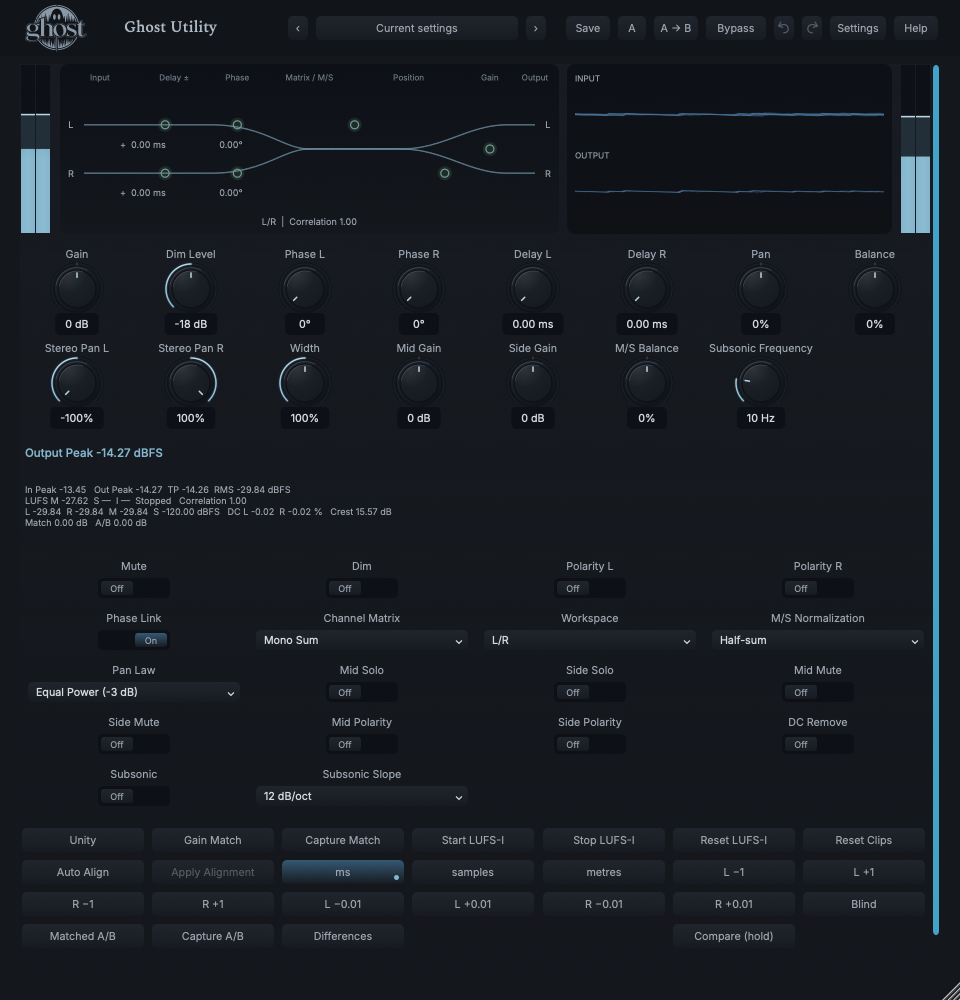
Actual Utility editor showing channel routing geometry, input/output waveform feedback and precision controls.
Actual plugin display · full annotated interface below

START HERE / ABOUT 90 SECONDS

Make a reliable mono check.

Insert Utility on a stereo track or bus and choose Init. Use speakers or headphones with genuine stereo playback.

START FROM INIT

Gain 0 dB · Dim Level -18 dB · Phase L 0 deg · Phase R 0 deg · Delay L 0 ms · Delay R 0 ms · Pan 0% · Balance 0% · Stereo Pan L -100% · Stereo Pan R 100% · Width 100% · Mid Gain 0 dB · Side Gain 0 dB · M/S Balance 0% · Subsonic Frequency 10 Hz · Mute Off · Dim Off · Polarity L Off · Polarity R Off · Phase Link On · Channel Matrix Stereo · Workspace L/R · M/S Normalization Half-sum · Pan Law Equal Power (-3 dB) · Mid Solo Off · Side Solo Off · Mid Mute Off · Side Mute Off · Mid Polarity Off · Side Polarity Off · DC Remove Off · Subsonic Off · Subsonic Slope 12 dB/oct

0 of 4 steps checked — reading progress only.

WHAT TO LISTEN FOR

You have heard a defined mathematical mono operation and its effect on this source, without adding coloration or a hidden safety processor.

Use Left/Right Audition to inspect channels individually. L→Both/R→Both are different operations: they copy one channel to both outputs.

LEARNING ILLUSTRATION — NOT CONNECTED TO YOUR PLUGIN

Here, width is an exact M/S transform.

Qualitative explanation of the static transform, not a vectorscope, audio calculation or plugin control.

A qualitative explanation, not a calculated response or audio preview. Use the plugin to hear the result.

PARAMETER REFERENCE

A small set of big gestures.

Choose the operation first: level, channels, timing, position, M/S or cleanup. Exact entry is available when a small engineering value matters.

Gain-36–36 dB · Default 0 dB

Wide-range signal trim. Zero is exact unity; use fine adjustment or typed values for small changes. This is Gain, not an invented separate Input/Output pair.

Try this: Enter -3 dB and compare the actual meter change, then use Unity.

Dim Level-30–-6 dB · Default -18 dB

Amount of attenuation while Dim is active. It remains stored while Dim is Off.

Try this: Start at the retained -18 dB and adjust for comfortable monitoring.

Phase L0–180 deg · Default 0 deg

Frequency-dependent all-pass rotation, displayed as phase shift at 1 kHz. Zero bypasses rotation; other frequencies do not receive the same degree shift.

Try this: Try a small move only after polarity and delay have been checked.

Phase R0–180 deg · Default 0 deg

Right all-pass rotation using the same 1 kHz reference. It changes phase relationships, not simple level.

Try this: Disable Phase Link when an independent right-channel correction is required.

Delay L0–100 ms · Default 0 ms

Causal left-channel delay. Milliseconds, samples and distance are views of this one saved time value. This is intentional alignment, not an acausal advance.

Try this: Use a one-sample nudge at the current sample rate, then compare correlation and mono.

Delay R0–100 ms · Default 0 ms

Causal right delay with fractional-sample precision. Distance uses 343 m/s; sample conversion follows the current rate.

Try this: Delay the earlier signal, not the already late one.

Pan-100–100% · Default 0%

Positions a mono source or applies a linked position offset to existing stereo channel positions. It does not silently sum stereo to mono.

Try this: Compare a small Pan move with Balance to hear positioning versus level.

Balance-100–100% · Default 0%

Attenuates the opposite L/R side with unity at center and no endpoint boost. It changes channel level, not each channel's pan position.

Try this: Use for a literal left/right level correction.

Stereo Pan L-100–100% · Default -100%

Positions the existing left-channel content independently. Default full left preserves its original position.

Try this: Move inward to narrow that channel's location without selecting a matrix mode.

Stereo Pan R-100–100% · Default 100%

Positions existing right-channel content independently. Default full right preserves its original position.

Try this: Compare an inward right position with a Width reduction.

Width0–200% · Default 100%

Exact static M/S width:0% is mono, 100% retains the original Side relationship, 200% doubles Side contribution. It is not Ghost Stereo's adaptive spatial macro.

Try this: Compare 0%, 100% and 150% and check the mono consequence.

Mid Gain-36–36 dB · Default 0 dB

Independent gain for the sum-derived Mid component in the M/S processing path. Zero is unity.

Try this: Lower a few dB to compare center versus sides.

Side Gain-36–36 dB · Default 0 dB

Independent gain for the difference-derived Side component. Mono input has no Side to amplify.

Try this: Try -3 dB before raising Width on already unstable material.

M/S Balance-100–100% · Default 0%

Attenuates the opposing Mid/Side component. Center is unity, without an endpoint boost.

Try this: Compare a small move with independent Mid/Side Gain.

Subsonic Frequency5–30 Hz · Default 10 Hz

Cutoff for the enabled subsonic maintenance filter. The retained frequency is inactive while Subsonic is Off.

Try this: Start at 10 Hz and inspect the low-energy/headroom consequence.

MuteOff / On · Default Off

Click-free monitoring silence. It does not reset the settings, measurements or stored sound.

Try this: Toggle to silence this path without changing Gain.

DimOff / On · Default Off

Applies the retained Dim Level as an explicit monitoring attenuation. It is separate from Mute and ordinary Gain.

Try this: Use Dim for a temporary quieter check.

Polarity LOff / On · Default Off

Exact left-channel sign inversion. It is not a delay or a constant frequency-dependent phase correction.

Try this: Use only for a deliberate polarity check, then compare in mono.

Polarity ROff / On · Default Off

Exact right-channel sign inversion, independent of left. A polarity mismatch can radically change mono summing.

Try this: Compare with Left untouched on a known related stereo pair.

Channel MatrixStereo / Mono Sum / Left Audition / Right Audition / L to Both / R to Both / Swap / Mid Audition / Side Audition / Mono Left / Mono Right · Default Stereo

Explicit Stereo, Mono Sum, Left/Right Audition, L→Both, R→Both, Swap, Mid/Side Audition and Mono Left/Right routing. Audition mutes the other stereo channel; copying to both does not.

Try this: Choose Mono Sum for a whole-image mono check, not Left Audition.

WorkspaceL/R / Encode M/S / Decode M/S / M/S · Default L/R

L/R processes ordinary stereo; Encode M/S emits Mid on left/Side on right; Decode expects that representation; M/S workspace works internally in M/S then returns L/R.

Try this: Use ordinary L/R unless you intend an explicit encode/decode chain.

M/S NormalizationHalf-sum / Orthonormal · Default Half-sum

Half-sum uses Mid=(L+R)/2 and Side=(L−R)/2. Orthonormal uses 1/√2. Match the convention across encode/decode for a correct round trip.

Try this: Keep Half-sum unless the surrounding M/S chain explicitly expects Orthonormal.

Pan LawLinear (-6 dB) / Equal Power (-3 dB) / Compromise (-4.5 dB) · Default Equal Power (-3 dB)

Selects Linear(-6 dB), Equal Power(-3 dB) or Compromise(-4.5 dB) positioning behavior. It is explicit, not an undocumented host-law guess.

Try this: Keep Equal Power initially and compare center versus edge on a mono source.

Mid SoloOff / On · Default Off

Auditions Mid within the active M/S processing path. Both solos retain both components; a mute takes precedence.

Try this: Use to inspect what remains common between channels.

Side SoloOff / On · Default Off

Auditions the difference-derived Side component. Silence on a truly mono source is expected.

Try this: Use to inspect stereo difference information, then release Solo.

Mid MuteOff / On · Default Off

Removes Mid in the M/S path, even if Mid Solo is also active.

Try this: Use for an explicit Side-only check rather than assuming the result is normal stereo.

Side MuteOff / On · Default Off

Removes Side in the M/S path. Its effect differs from muting one physical input channel.

Try this: Compare with the Mono Sum matrix and inspect the routing.

Mid PolarityOff / On · Default Off

Inverts the sign of Mid, not the whole left output channel.

Try this: Check the workspace before using it and compare the resulting stereo relationship.

Side PolarityOff / On · Default Off

Inverts Side in the M/S path. This can exchange the image's lateral relationship; it is not a width increase.

Try this: Compare briefly on an identifiable left/right recording.

DC RemoveOff / On · Default Off

Enables precision 5 Hz DC removal. DC detection remains available while correction is Off; there is no automatic gate.

Try this: Enable only when actual DC offset needs correction.

SubsonicOff / On · Default Off

Enables the narrow-range maintenance high-pass. Off preserves the unfiltered signal; it is not an artistic full-range filter.

Try this: Use only for unwanted very-low-frequency energy.

Subsonic Slope12 dB/oct / 24 dB/oct · Default 12 dB/oct

Chooses 12 or 24 dB/oct for the enabled maintenance filter. More slope is not automatically better.

Try this: Use 12 dB/oct first, then compare 24 only if the technical problem requires it.

CHARACTER REFERENCE

One focused processor.

Utility has no Characters. Its workspaces and matrix choices are explicit signal operations, not creative modes.

KNOW YOUR INSTRUMENT

Find your way around.

The Signal Geometry Map explains Input→Transformation→Output with real routing coefficients and measurements. Its waveform context is audio activity, not a spectrum or a fictional creative medium.

Actual Utility editor showing channel routing geometry, input/output waveform feedback and precision controls.
Actual native editor with the Mono Sum matrix selected. Open full-size capture

Select a numbered control

Choose a marker, or use the complete keyboard-accessible control reference above.

The map changes with L/R versus M/S representation, delays, phase and spatial positioning. Numeric controls remain the reference for exact values; geometry handles offer the same underlying edits.

Peak, True Peak, RMS, momentary/short-term/integrated loudness, channel levels, correlation, DC, crest and clip history are measurements, not processing. A clip indication does not mean Utility limited the signal.

Unity, Gain Match capture, Auto Align, measurement Start/Stop/Reset and comparison commands are actions rather than additional automatable sound parameters. Expanded sections expose the precision controls.

HEAR THE IDEA

Put it into practice.

Stereo source versus exact mono sum

Actual Utility with Channel Matrix Mono Sum, otherwise Init. The original has distinct L/R content. Listen in stereo to hear its convergence. This demonstrates a routing operation, not a tonal effect; level matching is disclosed below.

Source

Source WAV

Processed · actual Ghost DSP

Processed WAV
Example settings and provenance

{"channel-matrix": 1}. Actual native processor, stereo48k/127/double; source latency-aligned. Whole-file wet RMS gain 1.415548; common trim 1.0. Identical final20ms file fade; no listening approval inferred.

Reproduction record

Find a channel mismatch

Use a related two-channel recording, not unrelated instruments.

Channel Matrix Stereo · Phase L 0 deg · Phase R 0 deg

  1. Audition left and right separately, then return to Stereo.
  2. Check polarity before adjusting delay. Use Auto Align Capture and inspect proposed lag/polarity/confidence.
  3. Apply only a valid, intended correction; compare mono and undo if it harms the recording.

Listen for: A disclosed correction to delay/polarity, not a mysterious automatic phase fixer.

Inspect stereo content without changing the recording

Use a stereo mix or room recording.

Workspace M/S · Mid Gain 0 dB · Side Gain 0 dB · Width 100%

  1. Solo Mid, then Side, returning each solo to Off after listening.
  2. Compare their contents; a sparse Side signal is not a fault.
  3. Return to L/R and verify no audition/mute switch remains active.

Listen for: An explicit view of common versus difference information, not semantic source separation.

GO DEEPER

Beyond the first move.

Auto Align proposes before it applies

Capture compares current main L/R with left as reference. Inspect the signed relative lag, polarity and confidence. Apply delays the earlier channel and may correct polarity in one Undo action; it never invents an advance or silently changes phase rotation, gain or width. Silence, unrelated/ambiguous input or corrections beyond 100 ms remain unavailable.

Level match, then hold

Enable Gain Match and explicitly capture 3 seconds of input versus transformed output. The disclosed correction is held and bounded to±24 dB, before Dim/Mute—not continually riding the source. Insufficient/silent capture preserves the old result. Recapture after a material change; this is not compression or loudness normalization.

Measure a passage deliberately

Integrated loudness starts through explicit Start/Reset. Stop freezes the result; transport seeks and Panic do not choose a new measurement window. Silence can be unavailable rather than a misleading 0 LUFS. Clip-history reset is separate. Utility does not claim a full broadcast mastering/LRA workflow.

Compare complete configurations

Shared A/B stores complete standalone states or the whole Rack, not separate per-slot comparison banks. Optional matching captures a held correction; Blind hides names/settings until exit. Hold Compare—or its keyboard equivalent—to audition the opposite side; release, Escape, focus loss or closure returns to the original. Utility never chooses a winner.

Timing without an impossible advance

Delay is causal. Nudge by±1 current-rate sample or fine±0.01 sample; samples/ms/distance are representations of the same time. Positive alignment delay is intentional audio timing, not new host latency compensation. Polarity, delay, fractional delay and then phase rotation are separate decisions.

In your session

Fifteen continuous controls support host automation, internal modulation and MIDI CC learn. Matrix/workspace/law/slope, polarity/link/mute/dim/solo and hygiene switches are discrete host automation only. Actions and measurement commands are not modulation parameters.

No external sidechain, creative Character, Randomize, limiter, separate Output knob or hidden Mix is added. Shared modulation timing does not make this a tempo-synced alignment effect.

DAW recall retains defined measurement/matching state and settings; portable sounds do not carry captured audio history. In Rack, comparison follows whole-chain A/B. Metering and a closed editor never change the signal transform.

The preset browser offers All, Factory, User and Favorites, category/search filters and relevant Character filtering. A row's heart changes your personal favorites without loading or saving the sound. Save As creates a distinct User sound; explicit Save updates only the selected User sound. Factory content is protected. Name, category and tags support organization; deleting a User category keeps its presets as Uncategorized. Manage supports rename, duplicate, confirmed delete and individual/bulk/category import/export. Personal favorites stay on this installation rather than travelling in exported sounds.

Standalone and the matching Ghost Rack module share the same User sounds, categories and favorites. A module preset changes portable sound settings, not Rack placement, Rack wet/dry, bypass or modulation assignments. DAW recall embeds the sound settings and does not depend on a preset file remaining on disk. Rack chain presets are a different library and affect the whole chain.

Drag a knob normally, hold Shift for fine adjustment or Option for extra-fine. Double-click restores its default. Enter/context menus provide exact values, reset and value copy/paste; eligible controls also offer MIDI Learn and modulation. Tab and arrow keys provide keyboard access. A/B compares configurations; the adjacent copy button copies the active configuration to the other. Undo/Redo groups a continuous gesture into one edit. Settings provides UI scale, Reduced Motion, source configuration, portable settings and Panic. UI size/motion preferences do not change the sound.

WHEN SOMETHING ISN’T CLEAR

Find your way back.

Why does Utility sound unchanged?

Init is deliberately transparent. Choose one explicit operation; the meters do not process or normalize audio.

Why is Side audition silent?

A truly mono signal has no difference component. Also check workspace, solos/mutes and routing before increasing gain.

Why won't Auto Align apply?

It needs a confident relationship between current main L/R. Silence, unrelated channels, ambiguous signals or out-of-range corrections are not valid alignment targets.

Why is a loudness value unavailable?

Silence or an insufficient measurement window does not define a useful loudness value. Start an explicit passage and allow the measurement to accumulate.

Why did a phase change affect both sides?

Phase Link makes an intentional edit set both phases. Turn it Off for independent editing; polarity remains a different operation.

Where is Output or Character?

Utility uses its explicit Gain and signal operations. It has no creative Characters, limiter or separate Output gain control.