Build a complete idea from focused Ghost processors.
Chain any of the 24 Ghost Core effects in one native container. Each slot uses the same processor, controls and sound library as its standalone counterpart; Rack adds order, local blends and shared performance control.
One source travels through three ordered effects. Moving an effect changes the processing order; it does not change which logical instance owns its sound or assignments.
For a ready starting point, try Warm Channel or Soft Echoes in the header chain browser. Learn one stage before stacking extreme settings.
LEARNING ILLUSTRATION — NOT CONNECTED TO YOUR PLUGIN
Know which blend you are changing.
Qualitative explanation of the whole-Rack layer. This guide does not load modules, calculate audio or change your plugin.
At 0%, the global result is aligned Rack input before the effect chain, still under global Input/Output ownership.Intermediate values blend the entire finished chain with its aligned original. Individual effect/tile mixes remain unchanged.At 100%, the complete serial chain is delivered. A dry-sounding stage may still have its own internal or tile Mix reduced.
A qualitative explanation, not a calculated response or audio preview. Use the plugin to hear the result.
PARAMETER REFERENCE
A small set of big gestures.
Global Input, Output and Mix affect the whole chain. Tile Rack Mix/bypass and each effect's own controls remain separate layers.
Input-12–12 dB · Default 0 dB
Global gain before the effects and global dry reference. Changing it can change how nonlinear/dynamic stages react; it is not interchangeable with final Output.
Try this: Keep 0 dB initially, then trim only if the chain input level needs changing.
Output-12–12 dB · Default 0 dB
Final gain after the complete blend. The muted blue-graphite face identifies the actual Output, not a featured creative control.
Try this: Match the final bypass level after building the chain.
Global Mix0–100% · Default 100%
Blend of aligned Rack input and finished chain. It is separate from every effect's internal Mix and its tile Rack Mix.
Try this: Compare 100% with 60% for a parallel version of the whole idea.
Rack Bypass0–1 · Default 0
Tail-aware whole-chain bypass. New feed stops where required while existing declared tails drain; it does not reset settings.
Try this: Compare the chain with bypass while allowing echoes/reverb to finish.
Output Safety0–1 · Default 0
Optional final near-full-scale peak bending, Off by default. It is not a creative Character or a substitute for gain staging; meters still matter.
Try this: Leave Off while learning levels, then enable deliberately if needed.
Macro 10–100% · Default 0%
Direct host-automatable Macro 1 value. It affects only assignments made from a source configured as Macro; the source name and routing are separate saved choices.
Try this: Configure Source 1 as Macro and assign a modest positive amount to one effect control.
Macro 20–100% · Default 0%
Macro 2 performance value, independent of Macro 1. One source can target several parameters and use opposite signed depths.
Try this: Use a second deliberate performance dimension rather than copying an unrelated assignment.
Macro 30–100% · Default 0%
Macro 3 performance value under the shared four-source system. An unassigned Macro does not invent a destination.
Try this: Check the assignment list before expecting this value to alter audio.
Macro 40–100% · Default 0%
Macro 4 performance value. Host automation changes the base; each target retains its own base and safely bounded modulation contribution.
Try this: Give it a meaningful source name after choosing a useful target group.
CHARACTER REFERENCE
One focused processor.
Rack has no global Character. Each loaded processor retains its own approved controls and laws. The module library is native; standalone binaries need not be installed.
KNOW YOUR INSTRUMENT
Find your way around.
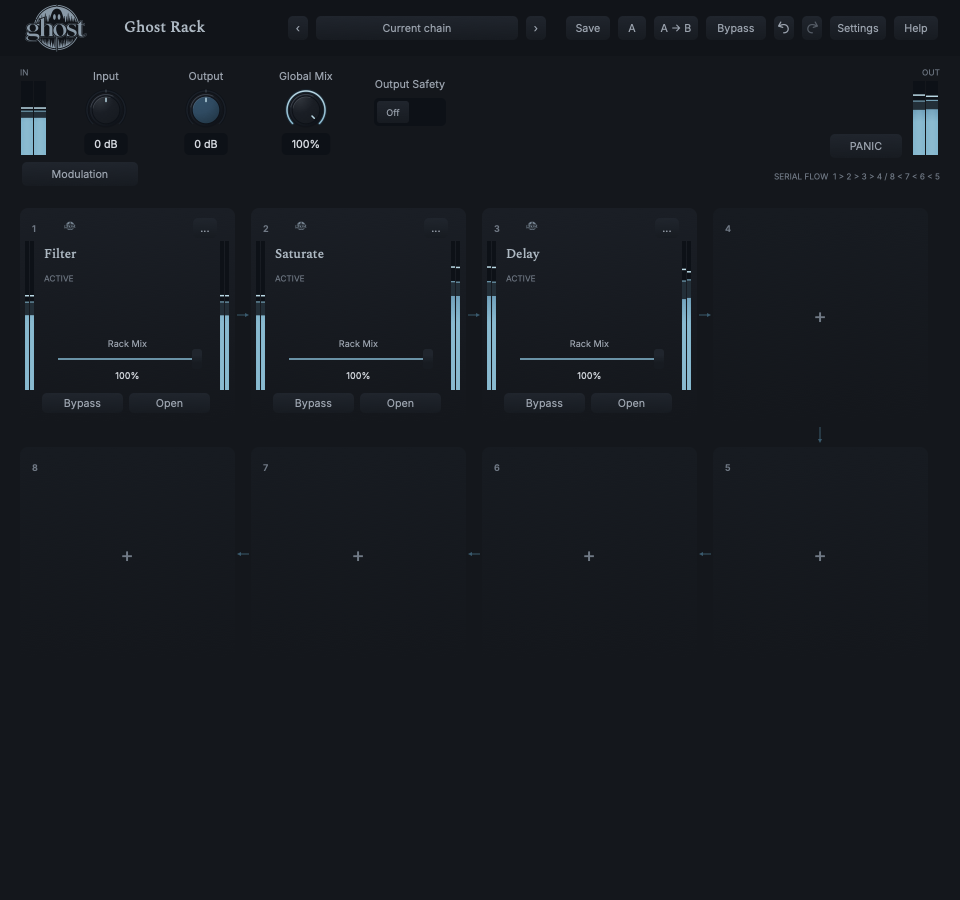
The board is a 2×4 serpentine signal path: top 1→2→3→4, then bottom 5→6→7→8 from right to left. The bottom-left tile is the last stage. Empty slots run no effect DSP.
Actual Rack editor after the demonstrated Filter→Saturate→Delay chain was loaded and processed; no simulated tiles. Open full-size capture
Select a numbered control
Choose a marker, or use the complete keyboard-accessible control reference above.
Tiles show identity, bypass, Rack Mix, activity and available preset/modulation status. Click a loaded tile/Open for one centered editor overlay. Close, Escape or backdrop returns to the unchanged board; opening another releases the previous full editor, never its audio.
Drag tile headers to preview insertion and drop to commit; Escape cancels. Focused Alt+Left/Right reorders, Enter/Space opens and M offers actions. The picker supports search/categories/Recent and keyboard selection.
The tile action menu offers Duplicate, Replace, Remove, Hard Bypass, Resume and module presets. Hard suspension is not the same as tail processing. Input/output meters and clip-reset measure actual delivered levels; PANIC is an explicit safety action.
HEAR THE IDEA
Put it into practice.
The real three-stage chain
Actual native Rack processing: Filter 4 kHz/Resonance 10% → Saturate Drive 12 dB/Output -3 dB → Delay Free 250 ms/Feedback 30%/Mix 30%. Other module values are Init; tile Rack Mix 100% and Global Mix 100%. The source stops at 3.5 seconds to reveal the echo. No plugin binaries are hosted.
Use the three-stage Quick Start chain and the same repeated phrase.
Global Mix 100% · Output 0 dB
Copy the complete current chain from A to B.
On B, move Delay before Saturate; compare echo repetitions passing through versus after the nonlinear stage.
Use whole-Rack A/B and level-match Output. Undo the reorder to confirm its scope.
Listen for: A change in actual processing order while instance identities and their settings/assignments remain attached.
One Macro, two musical destinations
Use Filter and Delay in a live chain.
Macro 1 0%
Show Modulation and configure Source 1 as a named Macro.
Drag its handle to Filter Cutoff, choose a restrained signed depth and Apply; assign that same source to Delay Mix with an appropriate amount.
Sweep Macro 1, inspect orange effective ranges, then reorder a module and verify both assignments still target the intended instances.
Listen for: One performance control moving multiple existing parameters without rewriting their bases or DAW automation.
Keep module and chain sounds separate
Use any loaded module in an otherwise useful chain.
Global Mix 100%
Load a sound through that tile's Module presets, not the header chain browser.
Verify order, tile Rack Mix/bypass and other modules remain intact.
Save the whole chain with header Save As; compare its separate Rack library with the shared module library.
Listen for: Portable module sound reuse without accidentally replacing the whole chain.
GO DEEPER
Beyond the first move.
One module editor at a time
The centered overlay reuses the standalone controls/state, not a separate algorithm. Close/backdrop/Escape returns to the board; four source handles remain available for modulation. Hidden visualizations suspend optional observation, while DSP, modulation and tails continue. There is no stack of inline expanded plugins.
Three preset scopes
Module sounds are exactly the same library as standalone, including categories/favorites, and change portable module state only. Modulator sounds store source settings without target assignments by default. Rack sounds store the complete chain under its defined ownership. None of these is a DAW-dependent external reference: projects embed their state.
Bind host automation by identity
Rack exposes globals/four Macro values directly. In an effect control's Host Automation… menu, deliberately bind Module Control 001–256 and automate that port in the DAW. Ports use normalized 0–100% through the actual descriptor, with discrete stepping where applicable. Reorder follows the instance; remove/replace makes a binding dormant, never automatically redirected. Undo restores the original. Choosing an occupied port is an explicit reassignment.
Reorder, duplicate, replace and undo
Reorder retains sound/history/assignments and persistent identity. Duplicate creates an independent identity with copied sound/local settings and retargeted modulation, not copied MIDI/DAW bindings. Replace creates a new identity; Remove clears instance routes. Undo restores exact original identity/state/routes. A full board rejects a ninth effect; one topology gesture is one transaction.
Shared sidechain and MIDI
Route one optional external mono/stereo sidechain in the DAW. Every capable module receives the same original bus non-destructively; no internal module-to-module sidechain matrix exists. Main is the signal arriving at each slot. MIDI messages/timing remain available to every capable module, and CC mappings follow identity. Missing-source behavior is module-specific—read that guide.
Four sources, not four fixed effects
Each source can be Macro, LFO, Envelope Follower or deterministic Random with its applicable editor settings. Several sources can target one parameter, and one source several parameters. Signed depths/curves operate around saved bases in natural domains. Source presets/Copy exclude target assignments. Envelope can follow Main or shared sidechain; a missing sidechain supplies silence.
Whole-chain comparison and recall
Header and panel A/B/Undo address the whole chain, not independent slot banks. Projects embed complete banks and approved live module continuation; Delay deliberately restores settings/seed with empty echo history. Utility's held matched/Blind comparison uses root authority, returns on release/cancel/close and never chooses a winner. Corrupt/unsupported state loads reject transactionally.
Tails, latency and safety
Rack aligns dry paths to actual accumulated processing latency, not musical echo times or Utility's intentional alignment delay. Normal bypass lets declared tails drain; Hard Bypass ends sustaining processing. PANIC uses a short safety fade, clears runaway/held state and recovers without resetting ordinary controls. Output Safety is a separate optional nonlinear final protection.
Factory chains are starting points
Init is empty. Warm Channel, Open Ensemble, Soft Echoes and Aged Motion show restrained chains. Prismatic Memory explores spectral stages; Two Source Identity requires a routed sidechain. Suite Survey Channel/Motion/Worlds are eight-stage overviews, not a promise every chain suits every recording. Monitor conservatively and isolate one stage to learn its contribution.
In your session
All 24 modules are native implementations shared with standalone, not hosted VST/AU binaries. A single installed Rack does not require the standalone effects to be installed. Each effect retains its own capabilities, Characters and guide.
Global controls and four Macro values are directly exposed to the host; 256 assignable identity-bound ports expose selected module controls. Automation, MIDI CC and internal modulation remain distinct and restore under their defined ownership.
Size/scale, selected overlay, modulation panel and Reduced Motion are project UI preferences, not portable module sound settings. Compact layouts scroll the board/panel as needed; one module overlay fits the available area.
Supported sample rates/blocks do not promise unlimited simultaneous heavy instances at tiny buffers. Watch real DAW headroom. Existing spectral UI sluggishness under multiple visible workloads is a known limitation, not a reason to alter audio or latency.
The preset browser offers All, Factory, User and Favorites, category/search filters and relevant Character filtering. A row's heart changes your personal favorites without loading or saving the sound. Save As creates a distinct User sound; explicit Save updates only the selected User sound. Factory content is protected. Name, category and tags support organization; deleting a User category keeps its presets as Uncategorized. Manage supports rename, duplicate, confirmed delete and individual/bulk/category import/export. Personal favorites stay on this installation rather than travelling in exported sounds.
Standalone and the matching Ghost Rack module share the same User sounds, categories and favorites. A module preset changes portable sound settings, not Rack placement, Rack wet/dry, bypass or modulation assignments. DAW recall embeds the sound settings and does not depend on a preset file remaining on disk. Rack chain presets are a different library and affect the whole chain.
Drag a knob normally, hold Shift for fine adjustment or Option for extra-fine. Double-click restores its default. Enter/context menus provide exact values, reset and value copy/paste; eligible controls also offer MIDI Learn and modulation. Tab and arrow keys provide keyboard access. A/B compares configurations; the adjacent copy button copies the active configuration to the other. Undo/Redo groups a continuous gesture into one edit. Settings provides UI scale, Reduced Motion, source configuration, portable settings and Panic. UI size/motion preferences do not change the sound.
Explore the processors
Filter — Multimode filtering, SAFE/OSC and source-derived spectrum.
Delay — Conventional Free/Sync echoes, reverse and Freeze; project echo history starts empty.
Crush — Digital bit/rate reduction and quantization.
Saturate — Nonlinear color with the shared featured Drive.
Space — Acoustic fields; optional external Driver transfers structure.
Dynamics — Down/up processing, transient shaping and multiband macros.
Stereo — Adaptive organization of existing spatial relationships.
Tone — Weight/Tilt/Air tonal balance with spectrum-first display.
Degrade — Source-responsive deteriorating medium and exact Seed.
Utility — Exact gain/routing/phase/alignment and measurements.
Tremolo — Free/Sync amplitude cycles and stereo motion.
Rotary — Dual-rotor motion with inertia and five magnetic speed positions.
Ring — Carrier/sideband processing and intentional Synth Drone.
Frequency Shifter — Additive-Hz translation and recursive spectral geometry.
Pitch Shifter — Transposition, formants and a moving generated-pitch family.
Granulator — Captured grain populations; frozen audio continues when its editor closes.
Spectral Delay — Living spectral memory with the featured Free/Sync Time control.
Spectral Freeze — Capture your source, then close an evolving spectral ecosystem.
Spectral Gate — Structure survival and temporary topology pressure.
Spectral Morph — Slot Main A transforms toward shared external B.
Spectral Resonator — Main builds/plays resonant bodies; optional sidechain excitation.
WHEN SOMETHING ISN’T CLEAR
Find your way back.
Why won't a tile play sound by itself?
Rack normally processes its track input. It has no hidden test tone. Intentional generators, retained tails and captured worlds are module-specific.
Why did a preset replace my chain?
The header browser is for Rack chains. Use a tile's Module presets to change only that effect's portable sound.
Why is a Macro doing nothing?
Configure that source as Macro and create eligible target assignments. An unassigned value has no destination.
Why did removing a module stop its automation?
Bindings follow persistent identity, not slot number. A replacement never silently inherits the removed instance's automation. Undo restores it or explicitly bind the new control.
Why do echoes keep sounding with an editor closed?
Closing changes observation only. Use normal bypass for tails, Hard Bypass or PANIC to end sustained processing safely.
Why is a sidechain-dependent sound different?
The DAW must route the shared external bus. Each module has a documented missing-bus fallback; a preset cannot invent the external source.